

How to add widget to Escutcheon theme?
-
Hi,
I was trying to add a widget to my blog, but when I go to widgets, WordPress tells me that
“There are no widget areas currently rendered in the preview. Navigate in the preview to a template that makes use of a widget area in order to access its widgets here.”I have been trying to figure out what this means I have to do, but with no luck. I have looked at both help files and Google, but I think I don’t know what I should be searching for.
Can anyone tell me how I can add widgets to this theme?
Thanks in advance.
The blog I need help with is: (visible only to logged in users)
-
Escutcheon only displays the sidebar widget on single posts and pages.
In the Customizer’s preview area, click either on the About menu item, or on the title of one of your posts. Once you do that, you’ll see a Sidebar widget area appear in the Customizer itself. Click the word Sidebar and you’ll be able to remove or add widgets to that area.
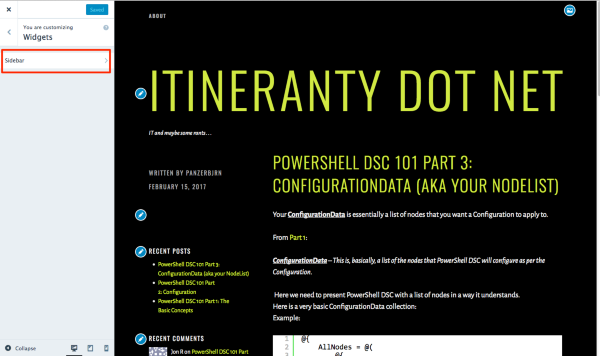
Let me know how it goes.
-
Thanks :-D
It seems to work now for me, hah hah, it seems so obvious now that is has been explained like that… -
No worries! Glad you got it sorted. I’ll mark this thread as resolved but feel free to start a new one if you need help with anything else.


- The topic ‘How to add widget to Escutcheon theme?’ is closed to new replies.
 WordPress.com Forums