

How to avoid duplicate images in Revelar
-
When using Revelar as my theme, as I click on one of my images to reveal the image description, two images of the same picture are shown before getting to the subscription. Is there a way for there only to be one of the images rather than two before getting to the image description? Thanks!
The blog I need help with is: (visible only to logged in users)
-
Every theme has a detailed theme description page like this one at https://wordpress.com/themes/revelar
/ That’s where set up instructions for it are found. The live demo site is at https://revelardemo.wordpress.com/Have you read what post formats are? Maybe you set the wrong format or did not set it up correctly. See: https://en.support.wordpress.com/posts/post-formats/
Are you the only person with Admin access to your site?
-
I suggest you read the Featured Images section on the detailed theme description page here https://wordpress.com/theme/revelar
The support doc is at http://en.support.wordpress.com/featured-images/#setting-a-featured-image
-
Yes, I am the only person with Admin access to my site. I will look into those links. Thank you!
-
Could you please provide a link to a post or page where you see duplicate images so I can take a look directly?
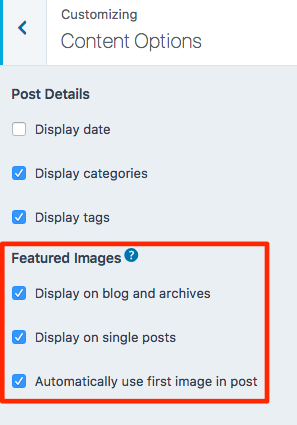
You can prevent Revelar from displaying the featured image (or displaying the first image in the post in the featured-image area) by unchecking these two boxes in the Customizer’s Content Options panel:


- The topic ‘How to avoid duplicate images in Revelar’ is closed to new replies.
 WordPress.com Forums