

How to create a website suited to my business needs.
-
Hi, and thank you in advance for the help. My website ( http://www.902soundandfilm.com ) is coming along well, yet is not what I had in mind. My business does several things, including videography, shooting music videos, commercials, documentaries, even music recording and mixing. I’m having a difficult time finding a template that will allow me to have “tabs” of certain catagories to different pages, which are visible near the top of the page (ie: one tab for commercials, another for music videos, etc – for potential clients) and a tab which opens a page with our rates. Do I need to choose one of the templates that are not free in order to have better options? The template I’m currently using (“2014”) does not seem to be very user friendly as far as getting these results. Can anyone help? Thanks so much! -Mike
The blog I need help with is: (visible only to logged in users)
-
Hi there!
Almost all of our themes have the ‘tabbing’ options you’ve mentioned here. We call that a Custom Menu.
Here’s a list of all of the themes we offer that allow you to set up a Custom Menu:
http://wordpress.com/themes/filter/custom-menu/
Let me know if I can help further!
-
Thanks for your help. I am still having a very difficult time putting this together the right way. After almost 2 weeks, I’m about ready to give up on WordPress! You’ll notice on the demo (screenshot) version of the 2014 “theme”, it has different categories scrolling down the left hand side of the page? No matter what I do or add, nothing shows up. This is the first of many issues I’m having. I’m trying to understand, but nothing seems to be working. Maybe I need to try a different theme? I just want a decent looking website with easy navigation!! This doesn’t seem user friendly. Can you help?
-
Hi there!
I’m sorry you’re having so much trouble setting up your site. Have you taken a look at our guide to starting out on WordPress.com?
As for your menus, it looks like you’re getting there! The list of Categories that you see on the demo site is created as the Secondary Menu. Let me walk through setting up your menus!
The Twenty Fourteen theme has two menu locations, the Primary Menu and the Secondary Menu. I’ve marked the Primary Menu with a 1 and the Secondary menu with a 2 in this image:
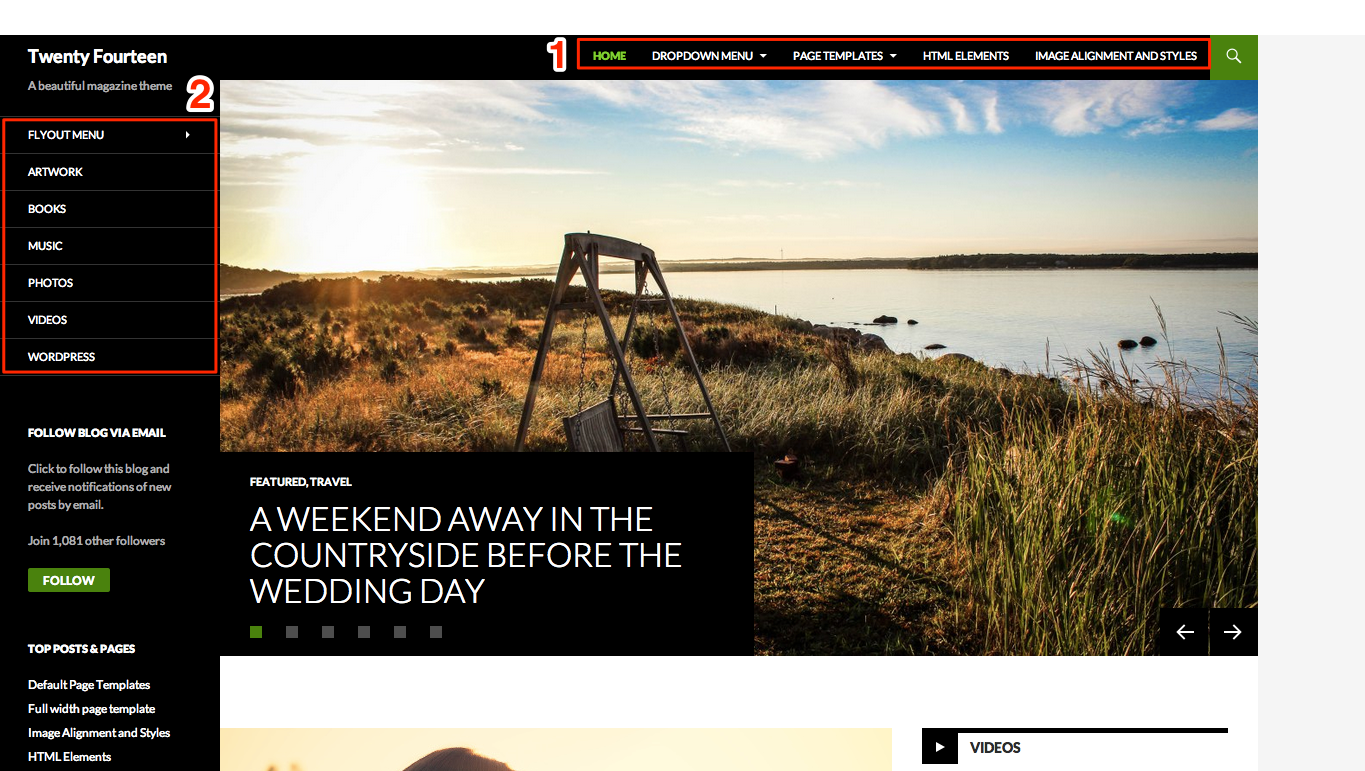
It looks like you have two menus started in Appearance > Menus. Let’s look at the Secondary Menu first since that’s the one you mentioned. From the dropdown menu at the top, select “Recording Studio (Secondary menu in left sidebar)” and click on Select.

Now, in the right pane, you’ll see a box that says “Menu Structure”. This is where your menu items will appear. On the left is the different types of items you can add to your menu. Let’s start with the Pages. Under Pages, on the left hand side, select View All. Now, check the boxes next to “Home” and “About” and select Add to menu.
You’ll see these pages listed on the right. Go ahead and add any other Pages, Links, Categories, or Formats to your menu. Now you can arrange your menu items in the order you want. Just click on any of the menu items on the right and move them up and down to rearrange them. You can create submenus by dragging the menu item slightly to the right until it’s indented from the page you want it displayed under:
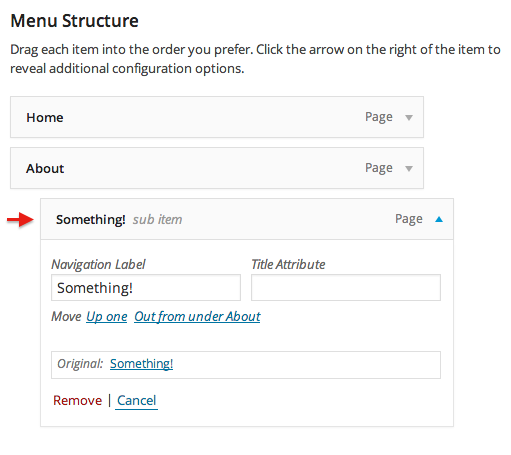
Make sure you save your changes!
Now you can setup your Primary Menu with the same techniques, just select the other menu from the dropdown at the top!
Let me know if I can help with your menus more!


- The topic ‘How to create a website suited to my business needs.’ is closed to new replies.


 WordPress.com Forums