

How to cut and paste directly from "Word 7" without having to introduce codes (c
-
During the last couple of months I have been cutting and pasting a number of texts in different colors and fonts from “Word 7” to my WordPress page editor. Now a lower case “p” has appeared at the bottom of the space for the text and in order to obtain the same results I have to introduce several codes before each paragraph, which is very complicated and slow for someone who is not a “pro” in computer science. How can I shift back to the earlier setting (without the p below)? and have the simpler method as the default setting?
Thanks, Peter Wessel (http://pewesselblog.com)
The blog I need help with is: (visible only to logged in users)
-
Hi there!
Have you tried using the Paste as Text function? Text editors like Word add a lot of extraneous code when you paste text directly into the Post editor.
Let me know if the Paste as Text function corrects this for you! If not, could you paste your next in and save it as a draft so I can see what’s happening?
-
Hi Peter!
I see you weren’t happy with my response. We did just update the Visual editor and the changes can take some getting used to.
You can change font sizes by selecting a format from the drop down menu:
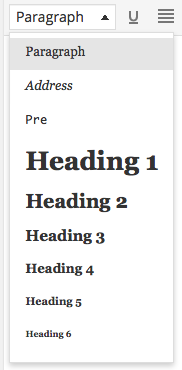
Or through the Text editor by adding style=”font-size: 12pt;” in the HTML as shown here:
<p style="font-size: 12pt;">This will be 12pt font</p>Just adjust the number 12 to the size you want the font to be. To be clear, you will need to adjust the image code in the Text Editor. This is explained here:
Let me know if you have any additional questions!


- The topic ‘How to cut and paste directly from "Word 7" without having to introduce codes (c’ is closed to new replies.


 WordPress.com Forums