

How to determine selector?
-
Howdy! Just upgraded my plan to premium, & new to using CSS, although familiar with HTML.
I’ve gone through the help site, but could still use a little boost to get started; didn’t have much luck finding what I was looking for through search, so apologies if this is redundant.
I’m using the Blask theme, which has a tag line on top of a gray rectangle. I would like to change the height of the rectangle, but I’m not sure how to go about it. So my question is, how do I figure out which selector to use to specify the values I want?
Should it matter, I’m using Safari.
I’m thinking if I can get some help with one change, I’ll be able to figure out the others! Any advice or direction to somewhere I can find this would be greatly appreciated!
Thanks :) Jess
The blog I need help with is: (visible only to logged in users)
-
Learning how to use a browser inspector is the key to finding the right element to target with custom CSS.
I suggest using Chrome or Firefox’s built-in inspector for this — I’m not sure how good Safari’s is. Here are some guides to using an inspector:
https://thewc.co/articles/view/web-inspector-tutorial
http://en.support.wordpress.com/custom-design/how-to-find-your-themes-css/
By selecting the site title in the inspector, I can see that it’s the padding on the element
site-brandingthat’s adding that extra space; when I change the top and bottom values to 0 in the inspector, the spacing is reduced: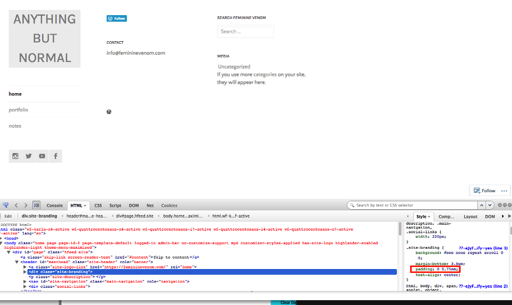
That means that this custom CSS should do the trick to override those two values:
.site-branding {
  padding-bottom: 0;
  padding-top: 0;
}
Let me know how it goes!


- The topic ‘How to determine selector?’ is closed to new replies.
 WordPress.com Forums