

How to download my Media Library?
-
I need to download my entire Media Library from my site. How can I do this?
The blog I need help with is: (visible only to logged in users)
-
Hi there,
The only way to do this would be to export your site content as described here:
Please let me know if you need anything else!
-
This is only exporting the xml. How do I export the entire Media Library file? Pay the $129??
-
Hi there,
If you export your entire site as an XML file, your Media Library will be included. If you’re looking to import your content into a self-hosted WordPress.org install, the images and media files should be there provided you import the XML file. The Guided Transfer you mention is for users that are moving from WordPress.com to a self-hosted site. A Happiness Engineer will export your site and help you import it onto a self-hosted site. However, the export file is the same.
Can you explain a bit more about what you’re looking to do? Are you trying to move to a self-hosted WordPress.org site?
-
Thanks Jeremy.
the purpose is a) back up my media folder off site (lots of family photos I don’t have elsewhere) and b) move the blog to a hosted site (1and1) and a new URL.
I don’t need help reinstalling the site, I just need the Media Library and all the image and video content.I ran through the Export process and if memory serves, the file was only about 8 mb. Thanks again for the insight.
-
Hi!
Ah, I understand. So, it’s not possible to create a backup of just your Media Library unfortunately. The only backup would be in the form of an XML file. You can read a bit more about this here:
However, if you’re moving to a self-hosted blog at 1and1, the XML file should contain all of your media files. Can you try to upload the files to your self-hosted blog? If, for some reason, all of the media files don’t transfer over, please let me know!
-
J
Forgive me for being confused. The exported XML file is a data structure that does not contain any media files. How does importing it into my new 1and1 hosted WP installation transfer those media files over? -
You’re correct in that the XML file doesn’t include the actual media attachments. However, it does include file URLs to all of your media items. When you import the XML file into your self-hosted blog, provided your WordPress.com blog is still up and running, it will ping the file URLs and pull the images over as well. Can you give that a try and let me know if it fails to bring over the images?
-
J
I’m not interested in simply the href sourcing the images from the existing site, I need the files themselves. That’s what I’m after.So if I pay the $119, can I get the files regardless of whether I’m moving the site to one of the chosen providers (I’m not btw)? I need the Media Library files, not just calling them into the new blog from the old blog.
Thanks for walking me through all this. -
Hi!
When you import the XML file into your new self-hosted blog, the image files will be imported into your self-hosted site as well. It won’t just be a src link back to the original file. You’ll find all of your media library items will be transferred to your self-hosted site. I promise!
Purchasing the Guided Transfer upgrade doesn’t provide a different type of file export, so you would still get just the XML file. There isn’t another way to export your site from WordPress.com. Can you give the XML import a try on your self-hosted blog?
-
Hey Jeremy.
got the new blog up and running. Used an wxr splitter and the import was pretty straightforward.So http://underthemossyoaks.com is up, most recent posts.
But the images are still sourcing from gressett.wordpress.comHelp.
-
Hi,
Can you make sure you check “Download and import all media attachments” when you’re importing into your self-hosted site as shown here?
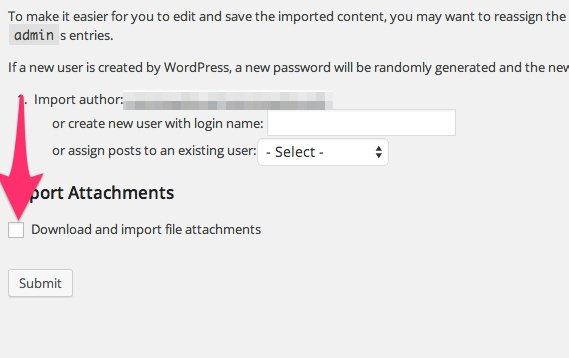
-
Yes. Did that the first time. Just went back and re-imported to be sure. Oddly, received about 100 “Media “*name*” already exists.” reports but checking the images on the first few pages of the new site still show the SRC going back to the old WP hosted site.
Not sure why it would import some but not all. -
Hi,
That is odd. It seems like the import brought over some of your media files, but not others. You mentioned you used a WXR splitter. Could you let me know which one you used? Also, it looks like you may have made your self-hosted site private or required a login to view it. Could you potentially make it public again so I can take another look?
-
Thanks again Jeremey.
Here’s the splitter I used
http://suhastech.com/wordpress-wxr-xmlfile-splitter-for-mac-os-x/and I’ve made the site public again. http://www.underthemossyoaks.com
-
Hi,
I ran the import from your WordPress.com blog into a test blog, and the image files were carried over changing the src URL to the new blog. When you exported your WordPress.com file, it should have automatically been split into five different xml files. You shouldn’t have needed to split them again using a WXR splitter. Can you try just re-importing the five xml files generated from the WordPress.com export?
-
I just ran export again from the WP site. Same file, a single 6 mb .xml file. No split files.
-
Hi!
I went ahead and emailed the five xml files to the address on file for your account. Can you give those a try?
-
J
Never got the the xml files. Can you email to (email visible only to moderators and staff)? Not sure why they did not come through. -
Hi,
I sent the zip of the XML files to the email address you requested. Please let me know if you don’t receive them!


- The topic ‘How to download my Media Library?’ is closed to new replies.
 WordPress.com Forums