

how to find free
-
When selecting Free plan, it still asks for a cc and wants to charge. How do I circumvent. Thanks
WP.com: Yes
Jetpack: No
Correct account: YesThe blog I need help with is: (visible only to moderators and staff)
-
Hi @iartfeher,
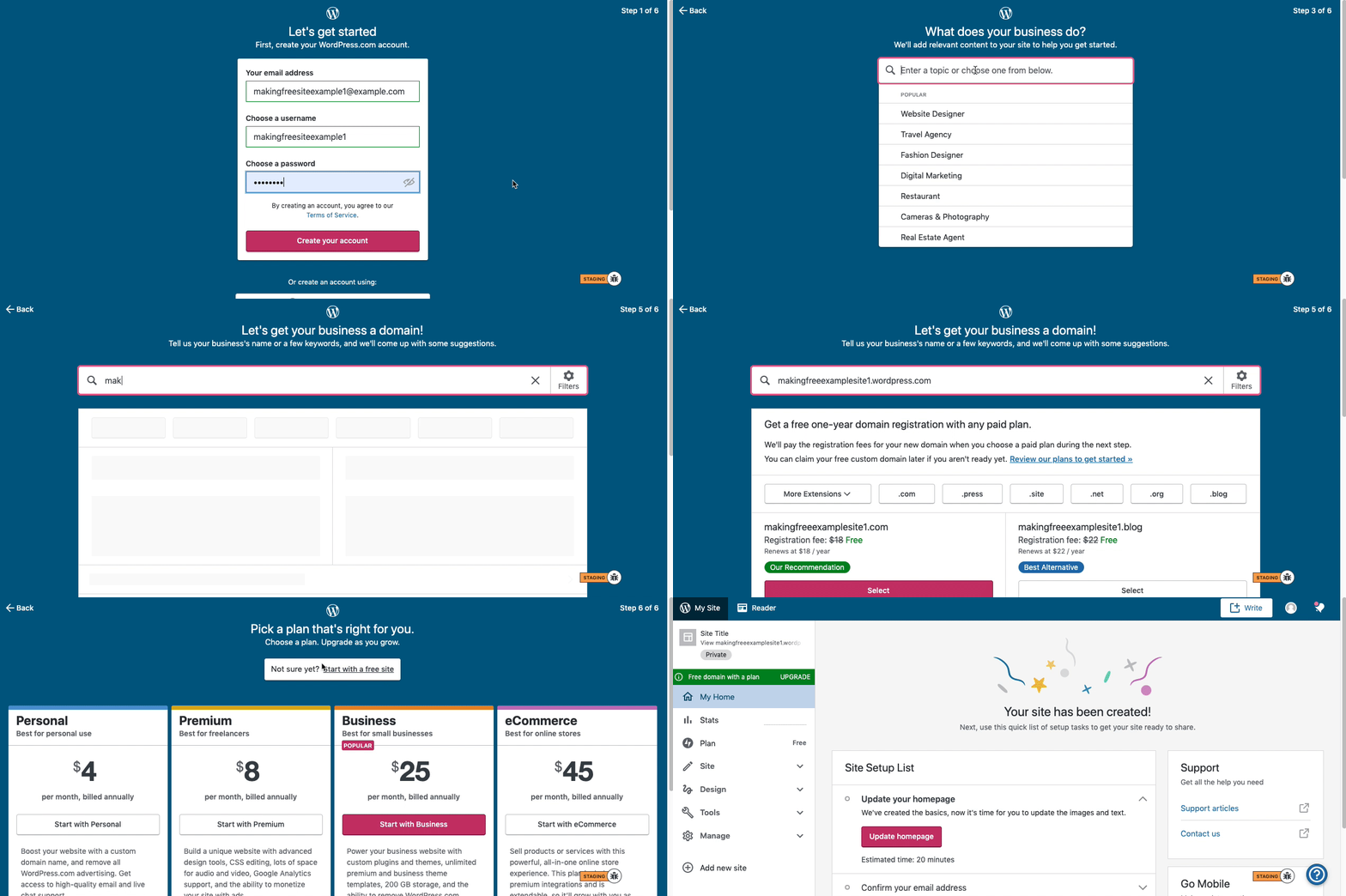
Here are visual instructions on how to create a free
.wordpress.comsite:Step 1: Choose your email, username, and password.
Step 2: Choose the type of site you want: select Blog for a.home.blogfree site or Business for a.wordpress.comsite.
Step 3: Pick a topic for your site.
Step 4: Enter a title for your site (optional).
Step 5: Specify your desired site address, including the full subdomain (e.g.,examplesite.wordpress.comorexampleblog.home.blog). Ensure you type the address exactly as you want it. The first option shown should match the free address you entered. Click Select next to it.
Step 6: At the top of the page, click the link labeled Start with a free site.Then, your free site should be created! Please follow these steps.
You can make multiple free sites on WordPress using the following URL.
Thank you


- The topic ‘how to find free’ is closed to new replies.
 WordPress.com Forums