

How to I get to the Publish optioh?
-
How do I get to the Pubilsh pull down shown here:
https://en.support.wordpress.com/posts/post-visibility/#sticky-posts
I want to add a sticky but can’t find the option to do that.
The blog I need help with is: (visible only to logged in users)
-
In the Publish module of a classic post editor, go to “Visibility: Public Edit,” and click on the word “Edit,” which is a link that opens a drop-down menu. In that menu you will find an option to “Stick this post to the front page,” under “Public.”
-
-
Try looking near the top right here:
https://noregretsbirthmothers.wordpress.com/wp-admin/post.php?post=11&action=edit -
Thank you, designsimply, but I don’t see Publish at the link you sent. I’ve been to this page a zillion times — am I missing something? I’m trying to pin a page to the top. Also, can I pin two pages to stay where they are?
-
The module is a box that should look like this:
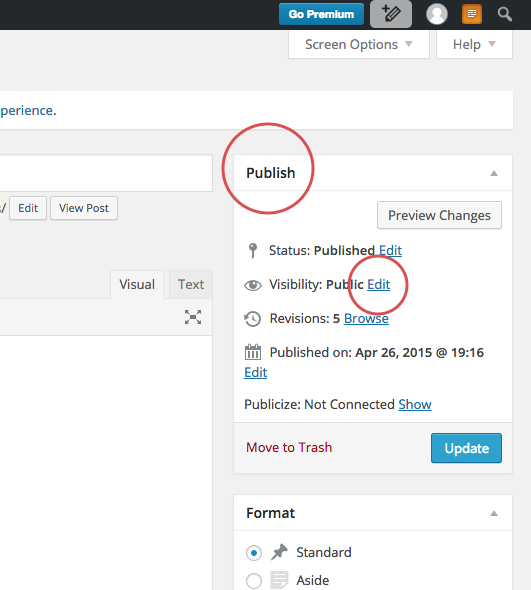
You have to click “Edit” on the Visibility line in order to see the sticky option.
-
Thank you, designsimply! I finally found Publish, Visibility, and Sticky in the righthand sidebar! So I was able to post my sticky!


- The topic ‘How to I get to the Publish optioh?’ is closed to new replies.
 WordPress.com Forums