

How to make address bar show just domain name without "wordpress"?
-
I’m not even sure if this is the right place to ask, but I’m super confused. Truth is, I have no web building experience, so any help is very much appreciated!
I just started a blog (http://brulosophy.wordpress.com) then decided to purchase the domain name, brulosophy.com, from namecheap. I then paid for the Domain Mapping upgrade, changed the required settings at Namecheap, and now when someone types in “brulsophy.com” they are redirected to “brulosophy.wordpress.com,” which is what shows in the address bar.
All I want is for the address bar to say just “brulosophy.com” while showing the content of “brulosophy.wordpress.com.” I’ve tried making the former my Primary Domain, but when I do and type in the address, it seems to create a continuous “redirecting” loop.
I’m so lost… any help would be very much appreciated!
The blog I need help with is: (visible only to logged in users)
-
Hi there,
All you have to do is set the domain: brulsophy.com as the primary domain by going to Store > My Domains in your Dashboard!
Then, you should be set! Feel free to reach out if you have any questions!
-
Thank you so much for the response! Problem is, when I do that, the “redirect” screen seems to attempt to load perpetually whenever I type my domain into the address bar. Am I doing something wrong?
-
Hi there,
I went to your site, and found that it was loading properly as seen in the screenshot below:
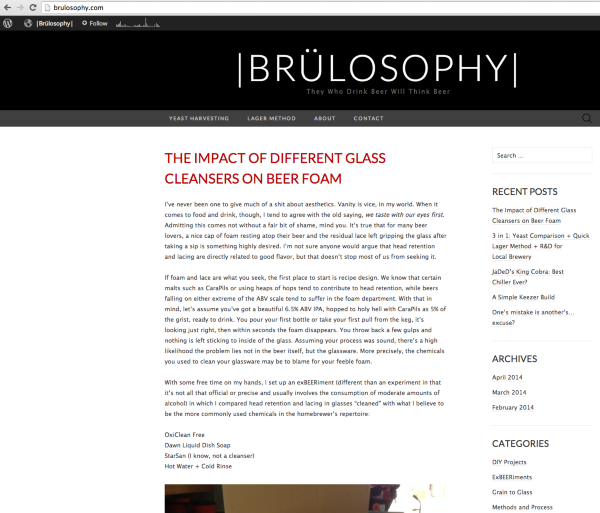
It can take some time to propagate. If you find that it is still not loading properly, can you please try clearing out your cache and cookies using the guide below?
Feel free to reach out if you have any questions!


- The topic ‘How to make address bar show just domain name without "wordpress"?’ is closed to new replies.
 WordPress.com Forums