

How to make images bigger
-
I am unable to change the size of image sin my post.
When I try to do this through the image editor, it doesn’t allow me to exceed the original image size
Even when I alter the size of the image on photoshop and upload it, the size remains unchanged.
Please advise
The blog I need help with is: (visible only to logged in users)
-
Hi there,
I’m not able to see the content at the links you’ve provided:
When you add the image into your post, you can choose your images to post with Thumbnail, Medium, Large, and Full Size options:
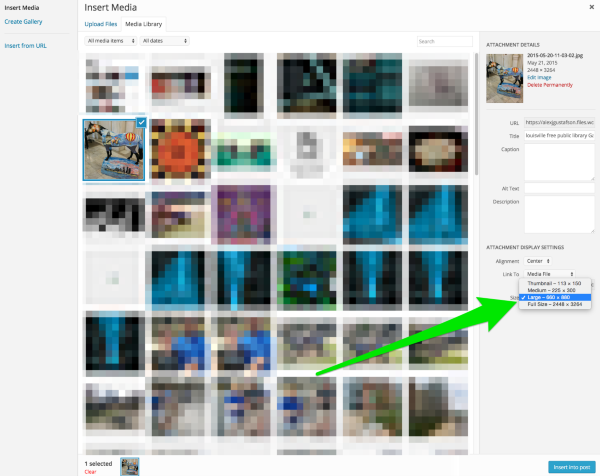
The size of those options are controlled in your Media settings:
https://artopestryint.wordpress.com/wp-admin/options-media.php
So even if you change the size of the image in the image editor, if you keep posting with Medium size, it’ll resize the Medium dimensions on your post.
I also see you submitted another request regarding Text:
The color of text in my blog is much too dull.
Although the menu is clear, the body of the post itself appears too dull. Is there a way to change this? Will I have to use css?
Please advise
I’m not able to see this screenshot either. It’s asking me to login to Evernote. When I visit your site everything looks clear to me, so I’m just not sure what you mean by “dull.”
What changes do you want in particular. Do you want to change the font to another one? Perhaps adjust its color or weight?
Since the fonts option in your Customizer will control both the menu text and the body text, the best way to leave the menu the same and change the post body will be to use CSS, yes.
-Alex G.


- The topic ‘How to make images bigger’ is closed to new replies.
 WordPress.com Forums


