

How to make Subcategories
-
Hello! I am having trouble making subcategories.
What I want to do is have a category ‘Links to Other Essays’ (which I have), and then have the subcategory ‘History 6 Essays’. However, I can’t figure out how to do this.
Thanks! -
Hi @lepapier123 ,
Open “WP Admin” of your site.
visit Posts » Categories page. Add the name for your child category (e.g History 6 Essays) and then select the parent category (Links to Other Essays) from the Parent dropdown menu.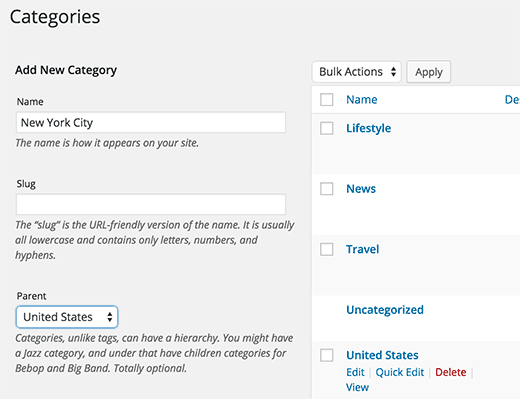
let me know if you are still having difficulty.
Thanks
Muhammad Mustafa -
Hello @mustafayo!
Thank you for replying.
I am having trouble getting to the “Categories” page under “Posts”. Maybe I’m not getting there correctly? I go to “My Site”, then “Posts”, but then it just shows be a list of my posts, so I’m not sure what do there.Thank you very much!
arielk555 -
Go to WP dashboard – Appearance – menu and then you’ll see ‘ Add Menu Item’s such as pages, posts, custom links and categories.
-
When I go to WP dashboard, then Posts, then Categories, “Links to Other Essays” isn’t listed as a Parent Category. How do I make it one?
Thank you! -
Hello @lepapier123,
You could get to the categories from My Sites Dashboard area > WP Admin > Posts > Categories
i guess you got to the categories by now.To create a new category:
inside Name box (i.e below “Add New Category” ) write “Links to Other Essays” and click “Add New Category” button. You just made a category.
To create a sub-category and set previous category as parent:
inside Name box (i.e below “Add New Category” ) write “History 6 Essays” and Under Parent drop-down you can see all your existing categories, select the one that you want to make Parent, and click “Add New Category” button. You just made a sub-category
I hope this was helpful.
Thanks
M Mustafa -
-


- The topic ‘How to make Subcategories’ is closed to new replies.
 WordPress.com Forums