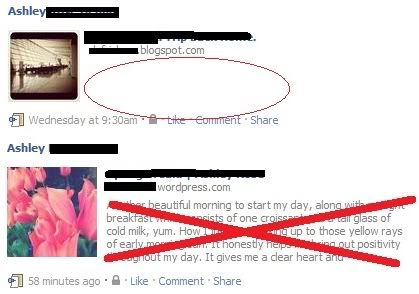
How to remove a "text" when publishing on Facebook? *Pic example included*
-
EXAMPLE: http://img.photobucket.com/albums/v244/thissfemale/picc.jpg
When publishing a WordPress post on my Facebook wall, I want my post to turn out like the first one, a Blogger post where it is not showing the text/paragraph of the post (red circle)… I was using Blogger then, but I have no clue how I was able to get it like that though.
The second one is a WordPress post, and it’s showing the text/paragraph of the post (red X) which I do NOT want… Does anyone know how I could change it?
-
That’s not actually configurable. The reason you got no text with your Blogger blog was, it was unreadable to FB. WordPress is readable, so posting a link will always include an excerpt of the text.
-
I just double checked and you can do it, just follow these steps
1) Paste the link into the Status Update Box
2) It should automatically generate the thumbnail and then the text from the website.
3) Click on the text from the website and it should let you edit it, or delete it.
4) Delete the actual link and type whatever you want to say for your post -
However with that all said, to do this you need to be manually publishing the link yourself (which I’m pretty sure was the point of this question), not having wordpress automatically publish.
-
-


- The topic ‘How to remove a "text" when publishing on Facebook? *Pic example included*’ is closed to new replies.
 WordPress.com Forums