

how to remove dates from posts
-
Hi,
I would like to remove the dates, categories, ‘leave a reply’ and logos from my posts so the only things on my site are the pictures and videos. I have removed some things, but cannot figure out how to do them all . . .
Thanks, James
The blog I need help with is: (visible only to logged in users)
-
To remove ‘Leave a Reply,’ disable commenting when editing that post or page:
https://en.support.wordpress.com/enable-and-disable-comments-for-published-posts-and-pages/
You can then remove the ‘comments are closed’ message with this CSS:
.nocomments{
	display: none;
}
This CSS removes the dates:
.post-meta{
	display: none;
}
Everything else it seems that you have it covered, but let me know if there’s something I missed and please provide a link to an example post or page.
-
Hi, thanks for that.
I still have the date on the posts though.
Also, how do I add in the CSS code?
Cheers, James
-
Sorry, didn’t see you’d given the code to remove date too.
But I just don’t know how to enter it . . .
Thanks again, James
-
Sorry, one more thing, my menu fonts are different from the main titles (minion pro) so how do I change this and can I increase both of their size?
Cheers, James
-
Hi James,
You can add in CSS through your Customizer:
https://en.support.wordpress.com/custom-design/editing-css/
Sorry, one more thing, my menu fonts are different from the main titles (minion pro) so how do I change this and can I increase both of their size?
You can change the menu to Minion Pro with this CSS:
#access .menu{
	font-family: minion-pro;
}
To change the font sizes, best to use the size tool built into the Font portion of the customizer to get it as close as possible:
https://en.support.wordpress.com/custom-design/custom-fonts/#adjusting-font-size-and-style
But those size settings affect multiple portions of the site. Once you get those as close as possible you can add the font-size css property to a selector. For example, your menu:
#access .menu{
	font-family: minion-pro;
	font-size: 120%;
}
-Alex G.
-
Hi Alex,
thanks for all this. With the codes to remove the dates etc. I just pasted them into the css box and they worked, but did the same with this font code and it hasn’t changed anything . . . how should I do it?
Cheers, James
-
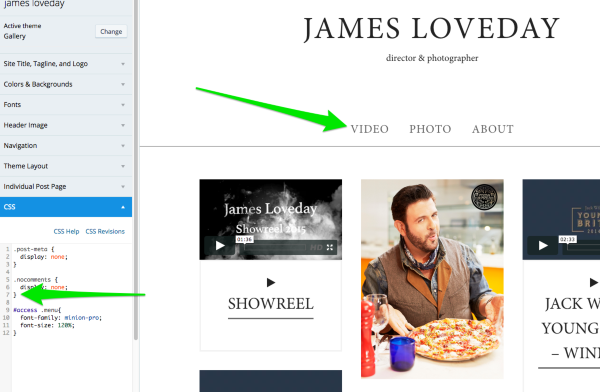
Just checked out your Customizer and it looks like you’re missing a curly brace from your previous code:

Once you a } to the end, then paste this CSS code it works:


- The topic ‘how to remove dates from posts’ is closed to new replies.
 WordPress.com Forums