

How to remove featured image from content page
-
On the Content page- can I remove the Featured Image from the left side, and still use that image for the homepage?
The blog I need help with is: (visible only to logged in users)
-
I’m afraid there isn’t a way in Dyad to remove the featured image on single posts but leave it displayed on the blog page.
-
I have some good news! We’ve just launched a new feature that will allow you to hide the featured-image on single posts in Dyad, while keeping them on the homepage.
Open your Customizer‘s Content Options panel and uncheck the box next to “Display on single posts.”
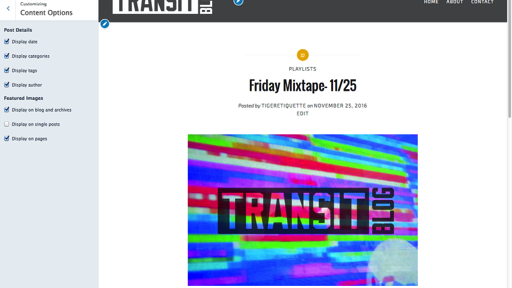
That changes the single-post format to what it would look like without a featured image.
Let us know how it goes!


- The topic ‘How to remove featured image from content page’ is closed to new replies.
 WordPress.com Forums