

How to remove the new editor
-
I am aware that this question has been discussed before. However the options that were described a year ago are not there anymore.
In my editor I clicked “try new editor”. I tried it and it is a mess and I want to get rid of it and it just plain does not go away. That sucks.The blog I need help with is: (visible only to logged in users)
-
Hi there!
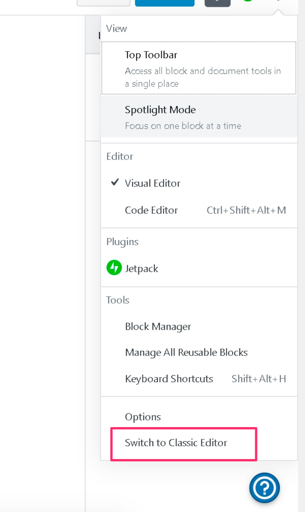
To switch to the classic editor, click on the ‘. . .’ settings icon in the upper right corner of the editing screen.
Then, click on Switch to Classic Editor.
If you have any trouble doing that or the option does not appear for you, let us know and we’ll help you out.
-
Ok, thank you. I found it. Thank you for helping.
Also I appreciate the quick responses.There is nothing logical about the whole thing and I a getting lost in all that bling bling of buttons and frames opening and closing. Yet, at least I found the one place where to click that was necessary.
I need to add, that I have been tending to my wordpress blogs for the past 11 years. So I am not exactly new to this.
Kind regards -
… and now I am back to the same issue just as I want to create a new post.
I am again in the new editor. Now please, how do I turn off this junk editor for always, for good and just so I do not have to bother anymore? -
-
To switch to the classic editor, click on the ‘. . .’ settings icon in the upper right corner of the editing screen.
I am back in the new editor and ‘. . .’ settings icon does not yield any option to switch back. No way. Come on, please fix this.
-
-
Really what is that junk editor. It is coming back, and coming back, and coming back and harrassing me. Plese, rid me of this freak editor!
-
-
-
Are you still speaking of geitsno.wordpress.com?
I can see the option to switch to classic on that site exactly where it should be. If it’s not visible for you, please see if clearing your browser cache makes it appear.
Around seven hours ago you had the Shawburn theme active on that site. With that theme active you will not see that option, and if you had the classic editor active, switching to Shawburn would have automatically re-enabled the block editor.
That’s because this theme, along with a few other new themes we recently launched, were specifically designed for the block editor, and the themes won’t work with the classic editor. To use the classic editor, you’ll also need to use one of our older themes, like Libre 2 which you currently have active on that site.
-
Hi kokkieh
Thank you for responding
I get classic editor when I edit an already existing post.
When I begin a new post then the new editor comes up from the beginning and there is no way to switch it to classic editor.
There is no general setting to turn off the new editor.
You write that the that you see the “option switch to classic” editor where it should be. Would please make a screenshot of the menu or button in case I miss something.
https://geitsno.files.wordpress.com/2019/10/where-is-classic.jpg
Kind regards -
-
Hi kokkieh
Thank you for showing me on the screen shot.
The issue then is that this shows on the screen shot, but not on screen itself. On screen it is hidden below the bottom of my actual display. My screen resolution is 1920×1080 pixels.In the end I was able to actually see and click this menu option by zooming out my browser view to 75% . Who would have thought of that?
So thank you again for pointing me in the right direction.
Kind regards -
… in other cases it is possible to scroll down the menus. It was not possible in this case. Weird.
-
That is weird. I’m afraid I have no idea what could have prevented you from being able to scroll, though. Glad you managed to figure it out.


- The topic ‘How to remove the new editor’ is closed to new replies.
 WordPress.com Forums
