

How to remove the shadow box around images in Forever
-
Hi
I write a blog through WordPress called rachelspick. I’m looking to update my blog design and improve it, but firstly I want to know how I can remove the shadow boxes around images in the theme of forever, because they’re so annoying and interfere with the look of my blog! Any suggestions??The blog I need help with is: (visible only to logged in users)
-
Hi there!
You can remove the border of the images by editing each image. Please edit the post and click on the image. Then click the Pencil icon (to edit) and then hit Advanced Options. There, you can remove image border by putting in ‘0’ next to the color as seen here:
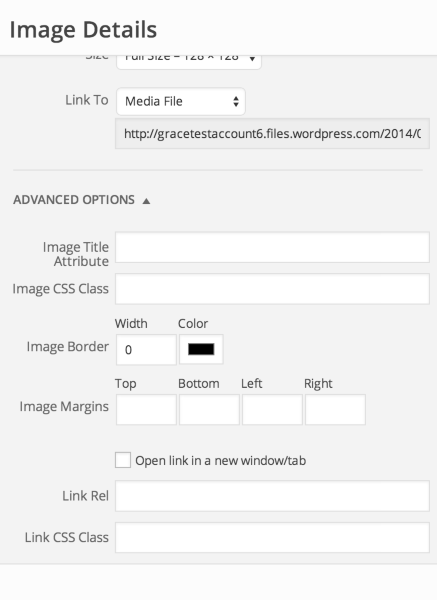
Unfortunately this would have to be done for every image. The only way to do this all across the board without editing each image would be if you edit CSS. It would require a little bit of code, which I will provide you. This upgrade would also include custom colors/fonts. So you can go to Appearance > Customize in your Dashboard and click on Custom Design > Try now. Then go to the CSS tab and paste in this:
.entry-content img {
	border: 0px;
}
You won’t be able to save it as you would need to purchase the upgrade, but this will show you a preview of how it would look. You can actually remove the border on all images if you want as well. Let me know if this interests you!


- The topic ‘How to remove the shadow box around images in Forever’ is closed to new replies.
 WordPress.com Forums