How to resize images to align with the header
-
Hello!
I want change the size of the page images to align with the header.
I’m using the Forever theme, and I would like to resize images to get its greatest possible look. It’s possible? Could you help me?Thank you very much!
The blog I need help with is: (visible only to logged in users)
-
Hi there, first off go into the CSS section in your customizer and below the CSS entry area, put 885 in the Media Width field and save.
Next add this to your custom CSS.#masthead img, img.size-full { max-width: 100%; width: 100%; }One note on the above. This is actually taking (at least some of) your images, which are around 560px in width and asking the browser to widen them out to 885px so they are going to lose quality. If you want the best quality, you need to upload images that are at least 885px in width and replace any existing images in the posts that were less than 885px.
-
HI thesacredpath!
Thank you very much for your help!
I’ve got it!How I see you’re an expert, could you help me in another small matter?
I would like to get the same distance from the navigation menu to the first image and to the header image.
It’s possible? How could I get it?Thank you again!
-
Glad that did what you wanted. For the spacing between the navigation and the content, add the following and it makes the space above and below the navigation pretty much equal.
.entry-content { margin-top: 5px; } #main { padding-top: 0; } -
Wow! Thank you very much again! :-)
Through your help I’m getting to customize my theme as I wish!One more question…
Could I remove or customize the footer? -
We are not allowed to hide or edit the WordPress.com and theme footer credits per our Terms of Service (#1 Attribution). See the Frequently Asked Questions on the Custom Design support page for more information.
You are allowed to restyle the footer credits to better fit with your design as long as they remain readable, and you are also allowed to add text to the footer, such as a copyright statement. If you need help restyling, or adding to, the existing footer credits, let me know and I would be happy to help.
-
Hi thesacredpath!
Excuse me for not having answered you before but I have not been able to.So, Can I change the color and typography footer?
If is possible… could you help me?I’m also interested in being able to change the color of the menu buttons in different states (rollover and press); this way I coulf use the same colors to customize the footer and menu.
-
Hi, and no worries on not answering till now. We can change all those colors. Paste in the following custom CSS and edit the colors as desired. I’ve used some obnoxious colors for my example.
/*footer font color*/
#site-info, #site-info a {
    color: #cc0000;
}
/*footer background color*/
#colophon {
    background: #ffee00;
}
/*menu current page colors*/
#access li.current_page_item a, #access li.current-menu-item a {
    background: #0cb200;
    color: #fff;
}
/*menu hover colors*/
#page #access li:hover > a {
    background: #a700b2;
    color: #fff;
}
/*menu base font color*/
#access a {
    color: #000cb2;
}
Let me know if you have any problems.
-
Thank you very much!
I’ve got to customize the menu and footer colors! ;-)I have another question…
In previous versions of WordPress, you could choose the static frame that show a video when you inserted in a post.Can I do this action by introducing css code?
-
In previous versions of WordPress, you could choose the static frame that show a video when you inserted in a post.
Can you explain a bit further, I’m not remembering a static frame.
-
Sorry, I have explained a little bad… he he
I meant that in previous versions of WordPress, when I published a video in a post, I could choose the frame that I want to appear in the video box, (before pressing the play).
Currently, I can not choose any frame, the video shows a frame by default.
Can I do it by introducing css code?
-
Ah, thanks a lot for the clarification. Try setting the thumbnail in Google Chrome. The Media Library uses Flash for setting the thumbnail and playing the video within the Media Library, and apparently there are some issues with Flash right now.
Let me know if you can set it in Chrome.
-
Also, with the latest Flash Player installed on my system, I was also able to set the thumbnail in Safari Version 9.1
-
Sorry, I can not find a way to customize the thumbnails of videos…
I have a Mac, I have installed the latest version of Flash Player, and then I tried both Safari as Google Chrome, but none of the browsers, I don’t see any option to customize the thumbnails of videos that I have in the media library …
Am I doing something wrong? :-(
-
As I understand it, there were some changes to the flash player and/or browsers that are causing the issue, and our developers are working to rewrite the entire thing so that it does not rely on flash at all, but it is requiring changes to a lot of things in order to do this. I’ve posted in our internal ticket on the issue to let them know that you have inquired about this, and hopefully this will be something that will get updated soon, but unfortunately, I can’t give you any sort of time frame on it.
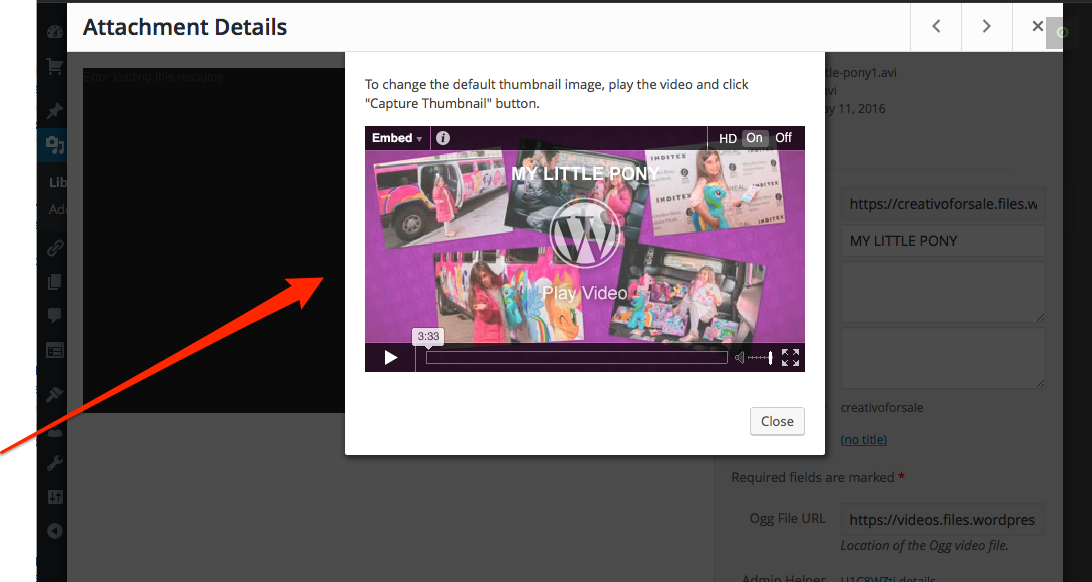
I just went into your Media Library and here is what I did in Safari to get the box to appear so that I could choose a thumbnail.
1. Click on the video you want to set the thumbnail in.
2. Click on the Thumbnail Preview at lower right on that page.
3. The box appears at the top with the video in it and I can click play and then click the “Capture Thumbnail” button.Is that what you were doing?
-
I am following your instructions; within my media library, I click on a video, press the edit button, but I don’t see any Thumbnail Preview in this page; I can see only two buttons at lower right corner: CANCEL and INSERT.
It’s a pity that I can not attach screenshots… :-(
-
What you do in the media library is click on a video and then click on the thumbnail image at lower right. Don’t click the “edit” button. That will open a small window where you can play the video and then click the capture thumbnail button.
-
I never see any buttons to set the thumbnail, there are only two buttons at lower right, (CANCEL and INSERT). If I click on the video or if I press the edit button, I always see only two buttons on the bottom right, CANCEL and INSERT.
-
When you go to your media library and click on a video, this is what you will see. See the thumbnail preview at bottom right (red arrow)? Click on that and this box will appear at center top (red arrow). Play the video from that box and the capture thumbnail button will appear over the video. When you get to the place you wish to capture, click the capture button. Then save. That all works for me in Safari 9.1.
-
Also, don’t go to the video from the post/page editor. Go directly to it in the admin dashboard. Here is a direct link to your admin Media Library: https://creativoforsale.wordpress.com/wp-admin/upload.php .


- The topic ‘How to resize images to align with the header’ is closed to new replies.
 WordPress.com Forums