

How to sign up for free plan
-
How do I sign up for the free plan? When I go to wordpress.com, it says there is that option, but when I sign in it is gone…every option I’ve found requires me to pay for a plan. I searched the forum but did not find an answer.
-
Hi there,
If you start to create your site, there are one or two options for free domain names, listed under the recommended domain name. When you are asked to select a plan, there is an option to have a free plan at the top of the page.
You can also publish the site for free. When you go to make your site live, it will ask again if you want to buy a domain name or a plan, but there are options to keep the free domain name and plan.Are these options not appearing for you?
(I see you’ve also posted another thread similar to this at https://wordpress.com/forums/topic/building-a-website-with-wordpress-2/. Does this answer your questions?)
-
Hi there,
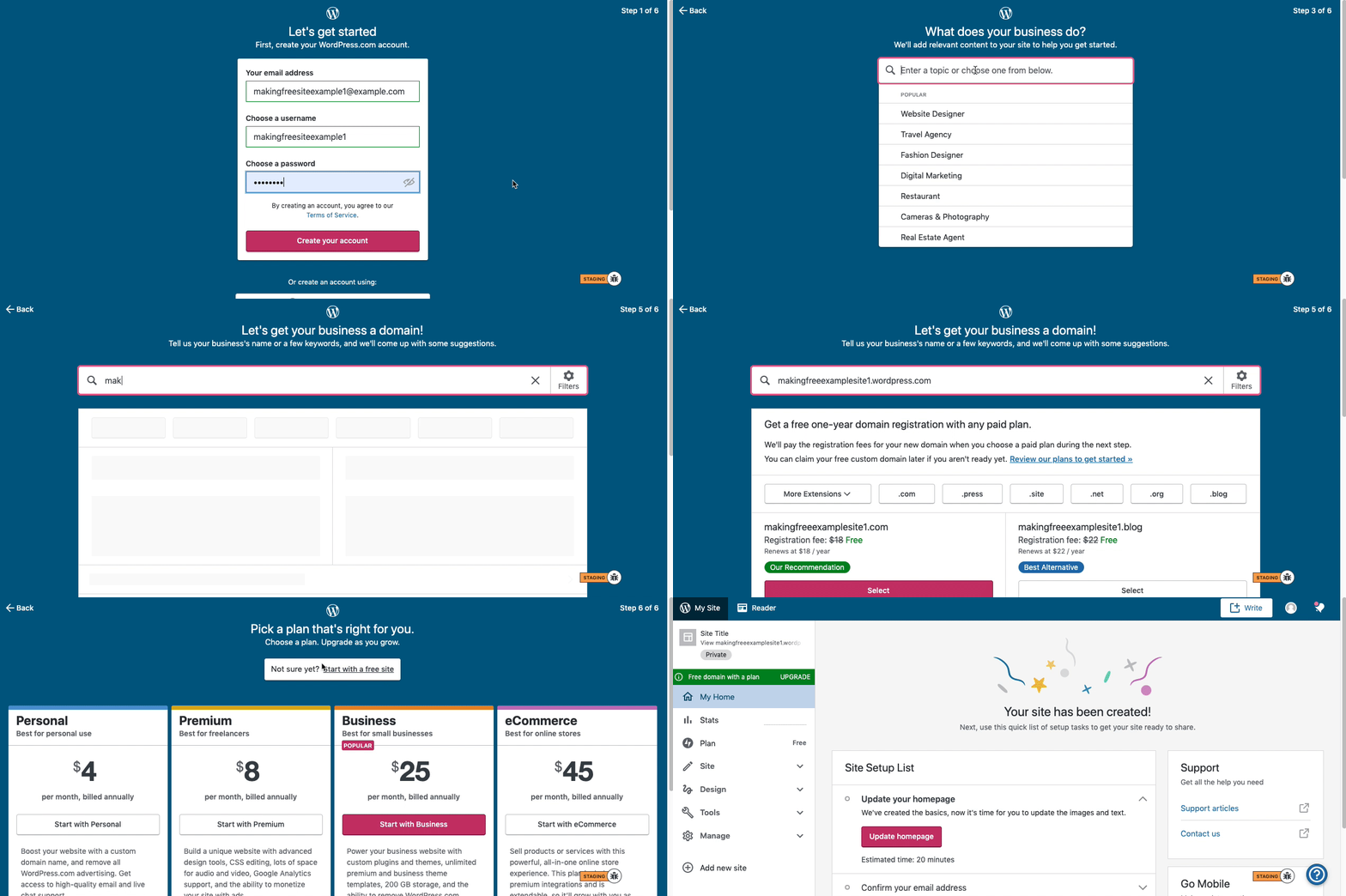
Here are visual instructions on how to create a free
.wordpress.comsite:Step 1: Select email, username, and password.
Step 2: select Blog for a.home.blogfree site or Business for a.wordpress.comsite.
Step 3: Select the Topic of your site.
Step 4: Type in the Title of site (optional).
Step 5: Type in the full, exact site address you want including the.wordpress.comor.home.blogsubdomain (ex:freeexamplesite.wordpress.com,freeexampleblog.home.blog). The first option should be the free site that you manually typed in. Click select next to that option.
Step 6: At the very top, click the link that says: start with a free site.Then, your free site should be created! Please follow those steps and if you have any questions, let us know. Thanks!
-
The issue that I’m having is when I select the free option it prompts me to create a new user. I already have a login, but when I am logged into wordpress.com I cannot find an option for the free option. When I go to my sites, it says that I don’t have any sites yet and asks me if I want to start one. From there my options are either to get a new domain name (which I don’t need) or use an existing one, but there are no free options that I can find. Where do I go to do this?
-
Ok. When you get signed in to the account click on
My Sitesin the upper left hand corner. A blue screen is going to load that says you don’t have any sites – click on the pinkcreatebutton on that page. You should then see this:Type a free site address that you want in to that search bar. The available options should populate. Please let me know if this does not work.
-
That worked…I wasn’t sure what to do at that page, so I stopped there. After I typed in an address, it did give me a free option. Thank you!



- The topic ‘How to sign up for free plan’ is closed to new replies.
 WordPress.com Forums