

how to stick a post to the banner with your new page editor
-
since I’m forced to use your new editor, I can’t for the life of me find the button that allows me to keep the posts on the rolling front page banner. Has it been removed it please?
The blog I need help with is: (visible only to logged in users)
-
The sticky function in the new editor can be found by clicking the little down arrow to the left of the date (or the words “New Draft” for a new post):

Once you click it the panel will open up and you’ll see the sticky option:
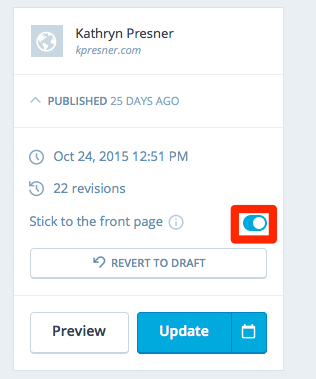
If you’re in the classic editor, on your “Edit Post” screen, under “Publish”, find the eye icon that says, “Visibility”. Click the edit button and then check the box that says, “Stick this post to the front page”.
Let me know if you have any other questions. Thanks!
-
Also, you aren’t “forced” to use the new editor. Anyone can still access the classic editor by adding “/wp-admin” to the end of their blog’s URL.
Yours would be sixpillars.org/wp-admin.


- The topic ‘how to stick a post to the banner with your new page editor’ is closed to new replies.
 WordPress.com Forums