

How to Upgrade?
-
I’d like to upgrade to a business plan, but the upgrade button isn’t doing anything… Any thoughts? Could this be because my site is limited due to excessive CPU usage over at Siteground?
The blog I need help with is: (visible only to logged in users)
-
You cannot purchase any upgrade here at WordPress.COM for any site that is not being hosted by WordPress.COM.
-
re:my site is limited due to excessive CPU usage over at Siteground?
We don’t provide support for any blogs other than those hosted by WordPress.COM and that site is not one of them.
WordPress.com and WordPress.org are completely separate and have different logins, features, run different versions of some themes with the same names, and have separate support forums. http://support.wordpress.com/com-vs-org/
If you don’t have a username account at WordPress.ORG click http://wordpress.org/support/ and register one on the top right hand corner of the page that opens, so you can post to the support forums there and receive advice from WordPress.ORG bloggers.
Resetting your WordPress.ORG password http://codex.wordpress.org/Resetting_Your_Password -
-
Yes but first you need to read what the limitations of being hosted here are http://en.support.wordpress.com/com-vs-org/ and comprehend that there is no upgrade that gives you equivalent to what you have on a WordPress.ORG install.
-
WordPress.com does not accept domain transfers but mapping an existing domain is possible.
Domain mapping of an existing domain URL that you already own and purchased elsewhere is not done free of charge. Mapping an existing domain costs $13. annually. You will have to renew the domain name purchase where you made it and the domain mapping purchase here every year.
Important Notes Before Upgrading http://en.support.wordpress.com/domains/#important-notes-before-upgrading
In order to map to a domain one must have an underlying .wordpress.com subdomain blog to map from and it does not matter what that underlying .wordpress.com URL is. It does not have to match the domain URL. If you have registered a .wordpress.com blog you log in as Admin under the exact same username account that registered the blog and purchase a domain name by purchasing an annually renewable domain mapping upgrade for the blog.
See here for mapping an existing domain that you already own http://en.support.wordpress.com/domains/map-existing-domain/
Dashboard > Store > My Upgrades is where you do the primary blog set up knowing it can take between 24 – 72 hours for domain name propagation to take place throughout the internet. You can view the DNS changes here > http://www.whatsmydns.net/ What’s important during that stage is to be patient.
To move your content see here http://en.support.wordpress.com/moving-a-blog/#moving-from-wordpress-org
-
Whew! OK, bought the business package and redirected the dns servers from siteground to wordpress.com. NowI’m getting this error message:
You can’t get there from here (site_id mismatch error). This happens when an external blog (a self-hosted blog using the Stats plugin) is pointed to WordPress.com by DNS. If you are trying to migrate away from WordPress.com, please update your DNS to point the domain to your own server. Otherwise please contact WordPress.com support and explain what you were trying to do, what steps you took, what you expected to happen, and what actually happened. It’s probably Andy’s fault.Is this typical during the mapping process? It seems to be a Jetpack error or something? Help!
Thanks,
Chris -
Hi there,
Sorry about this! It looks like the upgrade was added to your Jetpack site – not a WordPress.com site.
We will get this fixed up, but in the meantime can you create a WordPress.com site, and I can move the upgrade and domain to that site. You can create a WordPress.com site by logging into:
and going to My Sites at the top. There will be a box to create a new site!
Let me know if you have any questions with this!
-
I’ve been there. The box with my site reads Jetpack problem.
Should I recreate the blog and sign up for the upgrade to business class again?
-
I see that you just created the site: easyandelegantlif.wordpress.com
I have moved the Business upgrade and domain mapping to that site!
I am now able to see your WordPress.com site at the domain:

If that is not what you see, can you please try clearing out your cache and cookies using the guide below?
-
I should be able to use the unique url, too? Just easyandelegantlife.com?
It just says nothing found, but the title pops up. Will clear cache, too.
-
OK,cache and cookies cleared. Now trying to export/import the old site here. Can’t seem to save as the required WXR file and it’s a big site. With the business plan, unlimited storage, this won’t be a problem, right?
How do I generate the file?
-
Hi there,
Please note that you will need to export a XML file in order to Import it. There shouldn’t be a problem with size.
After you get a XML file of your site and you can import that. Please note only posts and pages will be imported as any themes/customizations you had on WordPress.org are not transferrable.
Cheers!
-
Hi,
Imported everything, but nothing is showing up. Is it taking time to propagate? I got an email saying it was imported….Also, I have two sites listed and only need the one. How do I delete the other?
-
Hi there,
It looks like the import has finished. Can you take a look at the export file and make sure it wasn’t empty?
-
When I go to: http://easyandelegantlife.com/ , I’ve got nothing. My business plan allows for me to use a non-WP.com URL, correct?
-
Please note that the domain mapping is working as seen here:
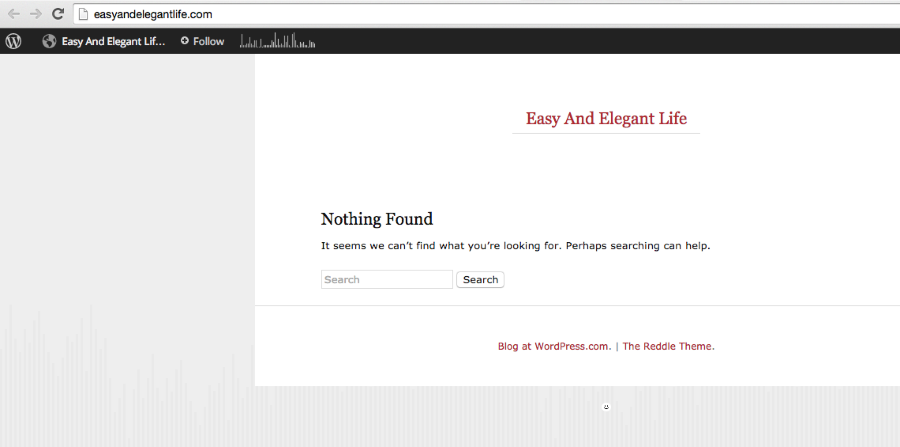
Check out the URL. However, the site is still empty – there was nothing in the import. Please check the export file. Your previous host may be able to help you.


- The topic ‘How to Upgrade?’ is closed to new replies.
 WordPress.com Forums