

How will I (blog readers) be able to view my Twitter link in the side bar?
-
I am unable to view my Twitter (Timeline) widgets in my blog sidelines. It just says Twitter did not respond, refresh in a few minutes, or the widget just gives the title name (eg. I have called one “Twitterbits” on my blog ingridvanamsterdam.wordpress.com, and underneath it says My Tweets underscored, but doesn’t give my Twitter name @IngridLoveArt and doesn’t link to anything. This applies to all blog names I have which have a Twitter widget.
The blog I need help with is: (visible only to logged in users)
-
Hi Ingrid,
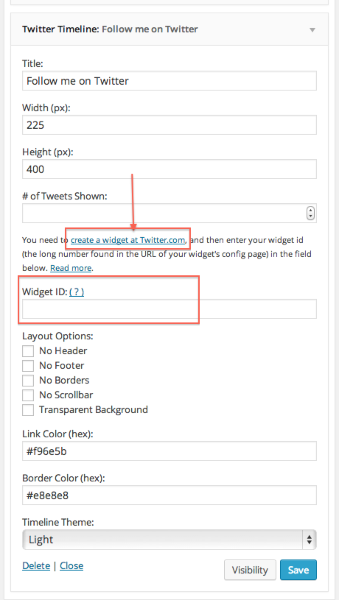
You need to create a “widget ID” at Twitter and enter it in the widget. If you expand the widget, you’ll see some instructions and a link to where you can do this at Twitter.
There are also instructions here:
http://en.support.wordpress.com/widgets/twitter-timeline-widget/Let me know if you still have any trouble!
-
Yes I did all of that. You can have a look on my blog (as mentioned above if you like to see what I mean). But thank you for your reply!
-
-
-
-
Tweets by @IngridLoveLight
<script>!function(d,s,id){var js,fjs=d.getElementsByTagName(s)[0],p=/^http:/.test(d.location)?’http’:’https’;if(!d.getElementById(id)){js=d.createElement(s);js.id=id;js.src=p+”://platform.twitter.com/widgets.js”;fjs.parentNode.insertBefore(js,fjs);}}(document,”script”,”twitter-wjs”);</script> -
-
Now did it again on my blog ingridvanamsterdam.wordpress.com. Still appears in the sideline as Twitterbits, underneath saying My Tweets.
-
Hi Ingrid,
That’s not what you need to put in there. It should be a string of only numbers, which you copy from the URL over at Twitter, as shown in the very first screencap in this document here:
http://en.support.wordpress.com/widgets/twitter-timeline-widget/Just the numbers part of the URL, not the entire URL.
-


- The topic ‘How will I (blog readers) be able to view my Twitter link in the side bar?’ is closed to new replies.


 WordPress.com Forums