

HTML Table Cell alignment
-
Hello,
I’m writing with my fist attempt at coding! (In other words–please note that I am an extreme rookie at both code and wordpress.com.)
I’m trying to format some cells within a table that I just built (based on the awesome tips found here: https://wpbtips.wordpress.com/2013/04/09/table-coding-for-wordpress-com-users/#Vertical-alignment-of-cell-content)
My challenge is that each time I try to edit the td style, it doesn’t behave as I’d expect.
Here is my table (withOUT my attempt at editing the cell alignment):
<table>
<col style=”width:20%;” /> <col style=”width:55%;” /> <col style=”width:25%;” />
<tr><th>TERM</th><th>DEFINITION</th><th>EXAMPLES</th></tr>
<tr><td><div style=”line-height:1.2em;”>Brand</div></td><td><div style=”line-height:1.2em;”>All the promises and perceptions an organization wants its market to feel and believe about its product/service offerings. An asset with one need: to grow while maintaining its reputation and profits.</div></td><td><div style=”line-height:1.2em;”>Coca-Cola, Sprite, ESPN</div></td></tr>
<tr><td><div style=”line-height:1.2em;”>Product</div></td><td><div style=”line-height:1.2em;”>A service or good.</div></td><td><div style=”line-height:1.2em;”>lemon-lime soda & ESPN.com</div></td></tr>
<tr><td>Feature</td></div><td><div style=”line-height:1.2em;”>Components of your product.</td><td><div style=”line-height:1.2em;”>lemon-lime flavor & up-to-date scores</td></tr>
<tr><td><div style=”line-height:1.2em;”>Sub-Brand or Child Brand</div></td><td><div style=”line-height:1.2em;”>Product that has its own brand positioning.</div></td><td><div style=”line-height:1.2em;”>Sprite is a sub-brand of Coca-Cola</div></td></tr>
</table>Here is the code I am trying to add to the header: <th style=”text-align:center;vertical-align:middle;”>
When I add that code after the <tr><th>, the text in column 1, row 1 jumps to column 2, row 1.
What am I doing wrong?
NOTE: The below form won’t let me select my updated URL, which is agmarketing.us.
The blog I need help with is: (visible only to logged in users)
-
Hey there!
Nice work plunging into HTML!
Could you explain to me what you are hoping to accomplish? Then, I can read your code to determine what’s going wrong, if anything.
Looking forward to hearing from you. Thanks very much.
-
Thanks! I am hoping for the first row to be centered vertically and horizontally.
For each of the following rows, I am hoping for left justification and for the cell text to be centered vertically.
-
Hi there!
It appears as if you may have already fixed your issue.
When I copied/pasted your code into a test site, this is what I see:
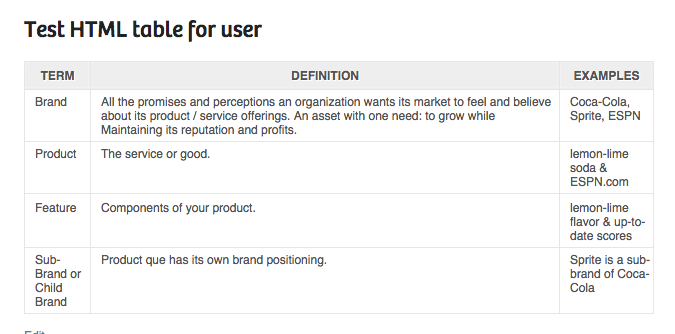
Is this what you’re hoping to accomplish?
If you still need assistance, please copy/paste the code onto a draft page or post, so I can test it directly on your site.
Thanks so much!
-
Odd! When I copy past it, I see this: http://agmarketing.us/?p=407&shareadraft=54caae40631f0
Maybe it is my template?
Thanks for your ongoing help!
-
Hmm…
I used the text align buttons above your content box here:

Now, your first row (the headers) are centered:
Don’t forget about those formatting buttons — they will add the HTML code into your table, if you use them.
Let me know if that’s getting closer to what you need. Thanks!
-
-


- The topic ‘HTML Table Cell alignment’ is closed to new replies.
 WordPress.com Forums