

Html table tags are not rendering as tags
-
I want my table below to render as tags(table,tr,td,th) instead of html table. I enclosed it with
andbut to no avail. Everytime I publish my blog it shows as html table instead of a code segment of html table tags(table,th,tr,td).
<table>
<tr>
<th>Company</th>
<th>Contact</th>
<th>Country</th>
</tr>
<tr>
<td>Alfreds Futterkiste</td>
<td>Maria Anders</td>
<td>Germany</td>
</tr>
<tr>
<td>Centro comercial Moctezuma</td>
<td>Francisco Chang</td>
<td>Mexico</td>
</tr>
<tr>
<td>Ernst Handel</td>
<td>Roland Mendel</td>
<td>Austria</td>
</tr>
<tr>
<td>Island Trading</td>
<td>Helen Bennett</td>
<td>UK</td>
</tr>
<tr>
<td>Laughing Bacchus Winecellars</td>
<td>Yoshi Tannamuri</td>
<td>Canada</td>
</tr>
<tr>
<td>Magazzini Alimentari Riuniti</td>
<td>Giovanni Rovelli</td>
<td>Italy</td>
</tr>
</table>The blog I need help with is: (visible only to logged in users)
-
Hi @ala2fadeel,
How are you posting the html code? Do you just copy and paste the snippet into the blog field and publish?
I’ve tried to use the html code you provided above and published a post using just that chunk of codes and it didn’t turn into a table.
Have you also try to use the <xmp></xmp> tags? They turn html code into text, basically.
-
Hi drunkentennis, I posting the html as follow:
1- In the html page of my blog I paste the code below.
2- Click on preview button
3- Click on the update button
<xmp>
<table>
<tr>
<th>Company</th>
<th>Contact</th>
<th>Country</th>
……………
</table>
</xmp>I have used
tags andtags
-
Hi drunkentennis, I posting the html as follow:
1- In the html page of my blog I paste the code below.
2- Click on preview button
3- Click on the update button
<xmp>
<table>
<tr>
<th>Company</th>
<th>Contact</th>
<th>Country</th>
……………
</table>
</xmp>I have used
tag andtag
-
Have you tried using the special code tags listed here?
https://en.support.wordpress.com/code/posting-source-code/
Try this if you haven’t already:
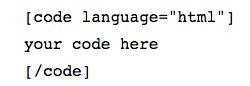
-
Thanks Kathrynwp, I owe you a beer:). I have tried this one below and it worked like a magic.
“[code language="css"]"
your code here
"[/code]” from your first link above. -
Great. :) You should be able to use “html” to get the proper HTML syntax highlighting. But if you’re happy with the CSS highlighting, that’s fine too. ;-)


- The topic ‘Html table tags are not rendering as tags’ is closed to new replies.
 WordPress.com Forums