

https changed to ttps in email messages
-
Within the last 10 to 14 days, I can no longer approve comments through the link in the Outlook email message and people who follow my blog can no longer unsubscribe or manage their subscription. The reason is this. When you hover the mouse over the link, instead of https appearing, it is not ttps. Somehow, perhaps during an upgrade to WordPress, the h was inadvertently removed. Let me know if you would like me to forward a sample message to you.
The blog I need help with is: (visible only to logged in users)
-
That’s very strange. I’ll tag this thread for Staff assistance because I do not know how to help you. Another Volunteer may answer prior to Staff but I tagged the thread so it will not fall through the cracks and escape attention. Please subscribe to the thread so you are notified when they respond and please be patient while waiting.
-
Hi @gaildever,
That is odd! Is this only happening in Outlook? If possible, could you take a screenshot of the message and upload it to your Media library while hovering over the button so the URL displays somewhere on your screen like this?
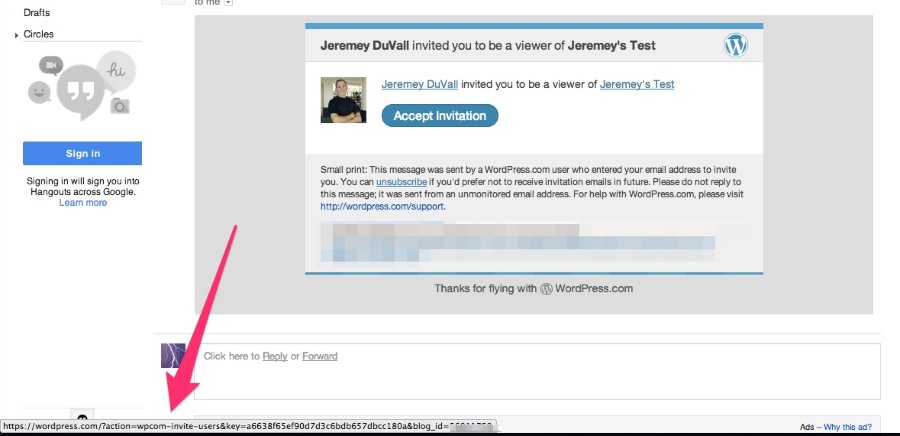
-
Yes, the problem only happens in Outlook. I uploaded two images to my Media library so the URL displays. Thanks.
-
-
Yes. I asked someone with a Videotron Outlook address to try it, and he had the same problem. People with Hotmail and Gmail accounts do not have the problem. I am reluctant to ask other Outlook users to test because you cannot unsubscribe once you follow.
-
-
-
Hey Gail,
I believe this issue is only happening with Outlook 2007 as I have a related user request that only appears when using that program. I’m looking into a fix, and I’ll keep you updated as soon as I know more!
-


- The topic ‘https changed to ttps in email messages’ is closed to new replies.
 WordPress.com Forums