

http://specialasianfood.wordpress.com
-
I am do my website but I am a novice who needs some help.
Though I have activate Penscratch Theme I only saw Penscratch under Specialasianfood. What do I do next and follow up. Can you guide me to finish up the post or page?
Email to me [email removed – it’s not a good idea to post your email publicly]
Thank you.Sophia Lim
The blog I need help with is: (visible only to logged in users)
-
Hi Sophia! Welcome to WordPress.com.
You can learn how to set up the features in Penscratch here:
https://theme.wordpress.com/themes/penscratch/
Click on each item to learn more. For example, here’s a guide to setting up the social links menu:
If you need help with something specific, please let us know. Thanks!
-
Hi Kathrynwp
Thank you very much for your reply of 10 April 2015.
Now I am struggling to do my site http://www.specialasianfood.wordpress.com
I would appreciate very much if you can give me the steps to do the page on Contents of Tables as I cannot draw the lines.
For example Click http://specialasianfood.com click View Menu Page of The Oriental Cookbook you will see Table of
Contents.
2. How do I minimise the characters in a word in the caption or any other place ?
3. How do I leave a space between the picture and words in the page?Thank you very much.
Warm regards
Sophia Lim
http://www.specialasianfood.com -
Hi Sophia, I’ll answer your questions separately.
The table of contents on this page look like HTML tables.
Forum volunteer justpi has a good tutorial on how to create tables in the Text/HTML editor:
-
Volunteer timethief also has some good posts on tables here:
http://onecoolsitebloggingtips.com/2008/03/31/how-to-make-html-tables-for-your-wordpress-blog/
http://onecoolsitebloggingtips.com/2010/03/24/align-images-html-tables-for-wordpress-blogs/
-
2. How do I minimise the characters in a word in the caption or any other place ?
Do you mean that you want to make the text size of some elements smaller, like captions? You can do that by adding some custom CSS. You’ll need to upgrade your site to either the WordPress.com Premium or Business plan to have access to that feature:
Once you have access to the upgrade, you can target your site’s CSS will help you make certain design and layout changes. Here are some very helpful posts that will help you customize your site with CSS:
http://en.support.wordpress.com/custom-design/how-to-find-your-themes-css/
We also have a CSS Customization forum where volunteers and staff can help with specific CSS tweaks:
-
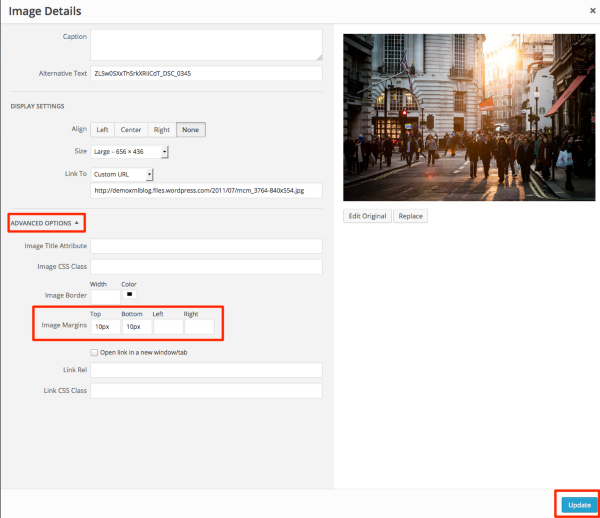
3. How do I leave a space between the picture and words in the page?
If you choose to upgrade your site to one of the plans as I mentioned before, you can add a space betwen all images and text with a bit of custom CSS. If you decide to upgrade your site, post a link to a sample post or page where you want more space between the images and text, and I can help you with the necessary CSS.
If you decide not to upgrade your site, you can still add margin to the bottom and/or top of each image within the Advanced Options area of the image editor. You can change the number 10 to however many pixels of space you’d like to add:
-
Hello Kathrynwp
I am a wordpress.com learner – I cannot understand all the URLs that you have sent me. Please make it simple and just give me the steps if you can assist. I am just constructing a simple website.
Thank you and appreciate your assistance
Best regards
Sophia Lim -
Hi Sophia, sorry you found it difficult to understand my replies below.
Perhaps it will be easier to take one question at a time.
Creating tables isn’t something built into WordPress.com, so if it’s something you want to do, your best bet is to explore some of the resources I provided.
The basic coding for an HTML table is provided here:
So for a three-column table like the one I see on your site, the code would be:
<table>
<tr><td>ROW1 COL1 CONTENT</td><td>ROW1 COL2 CONTENT</td><td>ROW1 COL3 CONTENT</td></tr>
<tr><td>ROW2 COL1 CONTENT</td><td>ROW2 COL2 CONTENT</td><td>ROW2 COL3 CONTENT</td></tr>
<tr><td>ROW3 COL1 CONTENT</td><td>ROW3 COL2 CONTENT</td><td>ROW3 COL3 CONTENT</td></tr>
</table>
You’ll need to replace the words in all-capitals with your own content, of course, and add additional rows as needed.
Just let me know if any part of this isn’t clear.
-
Hi Kathrynwp
Thank you for your email of 4 May 2015.
I am not creating tables but I want to create a Table of Contents for my recipe titles in WP Pages. My former Webmaster sent me this link http://www.youtube.com/watch?v=PqRliFPaKBY – this is what I want. But I need to use a plugin and your wordpress.com do not have a plugin in the Dashboard navigation.
Can you write in HTML so that I can copy and paste in the text page and when I click visual it can be read like the one in my website http://specialasianfood.com click menu page with headings Nos, Titles of Recipes and Pages and horizontal and the vertical lines without a plugin. If cannot be done – can you suggest some simple ways ?
Thank you.
Sophia Lim
-
Please have a look at this screenshot: https://cloudup.com/cS2drnx-zuo
Is that an example of what you’re trying to recreate from this page? http://specialasianfood.com/oriental_cookbook_recipes.htm
If so, that’s an HTML table.
If not, please send me a link to the page in question.
I don’t see a video at this link: http://www.youtube.com/watch?v=PqRliFPaKBY
-
Hi Kathrywp
Your link http://cloudup.com/cS2drnx-zuo may have but they have their terms and conditions and how to do it to apply to my recreate page. I am blur.
Yes this is an example given by you what I want to recreate from this page http://specialasianfood.com/oriental_cookbook.recipes.htm
You can see this link http://www.wpbeginner.com/plugins/how-to-create-atable-ofcontent-in-wordpress-posts-and-pages and https://www.youtube.com/watch?v=PqRliFPaKBY But these need plugins.
Akismis and Jetpack also need plugins to install. Can I do under Widget and link ?
I would appreciate your feedback. Thank you.
Sophia Lim
-
Yes this is an example given by you what I want to recreate from this page
You’ll need to create an HTML table to recreate that effect.
You can do that without plugins on WordPress.com.
One way to do it is by clicking the Text/HTML tab in your editor and pasting in the sample code I gave you earlier:
<table>
<tr><td>ROW1 COL1 CONTENT</td><td>ROW1 COL2 CONTENT</td><td>ROW1 COL3 CONTENT</td></tr>
<tr><td>ROW2 COL1 CONTENT</td><td>ROW2 COL2 CONTENT</td><td>ROW2 COL3 CONTENT</td></tr>
<tr><td>ROW3 COL1 CONTENT</td><td>ROW3 COL2 CONTENT</td><td>ROW3 COL3 CONTENT</td></tr>
</table>
Then, replace the dummy content with your own real content. Add new rows for each new item. For example, here’s a new row for Thai Pineapple Rice:
<tr><td>1</td><td>Thai Pineapple Rice</td><td>8</td></tr>Akismis and Jetpack also need plugins to install.
Akismet and all Jetpack features are already built right into WordPress.com so you don’t need to worry about them – no plugin needed.
-
Hi Kathrynwp
Thank you very much for your patience in assisting.
Which is the sample code you gave earlier – is it the Table given in your last email of 6 May 2015? I do not know HTML and replace real content. e.g. Thai Pineapple Rice – I do not know where to place it.
What does this mean –
<tr><td>1</td><td>Thai Pineapple Rice</td><td>8</td></tr>1. Kindly draw the vertical only half inch for the Nos and Pages and spacing half and resize the Table smaller so that I can insert the cookbook photo on top-right. How do I do it ?
2. How do I know is the end of the page and go to next page and how to link it to next page?
3. How do I link View Menu Page of The Oriental Cookbook at Home page to Table of Contents ?
4. Is there a more simple way of doing the Table?
Appreciate your assistance and reply.
Sophia Lim
-
Sophia, let’s stick to just the table issue here, since this thread has already gotten very long and we still haven’t resolved it. For your other questions that don’t relate to table creation, could you please start a new thread?
https://en.forums.wordpress.com/forum/support#postform4. Is there a more simple way of doing the Table?
You’ll need to learn how to create an HTML table if you want to build tables on WordPress.com. There is no built-in method for creating tables.
Earlier, I pointed you to some tutorials to help you learn how to create tables, and provided some sample code as well:
<table>
<tr><td>ROW1 COL1 CONTENT</td><td>ROW1 COL2 CONTENT</td><td>ROW1 COL3 CONTENT</td></tr>
<tr><td>ROW2 COL1 CONTENT</td><td>ROW2 COL2 CONTENT</td><td>ROW2 COL3 CONTENT</td></tr>
<tr><td>ROW3 COL1 CONTENT</td><td>ROW3 COL2 CONTENT</td><td>ROW3 COL3 CONTENT</td></tr>
</table>
In HTML, <table> opens the table and </table> closes the table.
<tr> opens each row and </tr> closes it.
<td> opens each table cell within a row, and </td> closes it.
Here are some further resources to learn how to create tables in WordPress.com:
http://onecoolsitebloggingtips.com/2008/03/31/how-to-make-html-tables-for-your-wordpress-blog/
http://onecoolsitebloggingtips.com/2010/03/24/align-images-html-tables-for-wordpress-blogs/
If you find that you’re not able to follow the tutorials or get the hang of tables, you might like to consider hiring someone to help you out.


- The topic ‘http://specialasianfood.wordpress.com’ is closed to new replies.
 WordPress.com Forums