Hyphenation in Twenty Ten?
-
I’ve been blogging for close to three years now and have always used the Twenty Ten theme. In all of that time, I have never once seen automatic hyphenation come into play. It’s always word-wrap.
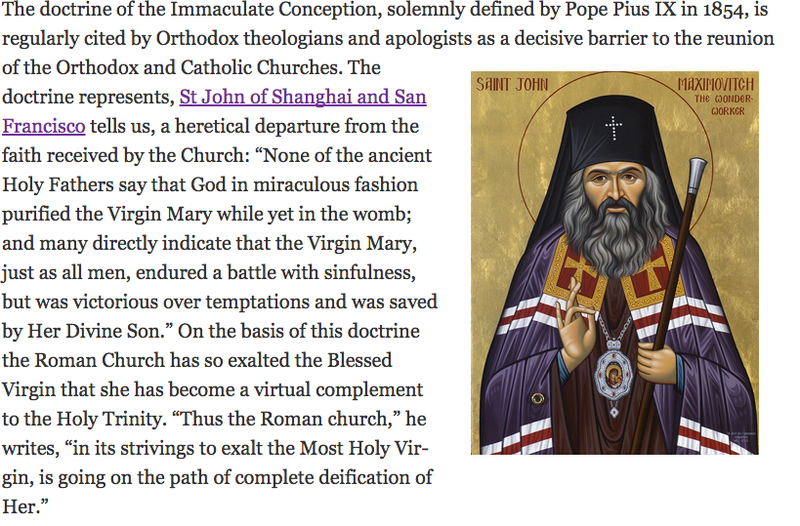
But yesterday a word got hyphenated–just one word. Here’s the particular blog: https://goo.gl/GnCmpr. To the left of the first pic, you may see one word hyphenated. I’m using Chrome for Mac, and I see the word “Virgin” broken into two syllables; on the other hand, when I look at the article with Safari, it’s word-wrap all the way.
I’m not complaining. I wish there was a way for me to turn hyphenation on and off for certain portions of the text, particularly when I insert a pic positioned on the right side of the page.
Is this new for Twenty Ten? Any explanations?
The blog I need help with is: (visible only to logged in users)
-
-
Hi @akimel, I did some research because I’m interested in this feature myself.
Unfortunately, it looks like there is no easy on/off for this feature. However, there is a way to turn off automatic hyphenation which involves customizing the CSS. You will need the premium WordPress.com account to have this edit capability.
See this thread for instructions: https://en.forums.wordpress.com/topic/help-me-remove-hyphenation-from-site-if-possible?replies=12#post-1926107
Hope that helps :-)
-
This is very odd indeed – not only is there no hyphenation code in Twenty Ten (except for widgets), Chrome is a browser that doesn’t even support CSS hyphenation: http://caniuse.com/#feat=css-hyphens
That said, I see the word being hyphenated in both Firefox and Chrome on Mac and will dig a bit deeper to see if I can come up with an explanation for it.
-
I’m seeing some “soft hyphen” HTML entities when viewing that post’s source using the Chrome inspector:
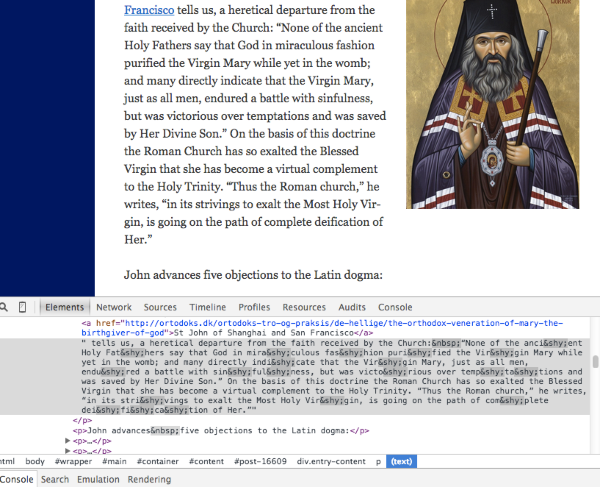
https://en.wikipedia.org/wiki/Soft_hyphen
These entities are what’s causing the hyphenation. If you’re pasting in your text from elsewhere, I’d suggest you make sure to convert it to plain text format before pasting it into the post editor, by saving it as a .txt plain-text document in your word processor.
Let me know how it goes.
-
Curious… I had no idea there was such a thing as a soft hyphen. Thanks for clarifying @Kathrynwp :-)
-
-
-


- The topic ‘Hyphenation in Twenty Ten?’ is closed to new replies.
 WordPress.com Forums