

I can no longer set or change Featured Image for a page.
-
The Featured Image panel is missing under Page Attributes, and I can no longer set or change it. I have used this tool to affect the image that is displayed when sharing links to a page from my site on social media.
The blog I need help with is: (visible only to logged in users)
-
Hi there,
If you’re missing any module from your Page editor, first place to check is in your Screen Options panel:
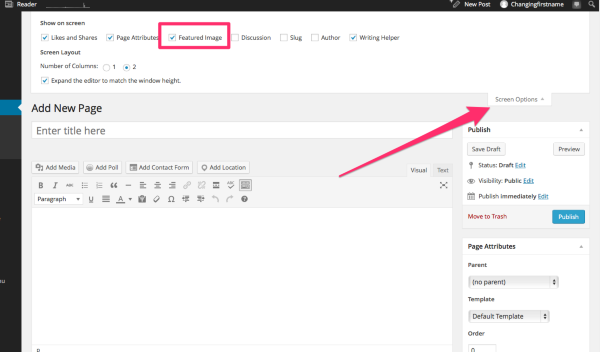
After opening Screen Options, make sure Featured Image is checked.
Let me know if you still don’t have access to Featured Image after checking there.
Best,
-Alex G.
-
Screen Options was the first thing I checked — Featured Image isn’t even one of the options.
Here’s what it looks like in Page and Post view:
Screen Options

-
Hi again,
Thanks for checking those options. :)
Investigated this a little further and this quirk came about with an update to your theme, Able.
Some users were getting confused — they activated Able expecting to use Featured Images prominently, because it originally supported back-end featured images (like you were using them) but the featured images were not displayed anywhere.
To help make sure no one was expecting something of Able that wasn’t intended, the Featured Image meta-features were removed so it would reflect correctly in the Theme Showcases and documentation. The idea being that Featured Images weren’t required for the theme’s needs anyway.
I’ve submitted this use-case to them, so they know some users still need the back-end functionality but it will require another update if they choose to bring it back. I’ll be happy to let you know if they do re-enable the featured image module for Able.
Sorry for the troubles,
-Alex G.
-
Ugh. Well, thanks for checking into it. The challenge now is that I have no way to make the existing image current (certain pages are updated monthly or quarterly, like http://sparkanthology.org/covers/).
Thanks for passing my use-case on! Maybe in the Able theme the feature, if enabled, can have a display name of “Social Media Image” or, since it gets injected as og:image for Facebook … “Facebook Image.”
-
For Facebook specifically, there is a tool where you can scrape old content from their cache:
https://developers.facebook.com/tools/debug/og/object/
Paste the URL, and you can see what image the pull up. If it’s outdated, just click the “Fetch New … ” option and it will refresh.
I’m not sure other networks have the same function, but I’ve used this one often. :)
-Alex G.
-
That’s not the problem—I already use that Facebook cache tool every time I make an update. In fact, it was when using the tool today (and seeing the older Volume IV cover after I clicked “Fetch New”) that I discovered the Featured Image feature removal.
The problem is that now I don’t have any way to change the image WordPress is already serving up for that page, because even though Featured Image is not available through the UI, it was available and I had previously set the image. Facebook will continue pulling that image, because I can’t remove or change it.
-
Ah! Thank you for that clarity. I’ll make sure that’s address more clearly to the development team when the reconsider.
Thanks again for reporting this, and I really do apologize for the trouble.
-Alex G.
-
No problem, I appreciate that you helped figure out what was going on and can direct it to the right people!


- The topic ‘I can no longer set or change Featured Image for a page.’ is closed to new replies.
 WordPress.com Forums
