

I cannot drag type like I did before onto my post. My links are not sticking.
-
I used to create my post in Microsoft Word for Mac and then I would use “Web Page Preview.” I dragged my type onto a new post. Now it is behaving like I’m adding an attachment instead of allowing the type to stick. I cannot drag links like I did before either.
The blog I need help with is: (visible only to logged in users)
-
Hi there!
This is our new upload feature, which will allow you to drag an image or other file to your post editor to upload it to your post! You can read more about these recent changes here:
To copy your content from Word, you can use the Paste as Text button. You can toggle the plain text icon off by clicking on it again. Here’s what the button will look like when the plain text editor is off:
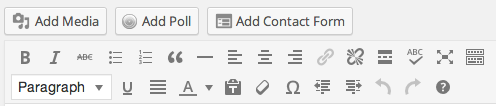
And here’s what it will look like when it’s on:
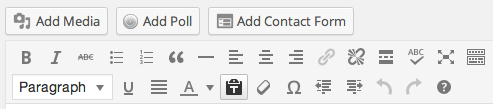
Let me know if I can answer any more questions for you!
-
Hi there!
I see you were not happy with my response. I’m sorry if I was unclear. Dragging text to copy it to our editor will not work anymore. You’ll need to copy and paste using the directions I gave you above.
Is there something else I can help you with?
-
Hi Shawna,
I sent you back a message that you didn’t answer – I realize now you didn’t get it. It’s hard to show you without images, so I’ve put links and uploaded them to my blog, so you can see my problem.
I looked at the links you sent me and did not have any luck. According to the link, my 2nd row “kitchen sink” is supposed to have something listied as #6 Paste from Word. Like below:
http://myjourneysinsight.com/?attachment_id=18458But I don’t see that on my blog. See how my blog looks with the link below:
http://myjourneysinsight.com/?attachment_id=18459Then it says when you toggle that new feature called Paste as Text – a box comes up. But when I use that feature – nothing at all happens – no window comes up. So I’m still not able to paste the type font I want onto my page. The only one available is Times Roman. I like Helvetica.
http://myjourneysinsight.com/?attachment_id=18460
Also, when I upload an MP3, it used to have a second window when the music played that looked like this:
http://myjourneysinsight.com/?attachment_id=18461
But now it’s inconsistent for my music to have this new window, which is very slow loading by the way.
I sure hope you can help me with this! I’m not liking these changes at all!
Judy
-
I understand now. Thanks so much for those images!
I just updated the documentation about the Visual Editor yesterday. So there’s a new accurate screenshot:
http://en.support.wordpress.com/visual-editor/
And some updated information about the Paste as Text function:
http://en.support.wordpress.com/visual-editor/#pasting-text
We’ve eliminated the box that pops up. The first time the button is clicked, you’ll be notified that Paste as Text is enabled. Then you can paste into the editor like normal. Just click the button again to turn off the Paste as Text function.
Now for the music player. I’ve got a couple of options for you. Let me know if I can help you set either of these up.
1. You can set up your music files as they were before by using the mp3’s direct URL instead of the attachment page. For example, the music file linked in your most recent post.
Your link is this one:
If you used this one instead, you’d get the player you’re used to:
[audio src="http://judyunger.files.wordpress.com/2014/03/take-me-away-mix-1-gtr.mp3" /]
You can find this link by opening the file through your Media Library. On the right hand side you’ll see some information about the file, including a File URL:
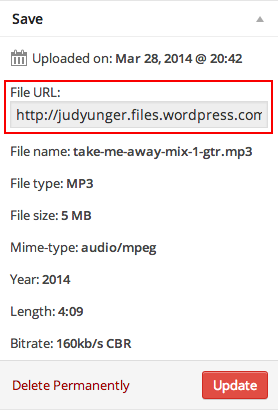
Just double click in that box so the text is highlighted and copy the URL. Then use that link in the hyperlink editor instead of the previous one.
2. You can embed a player right into your post. You can do this with a little bit of shortcode.
Using the same File URL as above, you can create an embedded player using this code:
[audio http://judyunger.files.wordpress.com/2014/03/take-me-away-mix-1-gtr.mp3]You can modify this code to include the title, author, starting volume, and other things.
This was a bit of a long response, but I hope you’re still with me!
Let me know if you have any questions. I’m more than happy to figure them out with you! :)


- The topic ‘I cannot drag type like I did before onto my post. My links are not sticking.’ is closed to new replies.
 WordPress.com Forums