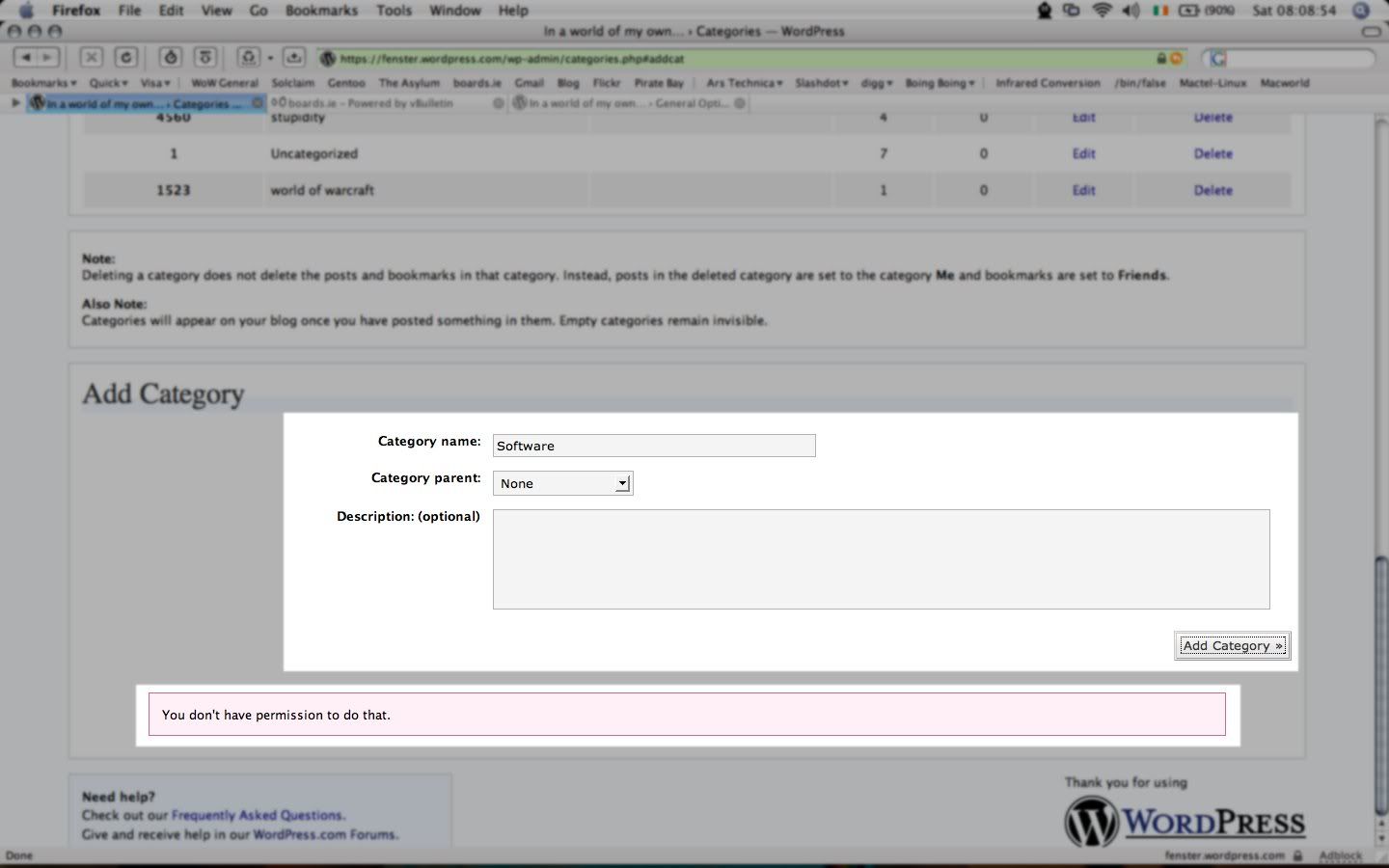
I can’t add categories
-
It’s that easy.. I can’t add categories =(….
The “thing” says “Saltar a nuevo elemento”
Thanks
-
normally on the dashboard you click “manage” and below that a line appears with “categories” on it – you click that too
then you click “add new” and fill in the name of the category and then you click “add category”
if this doesn’t work for you I believe you’ll have to send in a feedback from the button on the upper right hand side of your dashboard
I’m sorry I can’t be more helpful than that
-
“Saltar a nuevo elemento” translates to “To jump to new element”
Why it says that, I don’t have a clue. That’s not a normal WP responce though as far as I know.
Best bet would be to send in a feedback and a link to this forum thread. Sounds like a backend issue.
-
-
I’m having a problem also: I’ve been compeltely unable to add or remove categories for the past four days. I get a you do not have permission error.
Was your error similar to this?
-
I’m having the same problem, but no error message. I am new to WP, and have never been able to add new categories. I fill out the “Add Category” page, hit the “Add Category” button, the “Jump to new item” link appears (https://lockenothobbes.wordpress.com/wp-admin/categories.php#cat-undefined) but takes me nowhere, and the “Category parent” dropdown is now populated with “null” following “None”, “Blogroll” and “Uncategorized”. I have tried reducing browser security parms to low, but it doesn’t help.
Hope somebody can share the answer to this…
-
-
Friendly reminder that when one writes “I’m having the same problem” when they don’t have the same problem, (And neither one of you are getting that error of the OP) chances are the mean old moderator gets very angry because he has to delete your post and write it in it’s own thread and that takes the time he should have spent on answering other folk’s questions. :D
Anyway, Fenster, you don’t mention what user level you are for this blog. I’m going assume that it’s Admin and suggest that you send in a feedback explaining specifically what is occuring and how you are getting the error.
Lock, the form to add in a Category is at the bottom of the page you’re looking at. They just provide a link in case you have a long list of categories.
Hope this helps,
-drmike -
Mike-
My problem was “I can’t add categories” which is the title of this thread. That’s why I posted it here, after following the instructions of timethief to add the category. Anyway, after trying a number of other browsers, I found that ”only” IE 6 would support the control associated with “Category Name”. The control appears to be a combination of an edit box with a context-sensitive popup. It probably could have been coded for a wider audience of browsers, but oh well… Pointing users to IE for this function would probably be a best first step for resolving “can’t add category” issues. It would also be useful to know where else this control is used.
-L
-
Hi,
I seem to have the same problem as Pedrito, I can’t add categories. I am the adinstrator of the blogg, and click on manage – categorier – (add new) I fill ou the information click
add catrgory and get what looks lite a link on the bottom of the page with the text Jump
to new item. But when I click – nothing happens! Absolutely nothing. I am not redirected,
no new categry appears , nothing? What to do? I am using Windows XP.
Moderator, please help me!/Linda
-
Don’t know if this will help/relevant to your issue, but: I don’t open pages to maximum size so it took awhile to notice –that on extreme right side -bottom is “SAVE OPTIONS” button–which is EASY to overlook if page isn’t open ALL the way.
After making whatever choices > SAVE OPTIONS –your changes should appear
Personally: I think that button should be moved to Page – Center, but I’m not the WP head honcho, just a struggling NON-tech blogger.
If that button doesn’t resolve your probs, then follow above instructions and report situation via your own “FEEDBACK” button > upper right side of Your DASHBOARD.
-
Hi,
Thanks for your comment, but I have looked all over the page, opened it to the maximum and scrolled all the way down, but I can’t find a “save options” button. What to do? The only thing that appears is the “jump to new item”, which doesnt help me at all..
/Linda
-
-
Ok. After I fill out the name etc for the category, I click on ‘add category’. Then the ‘jump to new item’ appears, and even if I click on that, nothing happens….
/Linda
-
Oops, I get it now. Just noticed we have a new feature with the “Jump to new item” link. Wasn’t there when I added in my categories in the past.
All that link should do is move your browser window to see the new category.
The question is though is the new category showing up on the list of categories. Please double check this for us by moving to the top of the page and clicking on the Category tab. Please do not do a reload of the page because that will just reissue the last command which would be to add in the category.
I did send in a feedback to see if staff had any ideas on the subject.
-
Hi,
Thanks for realising my problem!
I have checked the list of categories (under ‘manage’ – ‘categories’), and the list of categories under ‘write post’ and I still only have two, ‘bloggroll’ and ‘uncategorised’. And I have tried to add categories many, many times now.
I hope there is some sollution to the problem…
/Linda
-
I gotta admit that I’m at a loss on this one. I know that adding categories does work. Not sure why it doesn’t in your case.
If you would like, please list the categories that you want in there and add me in as an admin (theapparatus at gmail dot com) and I’ll take a look for you.
I will send in a feedback though to staff and point out that you’re having an issue though. Donncha’s around today i noticed. Maybe he has an idea.
-
I am having the EXACT same problem. I can’t add categories. I have tried everything and still I only have uncategorized and blogroll. When I go thu manage on my dashboard and try to add a new category I get the ‘jump to new item’ and when I click that nothing happens. I understand it says the category will remain invisible until something is posted in it, but how can I post in it if I can’t access it??? I am new here and will readily admit my naievete, but I’m not completely dense. But I still don’t get it? HELP! (Oh and I sent feedback in too, just FYI)
Thanks! -
We volunteers cannot offer any more help than what is available to you in this thread. It’s good that you sent in a feedback. sysadmin is very busy right now but will get back to you just as soon as they can. I know this is annoying but please be patient.
-
Ok, Drike, your now administrator. As three persons have described the same problem in this collumn, it sems to be a general problem. Hope you can fix it.
/Linda


- The topic ‘I can’t add categories’ is closed to new replies.
 WordPress.com Forums