

I can't add the panels to the homepage
-
Hiya,
When I go to add the panels to the homepage via ‘customize – themes’ there’s no option to select a panel.
Can anyone help with this?
Thanks,
CharlieThe blog I need help with is: (visible only to logged in users)
-
Hiya Charlie,
With the Lodestar theme applied, panels may be added to a static front page. Your front page is set to display the latest posts instead of a static page, so the panels won’t display until you set a static front page. However, you should still be able to add panels at Customize > Theme Options as long as your front page is displayed in the previewer.
See the Setting Up Your Front Page section of the Lodestar theme guide for relevant instructions. That section includes a link to the Set a Static “Home” Page (Front Page) support page.
-
Hey Charlie, doc is spot on – you first need to select a static page to get the panel option.
Looks like you’ve currently selected the static front page option, but without actually selecting a specific page, nor have you selected a page for your blog posts.
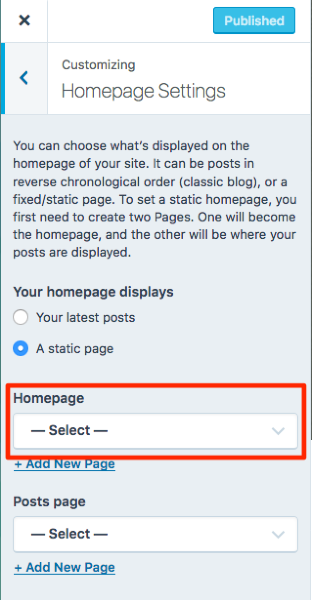
Have a look at the static front-page guide that musicdoc linked to above, and if you get stuck at any step, just let us know.
-
However, you should still be able to add panels at Customize > Theme Options as long as your front page is displayed in the previewer.
I may have confused @charliejaneupdates in saying that, without some explanation. I found the following behavior at Customize > Theme Options regarding the optional panels:
1. With the front page set to display the latest posts, aka the blog page, at Customize > Theme Options the panel options are present only if the previewer is displaying the front page. However, if you add panels there, with the latest posts front page setting, they will not be displayed either on the front page or anywhere else, since they may only be displayed on the front page, and only if the front page is a static page.
I wonder if the theme authors intended the panel options to display at Customize > Theme Options when the front page is set to the display the blog page. I also wonder if the presence of the panel options under the specified condition might be confusing to users.
2. With the front page set to display a static page, the panels options are displayed at Customize > Theme Options regardless of what is displayed in the previewer (front page, static page, blog page, post, archives page, etc.)
-
Correction:
2. With the front page set to display a static page, the panels options are displayed at Customize > Theme Options regardless of what is displayed in the previewer…
Sorry, this is incorrect. I’d tested that last night and must have made error. Today I find that the behavior to be the same when the front page is static as when the front page is set to display the blog page. The panels options are displayed at Customize > Theme Options only when the front page is displayed in the previewer, and not if any other content type is displayed there.


- The topic ‘I can't add the panels to the homepage’ is closed to new replies.
 WordPress.com Forums