I can't delete my menu/menu items!
-
I’m just using wordpress.com, and I am positively crying out of frustration trying to do this.
I made a mistake with my menus, and put all my pages in the default menu (Which puts everything along the top of the screen). I don’t want this, and so am looking to delete all the menu items and start over.
However, every time I try and delete a menu item, it just stays in the menu. I can click all the buttons. I click all the buttons. but they don’t disappear.
This theme DOES SUPPORT custom menus.
I haven’t changed anything but the theme.
I don’t know how to fix this and I can’t find anything anywhere else. Every other question I’ve looked at says to change some code or uninstall plugins but I don’t know how to do that.
This is what I want to change: https://gyazo.com/8af1fb08f7a3c9690d10df67d9daaa94.png
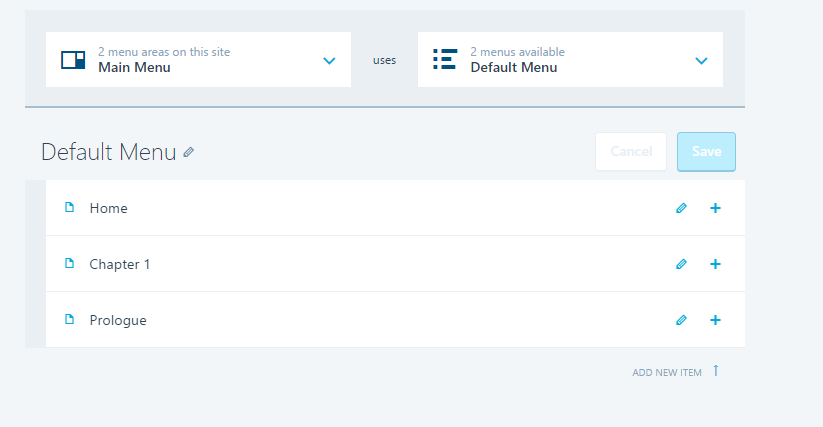
This is what the menu screen looks like:
https://i.gyazo.com/450c3e486b54601bf668a7d7c2c59a1b.pngAnd there’s no ‘Manage menu locations’, which I assume is where it appears on the site (that’s not what I want to change, I just want to reorder my menus and/or delete them)
If anyone can help me at all, please! I am just so tired of trying to fix this on my own!
The blog I need help with is: (visible only to logged in users)
-
This is a one or the other situation. You have two choices on any blog
(1) All posts on the front page.
(2) A static front page http://en.support.wordpress.com/pages/front-page/ and all posts on a different page.By default the front page of a blog displays all published posts in reverse chronological order with the most recently published post on top. When we publish a post on WordPress software the software automatically creates the same entry in the Archives, and on the dynamic (automatically updating) Categories and Tags pages in accord with the Categories and Tags we assign to that post.
So when we create custom menu and add the dynamic (automatically updating) category pages to that custom menu we create the appearance (not the reality) of posting to more than one page.
You need to be aware that:
1. There are differences between posts and pages described here
https://en.support.wordpress.com/post-vs-page/2. There are differences between static pages we bloggers create https://en.support.wordpress.com/pages/ that will not automatically update, and dynamic category pages created by the software when you publish a post which will automatically update https://en.support.wordpress.com/category-pages/.
3. We organize posts by category assignment prior to publication. http://en.support.wordpress.com/posts/categories/ and when we publish posts the dynamic category pages they automatically display on are determined by the categories we assign to them.
So the process you need to use is:
a. Assign Categories to your Posts. https://en.support.wordpress.com/posts/categories
b. Create a custom menu https://en.support.wordpress.com/menus/#1-create-a-custom-menu
c. Add only the dynamic category page links into the custom menu that you want to appear in that menu https://en.support.wordpress.com/menus/view-all/#adding-category-pages and arrange them as you wish them to appear https://en.support.wordpress.com/menus/view-all/#changing-the-order-creating-sub-menus
d. Create pages and sub-pages for static content, not for posts https://en.support.wordpress.com/pages/
e. Add any custom links and other items like static pages and sub-pages into your custom menu
https://en.support.wordpress.com/menus/view-all/#adding-custom-links https://en.support.wordpress.com/menus/view-all/#adding-pages
and arrange them as you wish them to appear https://en.support.wordpress.com/menus/view-all/#changing-the-order-creating-sub-menus -
To delete any menu or item from it go to
http://constellestiny.wordpress.com/wp-admin/nav-menus.php -
That was really informative!
I’ll follow this right away, and see if I can figure it out now. Thank you so much!
-


- The topic ‘I can't delete my menu/menu items!’ is closed to new replies.


 WordPress.com Forums