

I can’t find out how to create a free site
-
I can’t find the option for a free site anymore. The ‘create a new site’ button takes me to choose a domain and there aren’t any free options.
-
Hi there,
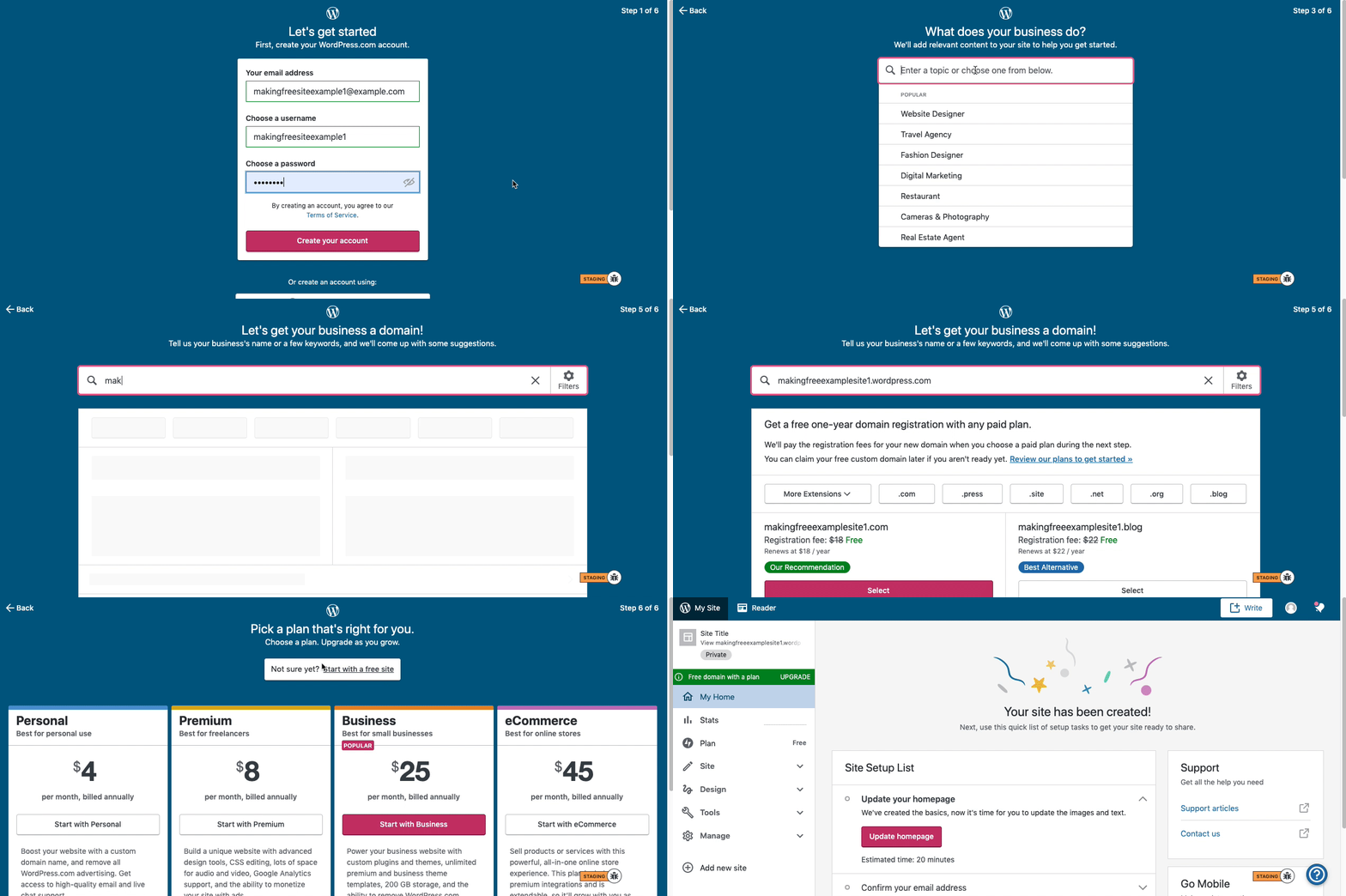
Here are visual instructions on how to create a free
.wordpress.comsite:Step 1: Select email, username, and password.
Step 2: select Blog for a.home.blogfree site or Business for a.wordpress.comsite.
Step 3: Select the Topic of your site.
Step 4: Type in the Title of site (optional).
Step 5: Type in the full, exact site address you want including the.wordpress.comor.home.blogsubdomain (ex:freeexamplesite.wordpress.com,freeexampleblog.home.blog). The first option should be the free site that you manually typed in. Click select next to that option.
Step 6: At the very top, click the link that says: start with a free site.Then, your free site should be created! Please follow those steps and if you have any questions, let us know. Thanks!
-
I already have one free site so I’m using the “add new site” button on my dashboard. I can’t see any of these steps available. It takes me directly to Step 5 where I type a site address. I see the exact same page you show in that video, but there is no free option. Should I do something different to have access to what you’re describing as step 1?
-
Maybe try again having cleared cache and cookies, or better still try again using a different browser.
-
I tried clearing cache and changing browser, I obtained the same result: straight to “Let’s get your site a domain!” page and no free option.
-
At https://wordpress.com/start do not enter a full domain name, like
example.comjust enter the name you want your site to have, likeexample -
-
-
I tried multiple words, names to see if that was the issue, always the same result. Is it because I already have one site?
-
For example, if you enter the word, “example” this should be what you see: https://d.pr/i/vaBqWB (I have highlighted the relevant parts).
What word did you most recently try?
-
I just tried “example” and there is no free option. I don’t know how to send a screenshot here.
-
-
Hm, ok that’s odd. We’ll need to fix that.
What happens when you select the recommendation that’s not a custom domain, is this case the
example133.home.blogoption? -
-
Ok, that definitely makes no sense.
I have asked our developers to take a look, and we’ll get back to you as soon as possible.
-
Would you please try starting at https://wordpress.com/start/domains?ref=free-lp instead?
That should work around the issue for now while we get to fixing it.
-
-
Hm, ok. We have identified that the issue is with the
[thing].blogsubdomains, but only under certain random situations.How about if you try to force it over to a
.wordpress.comsubdomain by appending that to your desired name, likeexample.wordpress.comIf that still doesn’t work, the fix will be out Monday at the latest.
-




- The topic ‘I can’t find out how to create a free site’ is closed to new replies.
 WordPress.com Forums

