

I can't see the fields to change site URL
-
Hi,
I read about this in this topic, but it’s closed now.But, I have exactly the same problem:
When go to settings and general, where i should see two fields where I can change the URL. But I cant see these fields…Why is that so?
I already mapped a new domain mizarstvo-kaker.com (i started with mizarstvokaker.wordpress.com –> which is still my login domain for wordpress).
Thanks!
The blog I need help with is: (visible only to logged in users)
-
Hi,
You can not change the site URL, your website address, at Settings > General. You can change the title and the tagline there, as well as the date and time formats and a few other items.If it is the website URL you wish to change, see: Changing a Blog Address.
-
Hi,
thank you for the answer.Anyway, I’m managing 3 different WordPress pages/blogs, and only with this one, this is not possible.
Site Title
Tagline
Timezone
Date Format…when on others…
Site Title
Tagline
WordPress Address (URL)
Site Address (URL)
E-mail Address
Membership
New User Default Role
Timezone
Date Format -
I don’t know. Perhaps the “others” have custom upgrades or are self-hosted?
My General Settings page has the following options:
Site Title
Tagline
Timezone
Date Format
Time Format
Week Starts On’
Language
and
Snow (seasonal)There may be slight differences between themes, but I’ve never seen or heard of a WordPress.com theme in which you can reset the website URL at General Settings. And what is “WordPress Address (URL) if it is different from “Site Address (URL)”?
-
-
Know that full access to dashboard settings on any blog is available only if and when one is logged in as Admin http://en.support.wordpress.com/user-roles/#administrator under the exact same username account that registered the blog.
-
Hi there,
You can change your site’s URL using the instructions that @musicdoc1 provided you:
http://en.support.wordpress.com/changing-blog-address/#instructions-for-changing-your-blog-address
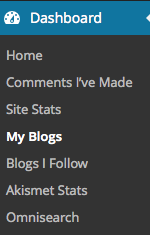
Go to Dashboard > My Blogs in the Classic Dashboard and you should follow the instructions from there:
Cheers!


- The topic ‘I can't see the fields to change site URL’ is closed to new replies.
 WordPress.com Forums