

I need to learn how to get to the Features and Services section on the front pag
-
I purchased the Business Identity Theme. I have been able to work on the front page, but I don’t know how to get to the Features and Services section that is on the Front page.
The blog I need help with is: (visible only to logged in users)
-
Hi there!
The features and services section of your front page is controlled by a normal page. We’ve got a detailed explanation how to set it up in this document:
http://businessidentitydemo.wordpress.com/docs/front-page-template/
But here’s the quick version. :)
You’ll first need to create a page that displays your content for the Features and Services section. Then open up your site’s customizer.
In the “Front” tab of the Customizer, you’ll see three options regarding the Features and Services:
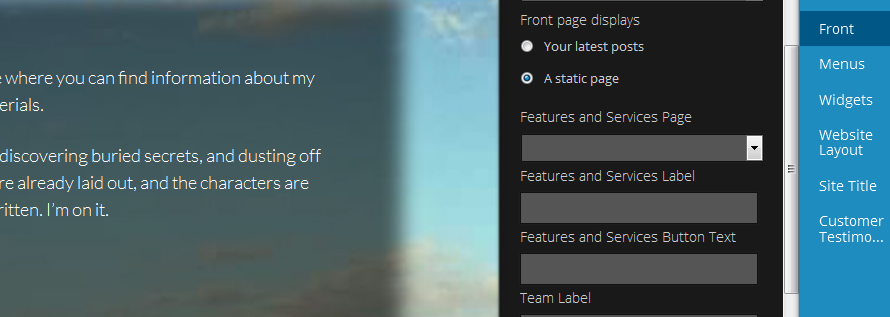
In the first dropdown, select the page that holds your content (which you just created)
. In the “Label” and “Button Text” fields, type in what you’d like to see in those areas. The customizer will show you what it looks like. Make sure to hit save!Once you have that setup, just edit the content to your liking in the Features and Services page.
Let me know if you have more questions! Business Identity is a little complex, but it’s a super cool theme. :)
Best,
-Alex G.
Happiness Engineer | WordPress.com
-
Thanks, Alex.
I’ve still been trying to figure out how to do the Features and Services section, and I’m not quite there yet. I’ll try to ask specific questions about the parts I don’t understand.
I made 2 new pages as instructed for the front page: on named “Home” and one named “Blogs.” That is where my blogs are showing up. Do I need to make a separate page than this for the Featured and Services section of did I do this correctly?
I would like to use the grid and found the instructions for it at: http://businessidentitydemo.wordpress.com/docs/grid/#
Although I understand “copy, paste, and adapt,” I don’t know where and how to adapt.
–I assume I need to copy this on the page I created for the content for this section. I called this page “Blog” because that is something that is going to change the most often on my website.
–Where do I paste the grid instructions?
–How do I adapt it to fit my contect?What if I wanted to feature my new book there as well, and have that remain on the front page? If I set something up at the top of my “Blog” page (which now appears empty), would that keep it first on the list in the grid on the front page? And would the rest of the items in the grid be my most recent posts?
To reiterate I would like to include the following information in my featured services section and have it appear in a grid as is shown in the sample:
–always there: info about my book and where to purchase it i
–latest postsI am also not understanding just what I am supposed to put in the “Label” and “Button Text” fields. Is the “label” the headline above the paragraph? What is the Button text?
I am figuring out most of the rest of the pages at this point–well, I don’t have the widgets all the figured out yet, but I’m getting there.
Thanks for the help. Kathie
-
Hi Kathie!
Since you’re using the Blog page to hold your blog posts, you don’t want to set that up as your Features and Services section. I’d recommend creating another page, titled perhaps “Find Kathie’s Books” since you want to include info about the books and where to purchase. Then select that page as your Features and Services page in the Customizer.
Although I understand “copy, paste, and adapt,” I don’t know where and how to adapt.
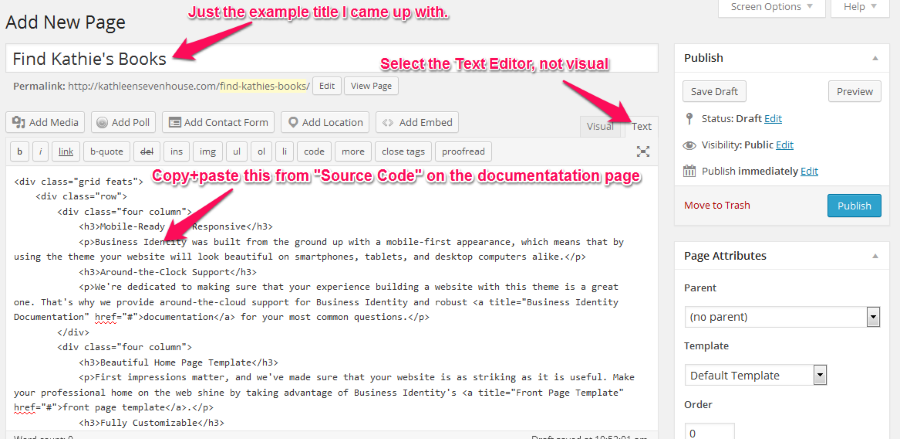
All that’s meant by adapt in this case is replace the example text with your own text. So instead of “Mobile-Ready and Responsive” you might have “Available on iBooks.”
You’ll paste the Source Code into the text editor for your new page, so it looks like this:
To reiterate I would like to include the following information in my featured services section and have it appear in a grid as is shown in the sample:
–always there: info about my book and where to purchase it i
–latest postsFor the always there, have that content in the grid format using that new page.
Your latest posts are included in Front page separate from the “features and services” section.” In fact, they’re already included: https://cloudup.com/c-ORMtt6EBzI am also not understanding just what I am supposed to put in the “Label” and “Button Text” fields. Is the “label” the headline above the paragraph? What is the Button text?
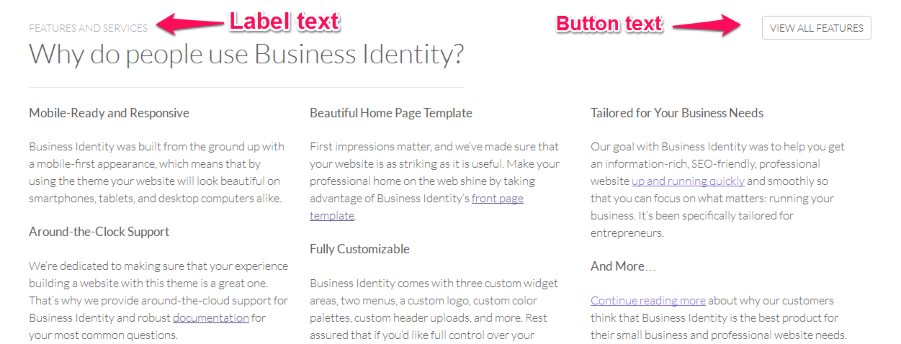
You type in values for Label and Button Text and they’ll appear in this section of your site. Here’s how they appear on the demonstration site:
You’re making progress, keep it up! :)
I’m here to help with more questions, too.Best,
-Alex G.


- The topic ‘I need to learn how to get to the Features and Services section on the front pag’ is closed to new replies.
 WordPress.com Forums