

I want ti use more genericons in my main menu
-
Hello. There is a wonderful site with ‘genericons’ (http://genericons.com) designed by Automattic, the same company responsible WordPress.com. The sad thing is that WordPress.com discards the ability to upload folders downloaded in http://genericons.com as instructed, and the CSS classes that are included by the creators.
I use the “Awesome” theme and, for example, I wish use the “gallery” icon (see http://genericons.com/#gallery) in the menu tab in my Portfolio. Its very difficult. I think there’s a trick for creating a CSS class to that icon (I tried, but I is not quite right). Can you give me a hint to do?
I repeat: I am sorry that in a WordPress.com site can not be used with tools Automattica naturalness as genericons.
Thanks for your attention.The blog that I need help is isaimoreno.com
The blog I need help with is: (visible only to logged in users)
-
Hi there,
Currently, it isn’t possible to upload the genericons to your WordPress.com site. This is because, while WordPress.com users can input their own custom CSS, you cannot upload stylesheets and link them to the HTML file. So, it’s possible to use the :before selector to place an icon before a snippet of text. But, it’s not possible to upload those particular icons. Does that make sense?
If you would like to place an icon or string of text before a certain element, this would be the general format:
div:before {
content: ‘src’;
}Here’s an example:
h1.entry-title:before
{
content: ‘Read this: ‘;
}That example creates the following:
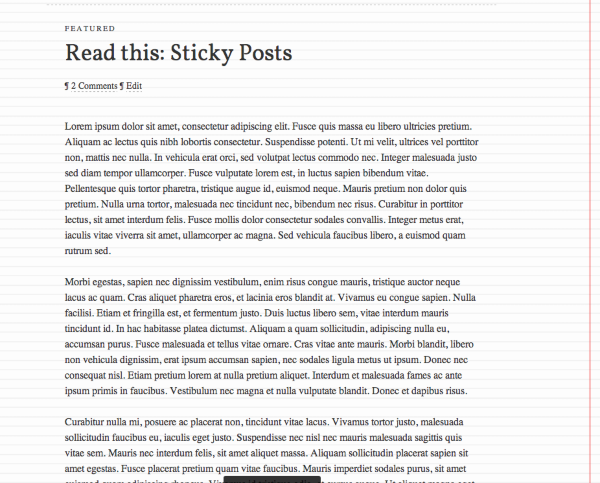
Does that make sense?
Also, are you currently moving to a self-hosted site? Currently, your name servers for isaimoreno.com are not pointed at WordPress.com. For your domain to work correctly, you will need to change the name servers to the following:
NS1.WORDPRESS.COM
NS2.WORDPRESS.COM
NS3.WORDPRESS.COMLet me know if you have any additional questions!


- The topic ‘I want ti use more genericons in my main menu’ is closed to new replies.


 WordPress.com Forums