

I want to add another Label on the Menu Bar "Subscribe" or "Sign Up"
-
My blog is http://www.muffinmama.com. I want to add another Label on the Menu Bar “Subscribe” or “Sign Up” where people can enter their email address to subscribe to get my posts (same as on my sidebar). How can I do this? I do not know CSS.
The blog I need help with is: (visible only to logged in users)
-
Hi there,
It isn’t possible to add this item to your menu. Only text-links can be added to this area.
However, in addition to the subscribe form in your sidebar, you visitors have another option to follow your site as well:
http://en.support.wordpress.com/following/
I hope this helps! If you have any other concerns, drop me a note. Thanks much!
-
Thank you! I do have the follow button. Is there any way to make these 2 buttons stand out more?
And is there any way to make them pop out?
And on the mobile version is there any way to make them higher up?
-
Hey there!
You can drag and drop your Follow widget higher up in your sidebar if you would like. Just open your widgets, and pull that one into the position you want.
Here is a link to your widgets:
https://muffinmommy.wordpress.com/wp-admin/widgets.phpWithout the Custom Design upgrade which gives you the ability to change the designs aesthetics, you cannot adjust the text or buttons. However, you may see that other themes offer a different layout/color scheme/fonts.
Take a look at other themes, if you would like:
https://wordpress.com/themes -
How can I make my menu so that people can go “Recipes” on the menu bar, then go to “lunch” and then see every recipe that is categorized under “lunch”. Is it possible to set up my site so that all of the recipes can be found easier, not just in a long list?
-
Right now you’re using a Category Page for “Lunch.”
It sounds like you’d probably rather have a list with links to all the recipes, rather than displaying the whole recipe for each like that page does. Try this:
- Create a new static page called “Lunch”
- Add this shortcode to that page’s body:
[display-posts category="lunch"] - Preview the page
You can do a lot of things to that display-posts shortcode, like include the posts’ featured images or excerpts, and those options are described here:
Once you have that page as you’d like it, visit your Menu settings — remove the “Lunch” Category Page, and add in the static “Lunch” page in its place.
Let me know how you’d like that shortcode customized further and I’m happy to help. :)
-
Hi!
Thanks for your help. I tried to add “Breakfast” to the menu bar and pasted the shortcut in the body but it didn’t work.
But – I like the way my site is set up right now, but when you go under “Recipes,” to “Breakfast” and click on “Breakfast,” you get a list of all of the muffins. I would love to see a further list under “Breakfast” of all of the muffins that fall under the category “Breakfast.” And I would like for all of the categories under “Recipes” to show the subcategories as the different names of the muffins. Would you be able to help me with this?
Carmel -
Hi Carmel!
I see your Breakfast page ( http://muffinmama.com/breakfast/ ) where you have the display-posts shortcode in its body:
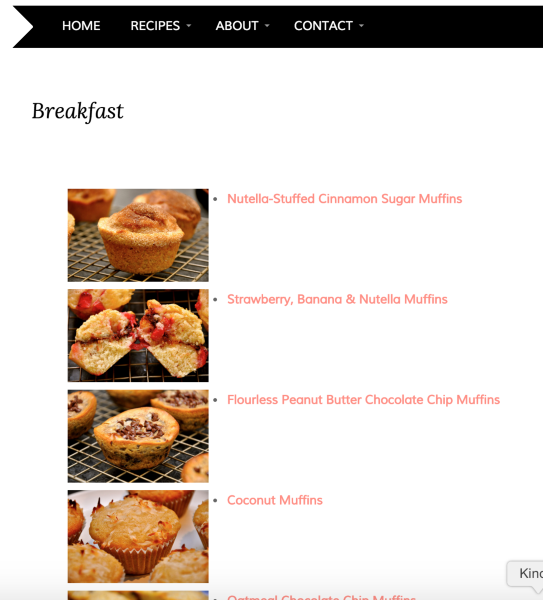
That shortcode is displaying all posts with the category of “Breakfast”
But its sounds like what you want is in your Menu to have each breakfast muffin be a sub-item of Breakfast as well. Then do the same with all your “Lunch” muffins, “Dinner” muffins, “Sweet” muffins, etc.
This can be done, but it’ll take a lot of steps. Most folks try to keep their menus smaller and lead to further lists (like you setup on your Breakfast page) because those lists will automatically update. The menu will not.
But here’s how to do it. Let’s look at this post:
It’s should go under Breakfast (and others, but we’ll just use Breakfast as an example)
Follow these steps to add a Custom Link to your menu:
Use the post’s link in the “URL” field, and “Nutella-Stuffed Cinnamon Sugar Muffins” in the “Link Text” field.
Once you’ve added it to your menu, move it directly beneath Breakfast:
Then click “Under Breakfast” in the items options. Save the menu.
Now if you want that item also to appear under Dessert, Snack, and Sweet, you’ll need to add that custom link again, and follow the steps again.
-
Thank you so much for the information! I totally don’t want to have to go through all of those steps, I didn’t realize.
Could you look at what I did?
When you click on “Breakfast,” for example, it shows the image and the name of the recipe.
How do I take away the bullets in the lists?
You are tremendously helpful, thank you so much!
Carmel -
Hi Carmel!
Yup, your Breakfast page looks great! Perfect use of the display-posts shortcode.
To remove the bullets, we’re going to add one more argument into your shortcode. Replace your current shortcode with this one:
[display-posts category="Breakfast" image_size="thumbnail" wrapper="div"]That wrapper=”div” portion changes how the posts are stored and displayed, and there will be no bullet points.
-Alex G.
-
Under the “About” tab in the menu, under “posts by Muffin Mama” – the last story, “My Muffin Obsession” does not display the thumbnail image. How do I correct this?
-
I’m changing the menu, so my previous question doesn’t apply, but why wasn’t the thumbnail showing up?
-
why wasn’t the thumbnail showing up?
It’s hard to say without being able to see the code. If there are any mistakes–even tiny ones like extra spaces, or missing punctuation, the codes don’t work as expected. If you have a problem with the thumbnails again, let us know and we’ll be happy to look at the shortcode and let you know what the problem is.
-
I understand. I have a new problem now. Under “Recipes,” there is a category “Nut-Free” and only SOME of the 39 recipes that are categorized as “Nut-Free” are showing up. How do I correct this? And, what will happen as I post more and more recipes, will they just keep being listed, will the page get longer and longer?
-
only SOME of the 39 recipes that are categorized as “Nut-Free” are showing up. How do I correct this?
There are some default behaviors built into the display posts short code to make it easier to use. One of those dictates how many posts show up. The default is ten. You can increase the number of posts that appear up to 99 by adding this bit of code to your existing short code
display-posts posts_per_page="5"Just change the number to the number of posts you want to see and you’ll be set. make sure to include this code inside the exiting brackets [ ] and leave a space between this expression and the ones next to it.
There is more information on the options you have with this short code here
And, what will happen as I post more and more recipes, will they just keep being listed, will the page get longer and longer?
That is the default behavior. We might be able to make creative use of the code to do something different if you’d prefer. What did you have in mind?
-
Thanks for this! What would you suggest from looking at my page. Right now, the code says this:
[display-posts category="Nut-Free" image_size="thumbnail" wrapper="div"]
Where do I specify the posts? What do I make the above code read? And what is optimal? 5, 10, 20?
-
I think 10 looks pretty good but I’ll give you the code with that selector included so you can experiment.
[display-posts category="Nut-Free" image_size="thumbnail" wrapper="div" display-posts posts_per_page="5"]If you decide not to show everything, you could also include a link at the end that took users to the full category page. Something like
<a href="http://muffinmama.com/category/nut-free/">Show me all the nut free recipes!</a> -
I think 10 looks good, too. But you’re right, there is no link so that people can see ALL of the nut-free recipes.
How do I add that link at the end?
Right now the page reads:
[display-posts category="Nut-Free" image_size="thumbnail" wrapper="div"]Can you tell me how to add that link at the end (I don’t know code, so I need to copy and paste something).
-
If you go to the text view of your editor (the same place you pasted the display posts code) try pasting this below the code:
<a href="http://muffinmama.com/category/nut-free/">Show me all the nut free recipes!</a>It will add a line to the bottom of the page that looks like this
-
But do I paste that inside the brackets after the other coding I copied and pasted above?


- The topic ‘I want to add another Label on the Menu Bar "Subscribe" or "Sign Up"’ is closed to new replies.


 WordPress.com Forums