

I want to copy the original Pique theme….
-
How do I make my title page look just like to original Pique? I can’t get the line to appear around the website title like it does on the rest of the pages.
Also, my website page title is smaller than the other page titles. How do I get it larger than the rest of the page titles like it appears in the original Pique theme?
And, when I type text in the title page, it also appears in the “about” page. How do I fix this? Rather, how do I set a separate page for the title page and the rest of the pages so I don’t have pics bleeding into the upcoming page when I scroll down? I think the header and my “about” page are the same, or at least they react the same in terms of uploaded images and text. I hope this is clear.
The blog I need help with is: (visible only to logged in users)
-
Hi there! The Site Title is designed a little differently in Pique both so that it’s differentiated from the panel headings, and also so that it looks balanced with a site logo.
Since you have access to custom CSS, you can add some code to your Customizer’s CSS panel to get your site title looking more like the other headings:
.site-title {
     -moz-border-bottom-colors: none;
     -moz-border-left-colors: none;
     -moz-border-right-colors: none;
     -moz-border-top-colors: none;
     border-color: #fcfbf9 #fcfbf9 -moz-use-text-color;
     border-image: none;
     border-style: solid solid none;
     border-width: 2px 2px 0px;
     color: #fcfbf9;
     display: inline-block;
     max-width: 100%;
     position: relative;
     text-transform: uppercase;
     word-wrap: break-word;
}

.site-title a {
     font-size: 44px;

}
.site-branding .site-title {
  padding: 0.75rem 1.5rem 0.85rem;
}

.site-title::before, .site-title::after {
     border-bottom: 2px solid #fcfbf9;
     bottom: 0px;
     content: "";
     display: block;
     height: 0px;
     position: absolute;
     width: 50px;
}

.site-title::before {
     left: 0px;
}

.site-title::after {
     right: 0px;
}
I’ll have a look at your other questions and get back to you separately.
-
And, when I type text in the title page, it also appears in the “about” page. How do I fix this?
The reason I think this is happening is that you’ve set About as your static homepage, but you’ve also selected it for one of your panels. If you only want it to be displayed on the homepage once, then either select a new page for your homepage, or de-select it as one of your panels.
-
Thank you for your help!
I put the code in and now, on the title page, there is a small line on the bottom left of the header title. How can I get rid of this?
-
Re: The previous post: Or, how can I put the same line under the header title on the left? I prefer this solution.
-
Hi there – it looks like you’re no longer using Pique’s special front- page format, but you have it set to display your latest posts instead. The CSS I gave you should work with a static front page like the Pique demo (I just double-checked) so before we tweak anything, could let me know if you intend to keep your front page displaying your latest posts instead of the Pique front-page panels?
-
-
Does the site title look like what you want now? It looks good to me:

You need to reselect your front page and posts (blog) page in the Customizer’s Static Front page panel:
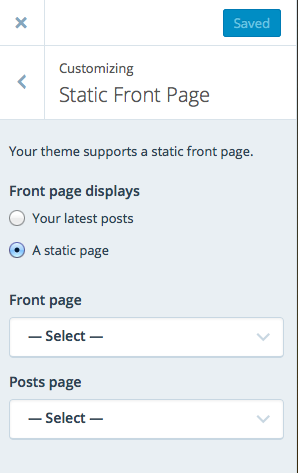
You can also refer back to the Pique setup guide if you get stuck:
-
I’d like to keep the Pique front page panels-style, set a static page, under that, set the following pages: About, Services, Blog, FAQ and Contact. Can you provide detailed instructions to do this?
-
Looks like you’re pretty well set up!
One little thing you’ll still want to do is assign the blog page you created to your posts. In your Customizer’s Static Front page panel, select Blog next to “Posts page”:
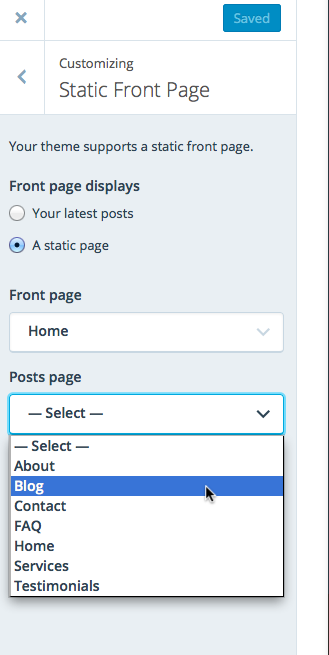
-
Is there code to reduce the menu that appears under the website title to a “line” menu, meaning a little icon that opens up when its clicked on?
-
No – Pique is designed to have a horizontal menu, not one that needs to be clicked to display.


- The topic ‘I want to copy the original Pique theme….’ is closed to new replies.
 WordPress.com Forums