

I want to put content on the right sidebar, NOT a widget
-
Hello, I’m new to WordPress and I have a question regarding the Twenty Fourteen theme.
I would like to put brief content on the right sidebar – but from the customization view it looks like all I can put there are widgets.
However, I saw someone else using this theme who had original content on the right sidebar. How can I do that?
Thank you, KestrelThe blog I need help with is: (visible only to logged in users)
-
Welcome to the wonderful world of WordPress.com :)
May be they had Full Width Page Template like this: https://twentyfourteendemo.wordpress.com/default-page-templates/full-width-page-template/
It will be helpful If you could link the site where you saw the original content extended to the right sidebar.
-
Hi! Thank you – the link is: http://smntks.com/
I don’t think it’s the full width sample you posted – it looks just like mine only with content on the sidebar not widgets. You can even click on them and it takes you to another page or site or something. -
The site you referenced is using Twenty Fourteen’s special “Ephemera widget,” which displays posts belonging to specific post formats. Here’s what the setup looks like:
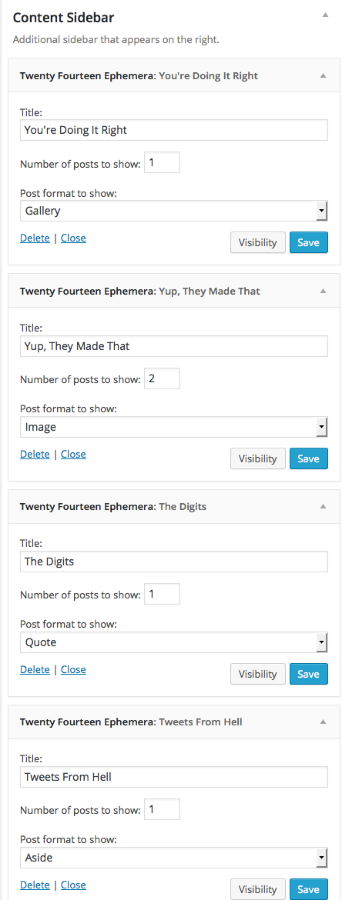
Just let me know if you get stuck.
-
Kathrynwp – thank you so much! I’ll give it a shot today and see if I can get it up there. :)
-
-
Ok, I can’t seem to get it to do what I want it to.
I want a link on the left sidebar which contains content that does NOT appear on the main page.
I want that content to show up on the right sidebar using Ephemera.
Clicking the link on the left side or the Ephemera box – should take you to the area with the content that is not on the main page.
Is it possible to do that?
I thought it was a page – but that appears on the top menu bar, not the left.
I thought it was a menu, but I couldn’t get that to appear anywhere
The Ephemera doesn’t appear on the sidebar either – but I think that’s because it has no content to link to it, but I don’t know.Thanks so much for the help – and sorry to be a pain :/
-
The Ephemera doesn’t appear on the sidebar either – but I think that’s because it has no content to link to it, but I don’t know.
You’ve selected posts with the “Aside” post format to display in the Ephemera sidebar widget. Have you gone back assigned any of your posts to the Aside post format yet, or do they all still have Standard post format? I just spot-checked a few of your posts and all had the Standard post format.
Until you assign some of your posts to Aside in your post editor, no posts will display in the widget.
-
OK – I put one up to show in the widget – and it does.
Now what I want is…So you go to my blog, the blog entries are right there on the home page
the things that show in the Ephemera widget should NOT be on the home page where the blog posts are. (but it is at the moment)
I want a link on the left sidebar – which would send you to where the Ephemera content is (and you see it on the widget on the home page too) Does that make sense? -
So you go to my blog, the blog entries are right there on the home page
the things that show in the Ephemera widget should NOT be on the home page where the blog posts are. (but it is at the moment)If I’m understanding you correctly, you can accomplish this by hiding all Aside posts in the main column on the blog page using custom CSS, if you choose to upgrade your site:
.site-content .format-aside {
 display: none;
}
I want a link on the left sidebar – which would send you to where the Ephemera content is (and you see it on the widget on the home page too)
This part I’m not quite clear on. What do you mean by “send you to where the Ephemera content is”? Have you seen a site that accomplishes what you’re trying to do?
-
That’s the site where I saw all this.
On the left they have various links – some of those show in the Ephemera. Evidently, though – they did put them in the main column (I had to scroll a long ways)
But if you click on the left – all the things show up together.Where would I put that code?
Man I’m so sorry to ask so many questions :/ I just didn’t realize it was going to be so complicated. I thought I was trying to do something pretty simple…. -
Are you referring to this menu in the left sidebar?

If that’s what you’re referring to, it’s a custom menu assigned to the “Secondary menu in left sidebar” position in the theme. On their site, they used category links in the menu to link directly to specific categories.
You would need to create a custom menu with the items you want in it, and then assign it to the “Secondary menu in left sidebar” location
Let me know if this is what you’re after.


- The topic ‘I want to put content on the right sidebar, NOT a widget’ is closed to new replies.
 WordPress.com Forums