

i went for the free 14-day customization. now how do i use it?
-
i gave my credit card to get the free 14-day trial for customizing, i wanted to get access to different fonts and type sizes and a way to insert links into posts. so now that i am “customizing” how can i access those features?
The blog I need help with is: (visible only to logged in users)
-
Hey there!
You have access to your Customizer here:
https://enduringgloucesterdotcom1.wordpress.com/wp-admin/customize.php?url=https%3A%2F%2Fenduringgloucesterdotcom1.wordpress.com%2Fwp-admin%2FIf you have any questions about how to make changes, please don’t hesitate to drop me a note and I can help further.
Please let us know if you have any other questions. Thanks much!
-
Yes- thanks. I saw that panel of customization options, and chose a new font. But how do I get that to apply to the blog? There’s nothing to click on to make it “go.”
Also- can I change the size of the typeface? and the spacing between the lines?
and I also had trouble with hyperlinks. Can’t seem to get them to work. I followed the directions, but they show up in RED and won’t work.
thanks -
Hey there!
The save and publish button for the changes you make in your customizer can be found at the top of the menu, here:
https://cloudup.com/c_FKei2r0sEAlso- can I change the size of the typeface? and the spacing between the lines?
Yes, once you choose a font face, you will then be given the option to change the font size. This, in turn, will change the spacing between the lines.
If you need further help with spacing afterward, let me know.
I also had trouble with hyperlinks. Can’t seem to get them to work. I followed the directions, but they show up in RED and won’t work.
I took a look at the link on this page:
http://enduringgloucester.com/art-of-gloucester/When I clicked it, I was taken here:
http://www.wbur.org/2010/10/04/tommy-heinsohnIt appears as if this is working correctly. If you’re still having trouble, could you please give me a link to the page or post with the malfunctioning link?
Looking forward to hearing from you. Thanks very much.
-
I did not post that link you tried. It came via e-mail from a contributor to the blog, already embedded, and it worked somehow.
I can’t post links.
Also I see no options on the list of customizations for choosing font sizes or line spacing. Where are they? Even with the font option open..
thanks -
and- I do not see that save and publish button. I tried to take a screen shot of my customization page, but it will not paste into this box. it does not look like yours. there is a save button, but again- nothing about size or line spacing,
-
-
I did not post that link you tried. It came via e-mail from a contributor to the blog, already embedded, and it worked somehow.
Can you please go to the link below:
https://wordpress.com/post/81986694/129/?optin
You will see that I created a (non-published) Draft Post. I was able to add a link to your post with the link button.
You can see the working link here:
https://enduringgloucesterdotcom1.wordpress.com/?p=129&preview=true
Can you now try? Highlight the words: THIS LINK. Then, click the link button. Where you see the URL box, add: http://wordpress.com
Make certain that you’ve added the http:// into the link address. Then, click Add Link.
Finally, click the blue Save Draft button and let me know when you’re done.
Also I see no options on the list of customizations for choosing font sizes or line spacing. Where are they? Even with the font option open..
When you are in your customizer, you will click Fonts. Then, you will see your font sizes above the name of your fonts. Like this:
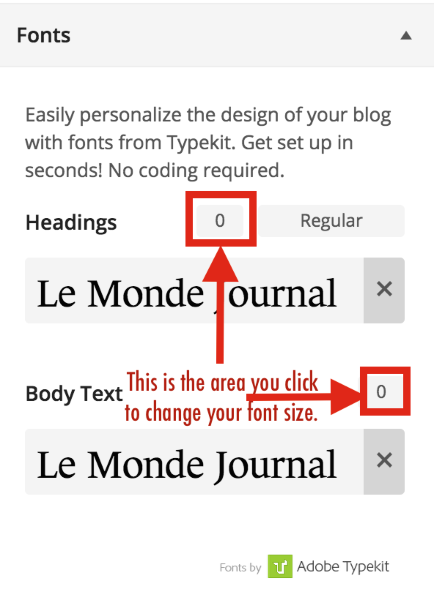
Change the fonts and see if your line height changes accordingly. If not, let me know how much more line height you’re trying to gain.
I mean SAVED. there’s just a blue button that says SAVED….no SAVE AND PUBLISH
It will not say SAVE AND PUBLISH until you make a change. Until then, it will just say saved.
Make a change to your font size, and then see if that button changes for you.
I hope this helps! If you have any other concerns, drop me a note. Thanks much!
-
sorry for the delay in my response. i will try those suggestions and let you know….thanks
-
i followed your directions for adding a link but i must have missed something. it did not work.
i will work on the font size thing now…..
-
OK- with the fonts- can I change just a line or just SOME of the type? If so- how do I do that exactly? when I click CUSTOMIZER it asks if I want to leave this page, and then I have no way to tell WordPress WHICH words I want to “customize.”
or am I changing the font and size on the whole blog every time I customize?
very confused as to how to operate this customizer. i really doubt I will want to pay for it….unless I can figure out how to work it. don’t even get me started with the “headers!” thanks -
Hi there,
When you change the font in the Customizer, you are changing either the BODY font or the HEADER fonts. This is an overall change. You aren’t changing individual words. When you use the customizer to change fonts and colors, you are adjusting the overall code in the theme’s design.
If you want to change the color of individual words and phrases, or make them bold or italics, you can do this right in your post editor (as seen in the example below):
https://cloudup.com/cm-E4E0sCmYThanks again!
-
OK- you answered a few of my questions there. thank you.
i will try again with the font sizes…… -
-
Hi Robyn- OK- I can change the fonts now, but I have not been able to post a link.
My free trial runs out in a few days and I have to decide if I want to pay $99 /year for this. So far all I can do with the Customizer is get a nicer font…
Not worth it, unless you can convince me there is more to it. For example. Is it possible to move elements around on the page? Like the black bar across the bottom of the header image which lists all of our pages? I’d love it if I could move that to appear on TOP of the header image. thanks
-
looks to me as if i can get a better deal by buying one of the PREMIUM site designs.
Can you explain the difference between the $99/year Premium deal (which just gets me that customizer thing, I guess) and the “Premium” site designs – which are priced from $24 /year to a couple of hundred dollars?
KInd of confusing to use the term PREMIUM in both places…..thanks -
Hi again!
I agree — the Premium term definitely gets confusing.
Here’s the deal:
A Premium Theme gives you infinite access to the theme. It never expires. You’ll also have access to the theme’s developers, should you need assistance with the configuration, or if you’re having trouble with the elements of the theme.
The Premium Upgrade is not related to Premium Themes. Here is an informational page about this upgrade:
The features included in this upgrade are:
Free Domain
Custom Design
VideoPress
Space Upgrade
No AdsThe Customizer doesn’t allow you to drag and drop the order of elements on your site. Here is what the Custom Design upgrade (included in the Premium Upgrade) includes:
https://en.support.wordpress.com/custom-design/If you’re not happy with your theme, and feel like you need to make a ton of design adjustments, I highly recommend looking into another theme. We have over 300 themes, and there’s certainly something that will make you happier:
Let me know if you have other questions!
-
Thank you for this simple explanation!
So- it sounds as if I can get everything I’m looking for, really, with a “premium” theme.
With a premium theme, I will not need the customizer in order to get fonts and the ability to post links, right? -
Hey there!
Exactly! As long as you like the way the theme works as-is, and wouldn’t want to make aesthetic changes to it, you’d be all set! You wouldn’t need other upgrades.
Thanks again!
-


- The topic ‘i went for the free 14-day customization. now how do i use it?’ is closed to new replies.
 WordPress.com Forums