

I would like to change the color of the title's in my posts.
-
I would like to change the font color of the title of my posts, but do not have a good working knowledge of CSS.
For example: I would like to create a recognizable title Jus Sayin but it would be Red or some other color than the current font.
Is this possible, I would like to make a template out of it. My current theme is “Big Brother.”
Thank you,
LDS
The blog I need help with is: (visible only to logged in users)
-
-
I gave them a glance over, but I don’t want to mess with backgrounds and things like that, it is just the color of the font in the post title that I am wanting to change.
Thanks,
LDS -
Hi LDS.
In that case, we can use a little bit of css magic :)
First thing we need to realize is you need two font color changes. First for clickable post titles (main page http://boxcarokie.com/) and also for post title in single post pages (http://boxcarokie.com/2015/06/11/the-joy-of-being-six-years-old/).
For the first one, the selector could be “.entry-header h1.entry-title a” and in the second case “.entry-header h1.entry-title”. So:
.entry-header h1.entry-title a,
.entry-header h1.entry-title {
    color: rgb(255, 0, 0);
}
I used red in this css statement -> rgb(255,0,0). To pick your preferred color, you can use this RGB color table.
And, just in case you want tow different colors for your titles depending on where they are, the main page or a sigle post page, you can split this code into two pieces: For instance -with green and red font color-:
.entry-header h1.entry-title a{
   color: rgb(0, 255, 0);
}
.entry-header h1.entry-title {
    color: rgb(255, 0, 0);
}
I hope this helps.
-
Hey thanks, I really appreciate it and will try to attempt to put it to good use. Will let you know.
LDS
-
Well Raulanton I gave it a shot, but as I am old school, it did not fly. I often wonder how it is that I got this far?
What I am used to working with is stuff like:
COMMENT LINK CREATIVE ENDEAVORS
MESSAGE</span>
<p class=”p1″>Message</p> greenMost of the CSS is way beyond my learning curve I guess? Is it possible to break it down to something along these lines (above) so us old folks would have a fighting chance at being creative.
Thanks again,
LDS -
To change the color of the post and page titles to red, go to Appearance > Customize > CSS, delete all the informational text in that window, and paste in the following custom CSS and edit the color code as desired.
.entry-title, .entry-title a {
    color: #1f567d;
}
Can you explain a bit further on what you want with the jus sayin? Where are you wanting that to appear on your posts?
-
What I do is satire, and some other things on my site. I would like to be able to put up a post entitled Jus Sayin and have it a different color than the standard fonts in the display box (red work).
So far, all I have been able to come up with is a kind of second best, I can change the “summary of the post” but the headline or title stays the same, then I link it to the regular page.
I have been having a marvelous time, hope you have a good weekend.
Thanks for your input
LDS
-
Here is an example of what I am talking about: http://boxcarokie.com/2015/06/12/cmon-weekend-3/
Later,
LDS
-
-
Hi there – I don’t see that you’ve added any custom CSS to your site, as suggested by a few folks in this thread. Your CSS editor is currently blank.
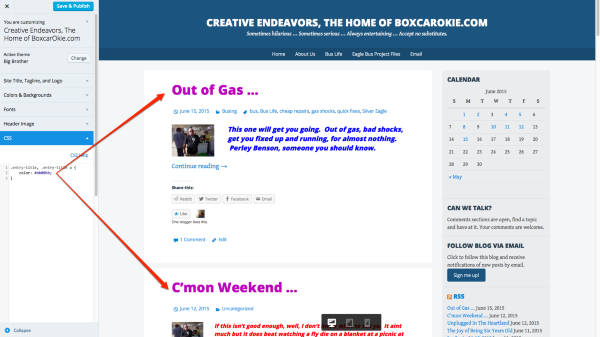
Head into your Customizer and try adding the CSS that Richard suggested. For example, this will change the colour of your post titles purple:
.entry-title, .entry-title a {
    color: #bb00bb;
}
If you want to target a particular post title, you need to add the post ID in front of it. For example, this will target your newest post only:
.post-22640 .entry-title, .post-22640 .entry-title a {
    color: #bb00bb;
}
You can choose whatever colour you want using a colour picker tool like this one: http://www.0to255.com/
You’ll find the post ID by viewing the browser source code. For example:
<article id="post-22640" class="post-22640 post type-post status-publish format-standard hentry category-busing-2 tag-bus tag-bus-life tag-cheap-repairs tag-gas-shocks tag-quick-fixes tag-silver-eagle"> -
Whoooooie! Purple? Nope, red might be nice, but no purple. Please do not get me wrong, it is not that I am not appreciative of the help and assistance, because I do appreciate your input.
It is that I am apprehensive about doing some of these things, as I am in wayyyyy over my head on a lot of it, and I don’t want to screw things up so badly, I possibly would not be able to recover from at some date in the future.
This is why my CSS editor is empty right now, just not sure if I want to jump in there and get my feet wet, or perhaps, commit some kind of personal internet crisis of my own making.
Thank you,
LDSS
-
Okay, I followed up on your suggestions, and I went in there and made the paste of code and all that. Nothing happened.
This is why I am pretty sure I am hopelessly lost on this, and it is a lost cause for me. Just do not understand what it is that I think I know, but you deal with thinking like this every day, so you should understand.
Thanks again,
LDS
-
Purple? Nope, red might be nice, but no purple.
Don’t worry – purple was only an example colour, something that would be obvious so you could clearly see where the change was happening on your site. :) You can always choose whatever colour code you like, using a colour picker tool like http://www.0to255.com/
I looked in your CSS editor and this is what I see:
.entry-title,This is a new post title test .entry-title a {
	color: #1f567d;
}
}
You’re very close! The reason it’s not working is that you have some extra stuff in there, including some text and an extra closing curly bracket. This is what it should look like:
.entry-title, .entry-title a {
    color: #1f567d;
}
Want to give it another try by carefully copy-pasting the above code and erasing what’s in your Customizer now? You’re nearly there!
-
Hey sis, you are so good to dive in where others dare not go, it did not work. I took the code, copied it, pasted it in there, then hit save and publish and nada.
I suppose I am just a hopeless case, valiant effort, and the support is really there, but it is still no soap.
Thanks,
LDS
-
You’re so close, don’t give up! :)
Your code is actually working right now.
The reason you’re not noticing a change with the colour code that you’ve used -1f567d – is that this code it’s the same dark blue that the theme uses by default, so you’re not noticing a change in the post titles.
http://www.colorhexa.com/1f567d
If you change the colour you’re using – 1f567d – to my horrible example purple – bb00bb – or a red like fc0335 – you should see that it works. :)
Here’s a screenshot: https://cloudup.com/ceMa7EKpdkv
-
Starting to feel like the dumbest person on the planet right now, good thing this hurricane is coming in and it is raining buckets of water, if it were not for that, I could get very depressed about all this.
Okay. I copied the red code, went to my site, customize, opened it up, CSS thing, replaced that color code with the new color, hit save and publish.
Nothing. I cannot for the life of me figure out what it is that I am doing wrong, other than making all of this public where my grandson can find it and then say ….. Man, what a dummy!
Thanks again,
LDS
Boxcarokie.com -
You’ve removed the hash sign (#) before the colour code, that’s why it’s not working. This is what you have now:
.entry-title, .entry-title a {
	color: fc0335;
}
This is what it needs to be;
.entry-title, .entry-title a { color: #fc0335; } -
-
You got it girl! You Da Man. All of them are red now.
Okay, before you kill me … Is there a way to just “highlight” a singular post and not have ALL OF THEM red?
That is my ultimate goal here, every now and then to put up one with a red title and make it stand out from all the others.
Is this possible?
LDS


- The topic ‘I would like to change the color of the title's in my posts.’ is closed to new replies.
 WordPress.com Forums