

Ideation and Indent isn't updating photos properly.
-
I run the blog thereviewhart.com every post has a photo on it but the photos stopped being updated in the photo bar on the right. Each photo is embedded within each post.
The blog I need help with is: (visible only to logged in users)
-
Hi Shen,
Thank you for getting in touch.
The images from a recent post won’t be included in the “Ideation and Indent” theme photo sidebar if they haven’t been uploaded via the Add Media tool of that specific post.
Additionally, the images from the top-most post (latest or sticky) aren’t included, as they are prominently featured on the left column.
Please let us know if you have any further questions.
Best wishes,
Stefan
—
Happiness Engineer
WordPress.com -
Hi Stefanpl,
The images for every post are inserted via the add media tool. The photo bar stopped updating some 6 posts ago. I do the same thing with every post as it’s a book review blog so there’s a very set format, there is nothing different about the most recent 6 posts in comparison to the photos which are up on the bar.
Shen.
-
Hi Shen,
I have looked up your problem and it appears that the media files for the last 6 or so posts, are unattached (http://en.support.wordpress.com/media/unattached-files/). That means they are not attached to any post or page, so they will not appear in the sidebar.
You can fix this from your media library here: https://thereviewhart.wordpress.com/wp-admin/upload.php
Make sure you filter your media by “Unattached”, and attach the pictures to the correct posts so they will show up.
Let me know if you need any further help! I will gladly assist you.
Best wishes,
Stefan
—
Happiness Engineer
WordPress.com -
Good afternoon,
I followed your instructions but I didn’t have the option to attach under my bulk actions. The only bulk action I had was to delete. In the end, I had to go back through those posts, delete the image and reinsert it from the media library.
Now, I am formatting a new post to go up tomorrow and I have inserted the image into the post, via the attach media button. It comes up as unattached. I deleted it and reattached it from the media library – still showing as unattached.
I have followed the instructions and I don’t see what’s going wrong. I can’t post each post then go back, edit it, delete the image and reinsert it from the library every time.
-
Hi Shen,
There is no bulk attaching option, unfortunately.
As long as the images are uploaded via the “add media” tool for that specific post – meaning you cannot bulk upload, you have to upload them one by one to the specific posts – everything should be working fine.
You can see the unattached images and attach them here: https://thereviewhart.wordpress.com/wp-admin/upload.php?mode=list&attachment-filter=detached&m=0&filter_action=Filter&s&action=-1&paged=1&action2=-1&affected&_ajax_nonce=18429027cc&ps
Currently there is only one unattached image. The only thing you need to do is click on “Attach” and select the published post that should be attached to that image.
There is no need to go in and delete the image, if the image is unattached you only need to attach it following the previous instructions.
Let me know if you are still running into issues!
Best wishes,
Stefan
—
Happiness Engineer
WordPress.com -
Hi,
So, I have had to go back and delete the image, then reinsert the image, every time I post a new post. That’s happened with every single post I’ve posted since the last comment on this thread.
They are not marked as unattached (I check both when I post the post, and when I have to go back and fix it). Yes, I am uploading them via the upload media button, as I do with every post, yet they refuse to go into the image bar without multiple tries at deleting and reinserting.
I do everything both you and your little walkthroughs have told me to, yet this just is not updating the side image bar properly.
-
Hi Shen,
Apologies for only getting back at you now!
I am unable to replicate the issue on Ideation and Indent. I will try to explain in the best way I can how the “Photos” sidebar works in Ideation and Indent:
1. The photos in your very latest post (the one at the top of your blog page) won’t show up in the sidebar when you visit your blog page here.
However, you’ll see them in the sidebar if you’re on another page of your site. This is only valid for the latest post on your website.
2. Images will only show up in the sidebar if they are attached to a post, that’s how the sidebar is built. You can check to see if an image is attached or unattached by going to your media library. (That’s under Media > Library in your dashboard.) You can check in the “Uploaded to” column. Images that are attached will have the title and date of the post they’re attached to.
I checked the photos on your blog, and as far as I can see they are all set up properly. The next time this occurs, don’t delete the image and re-upload it again, instead wait for a few minutes to see if it populates, as caching might be involved on the page. I have tested with your photos and with different photos as well, on 2 separate websites, and I was unable to replicate the issue.
Another recommendation would be using Google Chrome’s Incognito mode when uploading the photos, to make sure no caching is involved.
Please let me know if you have any questions about that. I hope I was able to help.
Have a wonderful day,
Stefan
-
Hi,
I have already cleared the cache and checked it on 3 different computers, the sidebar isn’t up to date.
As I said many times before, all the photos in the posts are marked as attached.
The Future Tense image should be at the top of the sidebar at the moment, but instead it’s I’d Rather Not Be Dead. When I click onto a post, the top post remains as I’d Rather Not Be dead, instead of switching over to Nightfall Gardens.
I upload the images via the media upload button, and I double check that they’re marked as attached. They are, therefore, I don’t see why this isn’t updating. It can’t just be a cache problem when I’ve tried it on multiple other computers and cleared my own cache.
I don’t see why this is such a struggle, it seems like it should be a very simple fix.
Thanks,
Shen -
Hi Shen,
I have just fixed that for you. The image was attached to the post indeed, but it was not set as a featured image for the post.
Setting it as a featured image made it show up in the sidebar. Please check the guide for setting up featured images here: http://en.support.wordpress.com/featured-images/
Let me know if you encounter the issue again!
Have a wonderful day.
-
Thanks, I feel like we’re making some sort of progress.
For some reason, Nightfall Gardens refuses to show up though. It’s set as the featured image, I’ve waited a few days, and it just won’t pop up there. Just to make sure it’s not my end I’ve had a few friends on separate computers look at it for me and they confirmed what I see.
It is attached to the post, I cleared my cache, again, and it just won’t go there. It all seems very hit and miss. Some of them will show up there immediately, others refuse to go there no matter what I do to them. I go through the exact same process with every post.
Shen.
-
Hi Shen!
Thank you so much for your patience with this. I just did some testing on my own site as well as looking at your site. The way the image sidebar in this theme works is very particular.
And unfortunately, it looks like, just uploading the image directly to your post won’t necessarily fix all of this. Here’s what I found:
Your image in the post Nightfall Gardens is attached to a post titled ‘Auto Draft’:
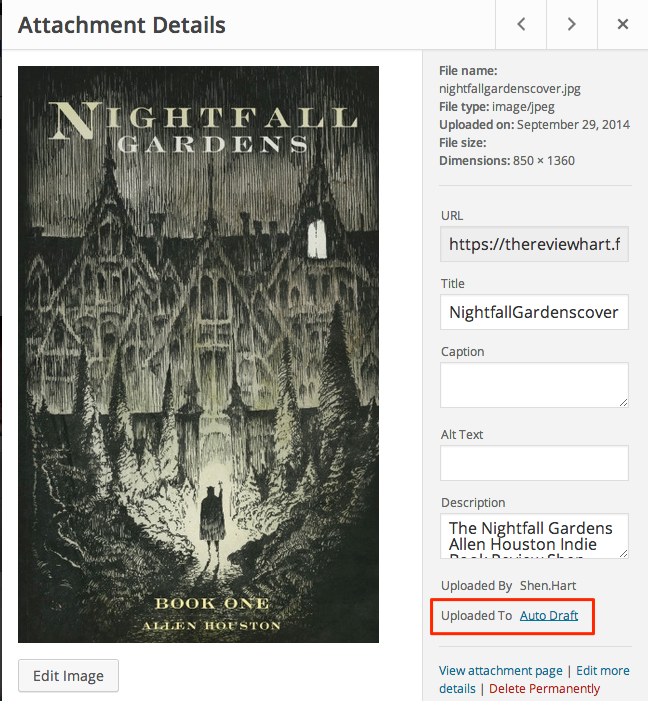
I believe this happening because an Auto Save happened before you manually saved the post itself. So basically, this image is linked to a post that does not actually exist.
Unfortunately, there’s no way to ‘unattach’ an image that’s already been attached to a post. In order to get this image to work, you’ll need to edit the post, remove the current image, and upload it again directly to the post. Or directly to the Media Library, and then manually attach it to the post.
In the future, you can avoid this problem by uploading your image to the Media Library and manually attaching them to your posts. Or by manually saving a draft of your post before uploading your image.
I hope this clarifies things for you. Let me know if you have any other questions!
-
Ah ok, that makes sense!
I’ll try uploading the images directly to the media library first and hopefully that should fix it.
Thank you.
-


- The topic ‘Ideation and Indent isn't updating photos properly.’ is closed to new replies.
 WordPress.com Forums