

Ideation and Intent Theme – Category Page Modifications
-
Hello,
I need to make some CSS changes to my site. I have been working with WordPress support who keep referring me to this forum for a better level of advice. I would be forever grateful to find help here.
Basically, my issue is this: I have the Ideation and Intent theme. I want to separate my Blog posts from another category of posts (named Scribbles). I only want my blog posts to be displayed on the home page. I want that home page to look exactly like the home page that comes with the theme.
I have been able to separate the two kinds of posts by putting my blog posts on a category page, which could be converted to a static home page. Before I do that, I want to get the top post on the category page to look more like the original home page, i.e., have the top post be a featured post like the built-in format with a bigger photo, title, an excerpt of text, and photo thumbnails.
My current home page (http://lobsterbird.com) is how I want the category page (http://lobsterbird.com/category/blog/) to look. If it can’t look like that, the important things are that the title and photo size be markedly different. An excerpt of the text is important too.
I also deleted the titles on that page and also want to delete the very first post divider line that remains at the top of the column.
I thank you very much for any help and expertise you might be able share!
Best,
SophiaThe blog I need help with is: (visible only to logged in users)
-
Hi Sophia, I will try to help you get things looking as you want. I’ll answer some of your your questions separately.
I have been able to separate the two kinds of posts by putting my blog posts on a category page, which could be converted to a static home page.
I’m not sure I understand this part. It’s not possible to have a category page be the homepage. Only a page found in the Pages area of your dashboard can be a static homepage. Could you explain in more detail what have in mind here?
-
I also deleted the titles on that page and also want to delete the very first post divider line that remains at the top of the column.
Are we talking about this page: http://lobsterbird.com/category/blog/
And if so, are you referring to this line?
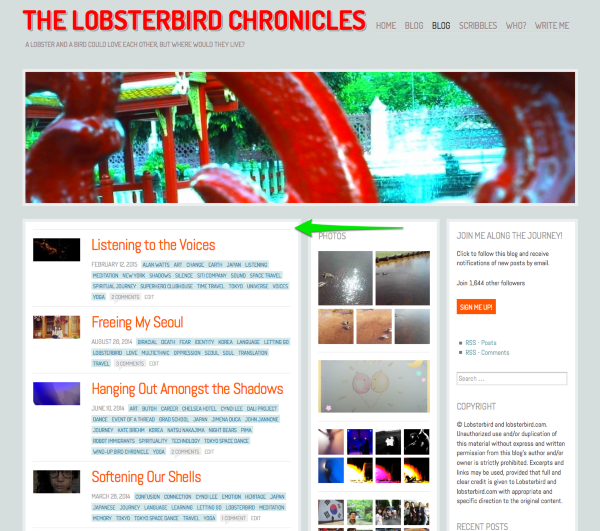
If that’s what you want to hide, this CSS should do the trick:
#post-1391.post-short {
     border-top: none;
}
Keep in mind that you’ll need to change the post ID number manually, since the most recent post in this category may change from time-to-time when you add a new post to the category.
-
Before I do that, I want to get the top post on the category page to look more like the original home page, i.e., have the top post be a featured post like the built-in format with a bigger photo, title, an excerpt of text, and photo thumbnails.
Before we start changing the look of the first post on the “Blog” category page, I think we need to straighten out the first issue that I mentioned above. :
-
Hi! Thank you for your help.
Did something change recently? I thought I played around with this and found it was possible to make a category page into a static home page. Even the support page seems different…
Well, if I can’t make that category page into a static page, I need another solution. Basically, I only want the blog posts to be on the home page and I want it to look exactly like it does now (just without the “Scribbles” posts). The other page I created with Display Posts Shortcode (http://lobsterbird.com/blog/) doesn’t come anywhere close to looking the same. The other happiness engineer I was working with said this is as close as it could get.
It is super frustrating that I wouldn’t be able to use the theme exactly as is, with the exception of not showing every single post on the home page. Do you know of a way that this could be possible?
Thank you — I really appreciate your help.
-
One route to accomplish what you’re after is to use Ideation and Intent on a self-hosted WordPress site running on your own hosting, where you’d be able to make a child theme and modify the theme’s template files so it works exactly as you want. You’d also be able to run plugins, such as ones that might be able to exclude particular categories in the main WordPress code “loop” which sets up the blog page.
You can learn more about the differences between WordPress.com and self-hosted WordPress sites here:
Did something change recently? I thought I played around with this and found it was possible to make a category page into a static home page. Even the support page seems different…
No, not as far as I know. The only pages you can select as the front page from the dropdown list under Settings > Reading when assigning a static page are the ones found in the Pages area of your site. Category pages are dynamically generated, not static pages, so they’ll never appear in that list.
I wanted to give you one last thing to think about. :-) While I realize you really like this theme and have devoted time to customizing it, it is an older theme that isn’t responsive, so it doesn’t adjust to smaller screens like tablets, phones, and other mobile devices. Given how many people use mobile devices these days, and given that Google is now penalizing sites that aren’t mobile-friendly, another route would be to choose a responsive theme on WordPress.com instead of going with Ideation and Intent. I realize you’ve already invested some time in this one, but I just wanted to throw out the idea for you to consider!
More info about responsive and mobile-friendly sites:
https://en.blog.wordpress.com/2015/04/22/your-site-is-mobile-friendly/
https://en.support.wordpress.com/themes/theme-layouts/ -
Thank you so much for your help. You’ve certainly been the most helpful responder so far and have given me a lot to think about.
I have two follow-up questions:
1. If I am seriously thinking about moving over to WordPress.org and I have some questions about my account, what is the best way to get support for this particular line of inquiry?
2. I have repeatedly (and disappointedly) searched for a different theme, but haven’t been able to find one that matches Ideation and Intent. As a writer and photographer, I want to give equal weight to photographs and writing, and have the ability to feature latest posts. I also do like the infinite scrolling. Do you know of any responsive theme that achieves this or shares similarity with Ideation and Intent?
Thank you again~~
-
1. If I am seriously thinking about moving over to WordPress.org and I have some questions about my account, what is the best way to get support for this particular line of inquiry?
Do you mean where would you be able to get help customizing a WordPress.org site? You could always try posting your question in the themes support forum:
https://wordpress.org/support/forum/themes-and-templates
You’ll need a free WordPress.org account to post – if you don’t already have one, you can register here:
https://wordpress.org/support/register.php
Since Ideation and Intent isn’t available for download over at WordPress.org, it doesn’t have its own forum, as other themes do.
2. I have repeatedly (and disappointedly) searched for a different theme, but haven’t been able to find one that matches Ideation and Intent. As a writer and photographer, I want to give equal weight to photographs and writing, and have the ability to feature latest posts. I also do like the infinite scrolling. Do you know of any responsive theme that achieves this or shares similarity with Ideation and Intent?
Infinite scrolling is available in almost every theme on WordPress.com.
A couple of free themes that you might like to check out, which highlight both text and images:
Gazette – https://gazettedemo.wordpress.com/
Apostrophe – https://apostrophedemo.wordpress.com/
Saga – https://sagademo.wordpress.com/
Intergalactic – https://intergalacticdemo.wordpress.com/Oxygen is an older theme closer in style to Ideation and Intent, but it’s responsive: https://oxygendemo.wordpress.com/
If you’re open to premium themes that opens up more possibilities as well.


- The topic ‘Ideation and Intent Theme – Category Page Modifications’ is closed to new replies.
 WordPress.com Forums