

Illustratr Theme – header text
-
Hi,
I’ve set up my portfolio page using the Illustratr theme. I would like to add a few lines of text to the top of this page- from the them info it looks like this should be possible. I have added this text on ‘pages’ but it doesn’t show up.
Doe’s anyone know how to do this?
Thanks!
The blog I need help with is: (visible only to logged in users)
-
Could we look at a specific example?
Here is an example of the default portfolio page in the Illustratr demo site:
http://illustratrdemo.wordpress.com/portfolio/writting-downtown/The text that starts with “Downtown Las Vegas is currently undergoing” is just a regular part of the post content. Is that the kind of text you’re referring to?
-
Yes absolutely- that is what I’m after.
So on this page…. http://bentley-design.co.uk/portfolio/ I’d like to be able to add text to the top of the page.
Thanks for your reply.
-
Your “Portfolio Page Template” front page (see the WordPress page on the Illustratr theme) is titled “Projects.” You’ve apparently left that page without content in the post editor. That’s fine, but if you want something to appear under the title “Projects,” this is where to put it.
You can add text, images, links, etc. to that page using the page editor just as you would in a normal WordPress post or page. Any content you add to that page will appear above the projects on the front page.
-
Your “Portfolio Page Template” front page (see the WordPress page on the Illustratr theme) is titled “Projects.” You’ve apparently left that page without content in the post editor.
Just to clarify, the portfolio page at http://bentley-design.co.uk/portfolio/ is automatically generated and there isn’t a place to enter text to appear above your projects.
You may instead want to create a new page for your portfolio with a different URL – say, http://bentley-design.co.uk/my-portfolio for example – and then add the portfolio shortcode to the page, instead of having it automatically generated at that default URL.
This method would allow you to display some text above your portfolio items.
Just let me know if you need any help with it.
-
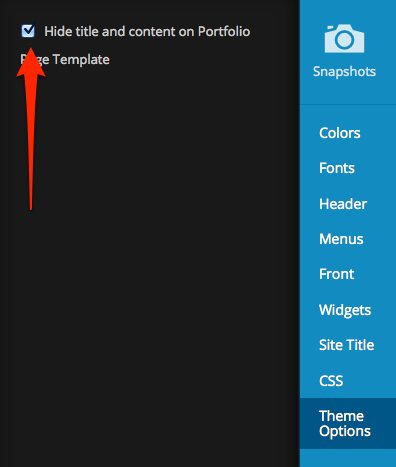
If you go the route I suggested above, be sure to uncheck this box in the Customizer under Theme Options:
-
Just to clarify, the portfolio page at http://bentley-design.co.uk/portfolio/ is automatically generated and there isn’t a place to enter text to appear above your projects.
I tested this on relatively inactive website of mine, here:http://sbstage1.wordpress.com/.
The static front page contains the title “Page 1” with a line of text and a trio of animated images added to the page content. Below the images are the two projects I created, or rather links (with tags) to the projects. -
rather links (with tags) to the projects.
Correction: It is actually the “Project Types” which display below the feature images of the Projects on the front page. The tags don’t display here.
-
That 7:09 post was published accidentally, before it was ready. There are actually three lines of text, and I’ve changed the static page title from “Page 1” to “Portfolio.”
-
Thanks for your replies.
Ok, I know how to create a new page, I’ve drafted one with the text I want- but how do I move/ link all of those portfolio projects to it?
-
I see the difference between yours and mine, now. Missed it before. The URL of your Portfolio page is the website URL with the page title as an extension, suggesting that it’s just a normal WordPress page, but it is isn’t. As kathrynwp says,
Just to clarify, the portfolio page at http://bentley-design.co.uk/portfolio/ is automatically generated and there isn’t a place to enter text to appear above your projects.
Mine, on the other hand, is a static Front page which I’ve created. It hasn’t been automatically generated. There’s no extension on the website URL, because it displays as the front page. Text, images, links, videos, etc. can all be added to it. But I can only create one of these. Don’t how many such pages you can create because I haven’t figured out where it’s done, where the settings are. Too late for me to look for it now. I’ll get back at this tomorrow.
Ok, I know how to create a new page, I’ve drafted one with the text I want- but how do I move/ link all of those portfolio projects to it?
Apparently you can’t. I made a mistake, as explained above. How was the Portfolio page created?
-
I have no idea!! On my dashboard there is a ‘Portfolio section’ on the menu. I just loaded projects on to there and voila- they appeared under the portfolio menu.
Under pages- ‘Portfolio’ is listed just as if it were any other page- but the text i type in that page doesn’t appear anywhere.
-
Wait, I was right the first time, but it’s there’s more to it that I missed.
At http://sbstage1.wordpress.com/ I’ve now created two identical pages, Portfolio and Portfolio 2, each of which can display text, images and other content like any post or page, AND can also display the Projects if, and only if, you select “Portfolio Page Template” at Page Attributes > Template. You can created as many such pages as you like apparently.
Ok, I know how to create a new page, I’ve drafted one with the text I want- but how do I move/ link all of those portfolio projects to it?
The projects are added to any page in your primary custom menu by selecting “Portfolio Page Template.” Just do the following two things after creating each page:
1. select “Portfolio Page Template” at Page Attributes > Template, and
2. include each new page in your primary custom menu.I haven’t tested the Social Menu yet.
I just loaded projects on to there and voila- they appeared under the portfolio menu.
Good. But you must have also created the pages, put them in your primary custom menu, and chosen the proper template setting.
-
-
I fixed it!
I created a new page, called it My Portfolio, and set it to Portfolio Template page. Then the text appeared and all of my projects automatically appeared on this page below the text. I deleted the old Portfolio page and updated the menu.
Thank you for your help!
-
Excellent. You’re welcome.
However, you’re old Portfolio page is still there: http://bentley-design.co.uk/portfolio/. Apparently you’ve only removed it from the menu. That won’t delete it. -
-
Looks like musicdoc1 helped you get everything set up – it looks great! I love the ornaments in your custom header.
If you need anything else, let us know or feel free to start a new thread!
-
Yes, it looks great.
A few suggestions which might help you going forward:
1. Your home page presently displays the latest posts. You could change this, if you like, to display any of your pages at Settings > Reading > Front page displays _______.2. Your “Blog” button takes you to what is typically called the “Home” page. It presently displays your latest posts. You can always rename this page.
3. If your number of Projects grows too large to reasonably fit in one portfolio you may want to add more portfolios. You may then number your portfolios (or name them according to their content perhaps), and create a new page titled Portfolios as I’ve done at http://sbstage1.wordpress.com/.
Then you’ll add the Portfolios page to your primary custom menu and “nest” Portfolio 1, Portfolio 2, etc. underneath the Portfolios page as described in the Custom Menus support page. Nesting menu items is analogous to assigning parents to pages with the Page Attributes > Parent tool.
-
Hello,
I’m trying the illustratr template. I made a page called: ‘Home’, that goes at the top in the navigation bar. When I clicked on it, the same text (‘Home’) appears below it. I wanna have a different text there. Anyone knows how to do that?
I mean, if you see the the demo site (http://illustratrdemo.wordpress.com/) & click on ‘home’, you’ll get a different text below it, which is: ‘Hello, I’m illustratr and this is my portfolio’.
Thanks a lot.


- The topic ‘Illustratr Theme – header text’ is closed to new replies.
 WordPress.com Forums