

Illustratr Theme – header text
-
It’s difficult to see what you’re talking about if you don’t provide your website address, and the URLs of any posts or pages referred to.
The “Home” button on the Illustratr demo page is not a page, it is a custom menu link to the static front page, which is a Portfolio titled “Hello, I am Illustratr and this is my portfolio.” You may not that there is no page extension in the URL shown when you select the Home button on this demo page. And if you do add the extension “/home” to the URL, you’ll get the message ” Oops! That page can’t be found.”
On the other hand, judging by your description, the “Home” button in your website’s navigation menu might be just an ordinary link to a page, created by default when the page was assigned to “no parent” in the Page Attributes module.
-
-
Hi onogram – since you’ve already created a custom menu for your site, you can have different words as your page title (i.e. “Hello, I am Illustratr and this is my portfolio.”) and as your menu label (i.e. “Home”)
Just head over to your custom menu at Appearance > Menus, click the little triangle next to the menu item you want to edit, and edit the words in the Navigation Label field, as you see here:
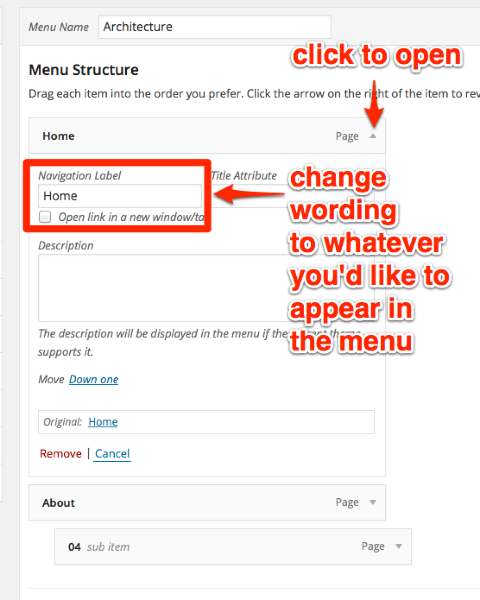
Just let me know if you need further help.
-
…you can have different words as your page title (i.e. “Hello, I am Illustratr and this is my portfolio.”) and as your menu label (i.e. “Home”)
How can you change the title of a page at Custom Menus? The “Home” navigation label can be changed, but “onogram” was asking how to change the title of the page which displays when she clicks on the navigation button “Home,” which is her static front page. To modify the page title when would require editing it at All Pages, or in the page editor.
-
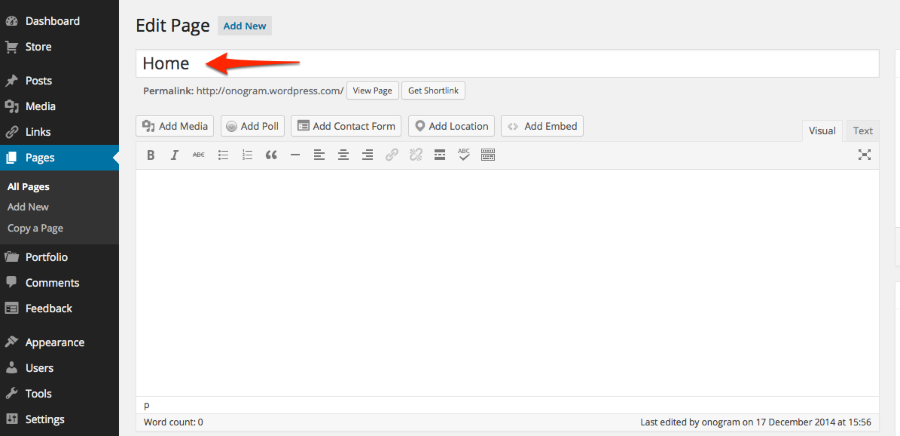
That wording can be edited in the post editor. Here’s a screenshot from onogram’s site, where “Home” is the current page title:
-
Thanks Kathrynwp and musicdoc 1.
I changed the page title, that I had named ‘home’, into something else and it worked! and I didn’t change the ‘Home’ in the menu label / navigation label. Another question: how can I use another font and/or font size? or is this only possible for the upgraded versions? -
Another question: how can I use another font and/or font size?
You can change fonts and sizes with Custom Design, which is part of the WordPress.com Premium and WordPress.com Business plans.
I changed the page title, that I had named ‘home’, into something else and it worked!
Great!
-
That wording can be edited in the post editor.
Yes, of course it can be. I got the impression that you were suggesting that it could be edited at the custom menus page.
Hi onogram – since you’ve already created a custom menu for your site, you can have different words as your page title (i.e. “Hello, I am Illustratr and this is my portfolio.”) and as your menu label (i.e. “Home”)
Just head over to your custom menu at Appearance > Menus, click the little triangle next to the menu item you want to edit, and edit the words in the Navigation Label field…
-
@kathrynwp,
Evidently a misunderstanding on my part of what you were saying in this post. No worries. -
-
p.s. if onogram or anyone else needs help with Illustrator, please start a new thread as this one has gotten pretty long, and the original issue is resolved. Thanks!


- The topic ‘Illustratr Theme – header text’ is closed to new replies.
 WordPress.com Forums