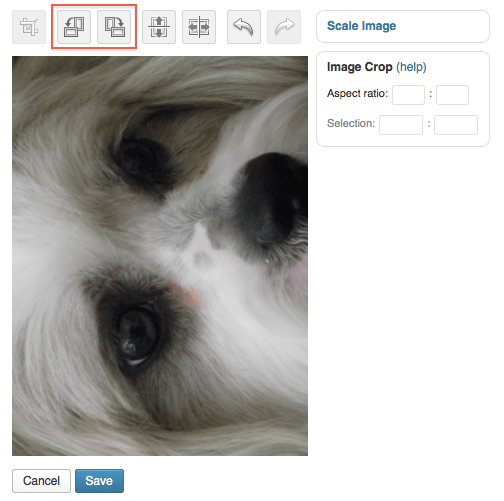
I'm using a free theme. My media Library edit feature doesn't show any of the icons
-
I have uploaded an image which arrives in my media library sideways on. I’ve tried different dimensions but the same happens
I have looked at the help feature which shows editing icons that don’t appear when I click to edit an image. Is this because I’m using a free theme?The blog I need help with is: (visible only to logged in users)
-
Hello avrilsterte!
Have you tried to edit your images directly from the Media Library or from the page/post editor?
I’m asking you that as there are many ways to access the image editing feature, and not all of them have icons.Free and premium themes work exactly the same way regarding this, so you don’t have to worry about that :)
May I ask what specific editing you were aiming at? I can guide you into that as well.
Let me know! Thanks :)
-
Hi Stefaniamattana
If you click on the link to my blog, you can see my problem in the latest post.
I would be so grateful for your help.
Thank you -
@avsilsterte,
Let’s try to edit the image from your post editor.
Access to your blog posts from the WP Admin here: https://stertegardenproject.wordpress.com//wp-admin/edit.php (you have to log in with your username and password to access the page).Click on the Edit link of your last post, so to enter the post editor screen.
Select the image you need to edit. At this point, some icons should be appearing to you. The first four icons from the left set the alignment of the image on the page. The fifth icon is a pencil and the last one (the first from the right) is an X. Click on the pencil to enter the picture editing mode.The Image Details window will appear to you. Under the thumbnail of the image (on the right), there’s an ‘Edit Original’ button. Click that to be able to rotate the picture.
The second and third icons from the left (top of the screen) in the new page will make the picture rotate clockwise and counter-clockwise.
When you’re done, click on the Save blue button under the picture.
Now the image should come up as rotated.I hope these instructions are clear! If you get stuck at any step, or if you have any doubts, just let me know and I’ll be glad to help.
-
I understood the instructions and all was going well.
However, I have the 4 alignment icons but there is no pencil, only a -+ to increase or decrease the size of the picture. Then there is a ballon-type icon for caption, then the X.
:-( -
Thank you timethief, but those icons just don’t appear, either in the Library edit, nor in the post edit..
I even tried rotating the original image before uploading, in the hope that it would then appear correctly but no, in that case it appeared just as loaded.
It is so frustrating! This has never happened before. -
@avrilsterte I’m sorry you still can’t edit your images!
I have tagged this thread for Staff attention, as I reckon you need direct assistance at this point. The Staff can have a look at your account and see why you can’t see the icons to edit your pictures.
Thanks for your patience meanwhile!
-
-
-
-
-
Thank you rootjosh! I edited it with internet explorer and it worked!
:-) :-)
Thank you!!!! -


- The topic ‘I'm using a free theme. My media Library edit feature doesn't show any of the icons’ is closed to new replies.
 WordPress.com Forums