

Image
-
Hi,
I am trying to be able to have images show in the forum
If this image does not work what am I doing wrong? Do I need to have the border alt height width included to have the image show? If so what do I put in between the “”
Thanks
The blog I need help with is: (visible only to logged in users)
-
The above is what I used to try to have the image show without using border alt height width
I am not asking how to put images on my site
-
-
-
-
Hi there!
If you’d like to embed an image in the forums currently, you’d need to use this code:
<a href="link_to_your_image" target="_blank"><img src="{link_to_your_image"/></a>We soon hope to have an easier way to add images, though.
-
what did I do wrong now to not show the image in my previous reply?
https://wordpress.com/pricing/
The above link is what I used to replace link to your image but the image did not show
The image should show instead of the “square” I got in my previous reply isn’t that correct? When I clicked on the square it showed the pricing page why do I see the “square” and not the image?
-
I realized there was a typo in the code I shared above, it should be:
<a href="link_to_your_image" target="_blank"><img src="link_to_your_image"/></a>I can’t see what code are you adding so I can’t advise on why it is not working for you. If you’d like to share the code, you’ll want to use the
codebuttons from above. -
-
still the same
This is the code I am using
<a href="https://wordpress.com/support/com-vs-org/" target="_blank"><img src="https://wordpress.com/support/com-vs-org/"/></a> -
Hi, you’re trying to embed a link to a page, and that’s why it’s not working. Here’s the code on how to embed the image shown below.
<a href="https://en-support.files.wordpress.com/2018/08/stats_e280b9_kokkiestrialtestsite_e28094_wordpress_com.png" target="_blank"><img src="https://en-support.files.wordpress.com/2018/08/stats_e280b9_kokkiestrialtestsite_e28094_wordpress_com.png"/></a>
-
Are you saying that I would not be able to embed a page from the support site or pricing page onto the forum?
What can be embedded on the forum?
Thanks
-
As an example what code would I need to use if I wanted to add the images from this post or something similar to a forum reply?
https://wordpress.com/forums/topic/live-site-looks-different-than-the-editor-site/
-
If you want to embed a screenshot, you can do so as fstat described or by using some free services, https://wordpress.com/support/make-a-screenshot/#sharing-your-screenshot
-
If I am understanding correctly at what @staartmees is saying I need to make a screenshot of the image I want to embed on the forum before I can put the image on the forum? Is this correct?
-
Since Staff are already helping here, there’s no need to keep adding a MODLOOK tag. :)
As it says IMG, you can only embed images. So the file extension you want to display here has to end in JPG, JPEG, GIF or PNG. And the site where you are hosting the image has to be public to appear here. If your site is Private, it won’t work.
Example:
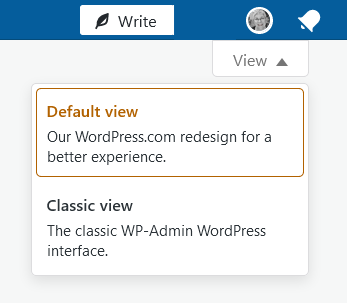
-
<a href="https://"https://i2.paste.pics/562ed620025ebd89fead8425835b65c9.png" target="_blank"><img src="https://https://i2.paste.pics/562ed620025ebd89fead8425835b65c9.png"/></a>I made a screenshot the file extension is png why does it not work?
-
<a href="https://i2.paste.pics/562ed620025ebd89fead8425835b65c9.png" target="_blank"><img src="https://i2.paste.pics/562ed620025ebd89fead8425835b65c9.png"/></a>Last one I had two https



- The topic ‘Image’ is closed to new replies.
 WordPress.com Forums