

Image Border
-
Hello. The feature enabling the addition of a border to an image seems to have disappeared (previously found under the “advanced” tab when editing an image on a page or blog). Is this feature now no longer available at all (which would be a disappointment) or is there another way of doing this, please? Thanks in anticipation of your help. Russell
The blog I need help with is: (visible only to logged in users)
-
Yes, I am looking for this, too! This used to work!!!
(Getting so sick of services removing features that worked just fine.)
-
Actually I want to use it to _remove_ the border around the pictures, but it was at the same place. Now I can’t find ‘advanced’ at all, can you?
-
There’s horrifically long thread that may contain an answer for you here https://en.forums.wordpress.com/topic/image-resize-1?replies=443 Apparently a plugin has been developed to restore what we lost but when it will be implemented is unknown at this time https://en.forums.wordpress.com/topic/image-resize-1/page/15?replies=443#post-1754610
-
Thank you! This https://en.forums.wordpress.com/topic/image-resize-1/page/15?replies=443#post-1747755 looks like the solution, yes.
-
Yes indeed it does and I have been hard pressed not to publish a rant on this “upgrade” that has created such havoc. ;)
-
Well, you just spared _me_ an enormous rant, thank you again. It worked!
Copying the solution here for others to find.
Add style=”border:0″ to the image tag in the Text Editor:
<img style=”border:0″ class=… />
-
Thanks for the advice …but the link refers to the use of plug-ins; as a WordPress.com user I cannot cannot install these. Reading the thread referenced by “timethief” suggests that the border function is now no longer available to WordPress.com users …and that’s a shame :(
-
@russellthetuba
Th thread I referenced is about Staff here at WordPress.com installing a plugin into this mulituser blogging platform that will restore all the advanced image editing functions we WordPress.com bloggers had before again.In the meanwhile try what manuschwendener posted at https://en.forums.wordpress.com/topic/image-border-8?replies=8#post-1757437
-
@timethief
Thanks for the quick response but despite following the instructions provided by “manuschwendener” (ie in the Text Editor add <img style=”border:0″ class=… />) I still do not have a border. I must be doing something wrong :( -
Yes: you need to write <img style=”border:1” class= … /> to get a border with a width of 1 pixel. Change the 1 to another number if you want the border to be wider. The 0 is to _remove_ the border.
-
@manuschwendener and @time thief
Adding the code “style=”border:1” wasn’t working; then I worked out that by adding “style=”border: 1px solid black” I was able to place a border around the picture. I hope this helps others with the same problem. Thank you both for your prompt and excellent advice. Russell :) -
-
-
Hi there,
Just an update, I have great news.
Our developers have added border and margin options to the Advanced Options as seen in the screenshot below:
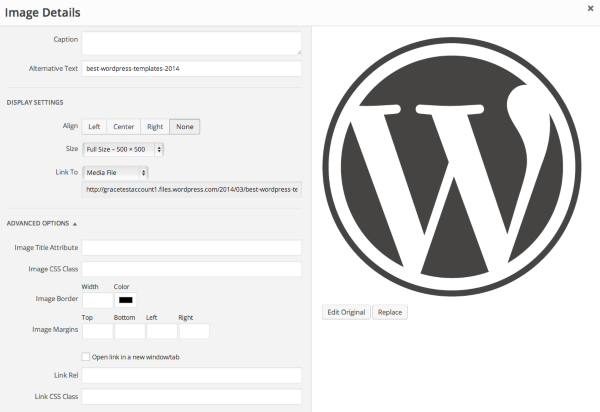
Cheers and Happy Blogging!
-
staff-ozmodiar
Wow! That’s an impressive turnaround in response to a query on the forum. Thank you! Russell -
-
-
-


- The topic ‘Image Border’ is closed to new replies.
 WordPress.com Forums