

Image Captions Won't Center
-
I want my image captions to be centered and have a border. The images will center, but the caption doesn’t, and a border won’t appear. I’ve tried both Chrome and Firefox. Neither works. Please help. URL is http://woesofmohs.wordpress.com/2014/05/31/here-we-go-again/
The blog I need help with is: (visible only to logged in users)
-
Hi there,
It looks like you’re in the post editing it. Would you mind if I took over the editing so I can take a look?
-
-
Hi!
I was able to center the caption with the following bit of HTML:
<div style="text-align:center">The Biopsied Spot</div>Basically, I added the surrounding text in the Text Editor. Can you give that a try and let me know if it works for you?
Regarding the border, you should be able to control the look of that by clicking the pencil icon when hovering over the image on your Edit Post screen. Then, you’ll have an “Advanced Options” tab as shown at the bottom here:
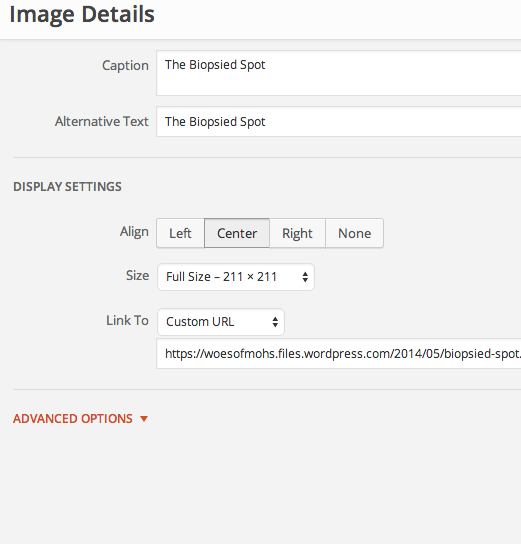
Let me know if you have any additional trouble!
-
-
Hi!
So, if you click to the Text Editor, you’ll see this bit of text:
[caption id="attachment_63" align="aligncenter" width="211"]<a href="http://woesofmohs.files.wordpress.com/2014/05/biopsied-spot.jpg"><img class="wp-image-63 size-full" style="border: 3px solid #ffaca9;" src="http://woesofmohs.files.wordpress.com/2014/05/biopsied-spot.jpg" alt="The Biopsied Spot" width="211" height="211" /></a> The Biopsied Spot[/caption]You’ll want to enter the code like this:
[caption id="attachment_63" align="aligncenter" width="211"]<a href="http://woesofmohs.files.wordpress.com/2014/05/biopsied-spot.jpg"><img class="wp-image-63 size-full" style="border: 3px solid #ffaca9;" src="http://woesofmohs.files.wordpress.com/2014/05/biopsied-spot.jpg" alt="The Biopsied Spot" width="211" height="211" /></a><div style="text-align:center">The Biopsied Spot</div>[/caption]You’ll notice I entered the code at the end of the image text surrounding the actual caption.
Let me know if that helps!


- The topic ‘Image Captions Won't Center’ is closed to new replies.
 WordPress.com Forums