

Image gallery comments
-
How do I disable the comment box, comments and reblog in the image gallery carousel?
The blog I need help with is: (visible only to logged in users)
-
Hi there,
You can disable the comment box by disabling comments on the individual image. Within your Media Library, click on an individual image, then click “Edit More Details” as shown here:
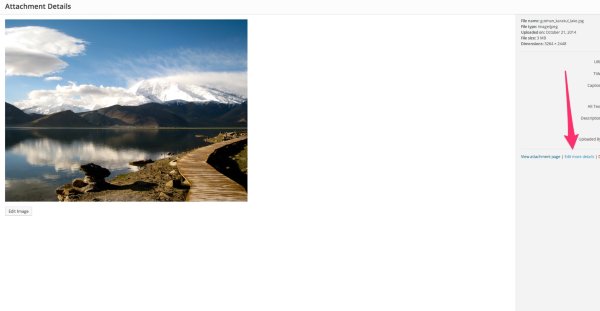
From that page, make sure “Allow Comments” is checked to “Off”.
As for the Reblog button, could you point me to the image gallery carousel on your site? I tested this, and I was unable to get the reblog button to show on my side.
-
Thanks for responding. Capture 1 is what I’m trying to get rid of and Capture 2 is what I see.
I don’t an allow comments box to turn off.
-
Hi,
Did you attach two images named Capture 1 and Capture 2 to an email reply to this thread? Email attachments won’t come through correctly. Can you upload the images to your Media Library instead?
Also, regarding this:
I don’t an allow comments box to turn off.
Could you clarify?
-
I just placed the Capture 1 and Capture 2 images in the media library of this site http://davidtmillerbeta.wordpress.com/. What I intended to write in the sentence in question was “I don’t see an allow comments box to turn off”. Sorry about that error. I’m a high school art teacher and I have all my students using WordPress for my classes. Thanks, David Miller
-
Hi David,
First, thank you so much for using WordPress.com with your classes. We really appreciate it!
In regards to turning off the comments on images, it looks like you’re missing the Discussion module. Can you check within the Screen Options menu on the top right-hand corner of the site and make sure “Discussion” is checked?


- The topic ‘Image gallery comments’ is closed to new replies.


 WordPress.com Forums