

image miniature
-
Can the image in miniature still remains when I click on one article?
The blog I need help with is: (visible only to logged in users)
-
To clarify, are you talking about this WordPress.com site? https://mumiracle539024617.wordpress.com/
I see that you have published one blog post on this WordPress.com site. The image that you see for this blog post on the homepage is called a featured image and this will show on the homepage.
To quote from WordPress.com help articles, “A featured image represent the contents, mood, or theme of a post or page. Posts and pages can have a single featured image, which many themes and tools can use to enhance the presentation of your site.” https://en.support.wordpress.com/featured-images/
This necessarily will not show up on the same size when you open that post. It will rather show the image in it’s original size. Note that you can edit the image size https://en.support.wordpress.com/images/image-settings/ for the images you embed on the posts.
I hope this helps. Feel free to get back if you have questions.
-
To have the featured image display on single posts as pages – in addition to your blog page – go into your Customizer‘s Content Options panel and check the two boxes next to “Display on single posts” and “Display on pages.” They are currently unchecked, so that’s why your images are missing in those places.
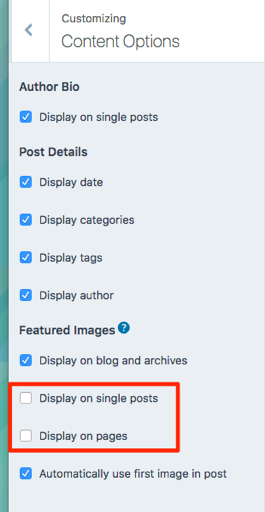
If you choose those options, you’ll probably want to remove the image you’ve now manually inserted into your posts, and also uncheck the box next to “Automatically use first image in post” – otherwise you’ll see duplicate images on your single posts.
Let us know if you have any other questions.
Arun – thanks for chiming in.
-
-
Changing the colour within widgets will take some Custom CSS, which is available with the Premium or Business plans. If you decide to upgrade, just let us know what changes you’d like to make and we can help with the code. You can also feel free to post in our CSS Customization forum.
If you’re not ready to upgrade, Apostrophe 2 includes several colour palettes you can choose from. Go into your Customizer‘s Colors and Palettes panel, click “Palettes,” and choose from the available colour schemes.


- The topic ‘image miniature’ is closed to new replies.
 WordPress.com Forums